Microsoft 365 and Office | Excel | For business | Windows
A family of Microsoft spreadsheet software with tools for analyzing, charting, and communicating data

This browser is no longer supported.
Upgrade to Microsoft Edge to take advantage of the latest features, security updates, and technical support.
' cx='32' cy='32' r='32' /%3E%3Ctext x='50%25' y='55%25' dominant-baseline='middle' text-anchor='middle' fill='%23FFF' %3EA%3C/text%3E%3C/svg%3E)
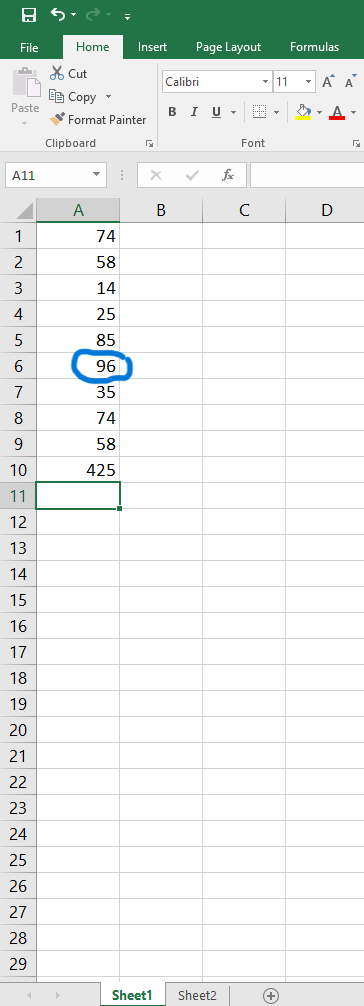
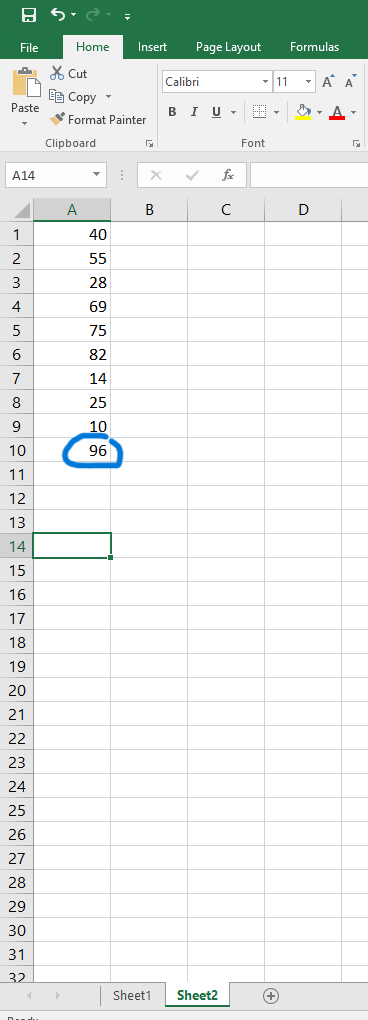
I am trying to create a formula to search for one cell (for example, in 1st picture 96) anywhere in another sheet (2nd picture). I would like to then apply this formula to all the cells in one column. For example, in sheet1 cell 6, search all of sheet2 column A and if 96 exists in sheet2 then return true or format yellow, etc. Then I would like to do the same formula to for each cell in sheet1: does this cell value exist in sheet2, if so highlight yellow.Using excel 2016, I've tried vlookup but cannot get it to work. Thank you.
Image upload not working. Linked here:
Locked Question. This question was migrated from the Microsoft Support Community. You can vote on whether it's helpful, but you can't add comments or replies or follow the question.
Hi Jason
You need to remove the $ sign before the 6 in your formula,
Try the formula
=ISNUMBER(MATCH(A6,Sheet2!$A$1:$A$10,0))
Regards
Jeovany
Hi Jason
To highlight the values in Sheet1 that match the ones in Sheet2, you may use Conditional Formatting with the formula rule
=ISNUMBER(MATCH($A2,Sheet2!$A:$A,0))
Please, Adapt the formula according to your real scenario
Do let me know if you need more help
Regards
Jeovany
=COUNTIF(Sheet2!A:A,Sheet1!A2)
If you want to show True or False
=COUNTIF(Sheet2!A:A,Sheet1!A2)>0
If you just want to show True for exist value.
=IF(COUNTIF(Sheet2!A:A,Sheet1!A2),TRUE,"")
Thanks for your help. I think it seems to be working. This is what I made: =ISNUMBER(MATCH($A$6,Sheet2!$A$1:$A$10,0))
However if I try to click the bottom right of the cell (black crosshair) and drag it down to replicate it for the other corresponding values (for example does A7 exist in Sheet2, does A8 exist, etc.), it just repeats the same rule but adds "applies to" my selection. I would like it to replace A6 with A7, etc. when I drag the crosshair down. Is there a way to do that?
I think it's working, thank you!!! Do you know how to have it also put a word in the cell if the value is found? For example, if the cell value is found in sheet 2 return the word TRUE and highlight yellow? I got it to fill/highlight the blank cell. Thank you again.