Developer technologies | .NET | Xamarin
A Microsoft framework for building cross-platform mobile apps using .NET and C# with native performance and user interfaces.
This browser is no longer supported.
Upgrade to Microsoft Edge to take advantage of the latest features, security updates, and technical support.
' cx='32' cy='32' r='32' /%3E%3Ctext x='50%25' y='55%25' dominant-baseline='middle' text-anchor='middle' fill='%23FFF' %3EVM%3C/text%3E%3C/svg%3E)
Hello Everyone,
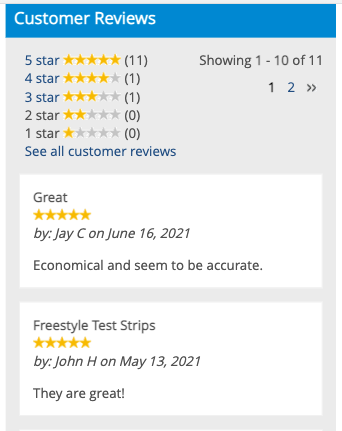
I want to design UI design as per the attached image. where I want to show users review comments & ratings. also want to introduce pagination which was shown right top corner of the image.
' cx='32' cy='32' r='32' /%3E%3Ctext x='50%25' y='55%25' dominant-baseline='middle' text-anchor='middle' fill='%23FFF' %3EKW%3C/text%3E%3C/svg%3E)
Hi 78141243,
Welcome to our Microsoft Q&A platform!
You can create a ListView to show the customer reviews and use Labels to achieve "pagination".
Here is a simple demo you can refer to.
MainPage.xaml
<ContentPage.BindingContext>
    <local:MainPageViewModel/>
</ContentPage.BindingContext>

<StackLayout>
    <StackLayout Orientation="Horizontal" HorizontalOptions="CenterAndExpand">
        <Label x:Name="firstLabel" Text="{Binding First}" TextColor="{Binding FirstColor}">
            <Label.GestureRecognizers>
                <TapGestureRecognizer Command="{Binding TapCommand}" CommandParameter="{Binding Source={Reference firstLabel}, Path=.}"/>
            </Label.GestureRecognizers>
        </Label>
        <Label x:Name="secondLabel" Text="{Binding Second}" TextColor="{Binding SecondColor}">
            <Label.GestureRecognizers>
                <TapGestureRecognizer Command="{Binding TapCommand}" CommandParameter="{Binding Source={Reference secondLabel}, Path=.}"/>
            </Label.GestureRecognizers>
        </Label>
        <Label x:Name="thirdLabel" Text="{Binding Third}" TextColor="{Binding ThirdColor}">
            <Label.GestureRecognizers>
                <TapGestureRecognizer Command="{Binding TapCommand}" CommandParameter="{Binding Source={Reference thirdLabel}, Path=.}"/>
            </Label.GestureRecognizers>
        </Label>
    </StackLayout>
        <StackLayout>
        <ListView ItemsSource="{Binding ReviewContentList}"
                HasUnevenRows="True"
                SeparatorVisibility="None"
                SelectionMode="None">
            <ListView.ItemTemplate>
                <DataTemplate>
                    <ViewCell>
                        <Frame Margin="10,5,10,5">
                            <StackLayout>
                                <Label Text="{Binding Title}"/>
                                <StackLayout Orientation="Horizontal">
                                    <Label Text="{Binding Name}"/>
                                    <Label Text="{Binding Date}"/>
                                </StackLayout>
                                <Label Text="{Binding Comment}"/>
                            </StackLayout>
                        </Frame>
                    </ViewCell>
                </DataTemplate>
            </ListView.ItemTemplate>
        </ListView>
    </StackLayout>
</StackLayout>
MainPageViewModel.cs
class MainPageViewModel : INotifyPropertyChanged
{
    public Command<object> TapCommand { get; set; }

    public List<ReviewContent> ListofAll { get; set; }
    public ObservableCollection<ReviewContent> ReviewContentList { get; set; }

    string first;
    string second;
    string third;
    Color firstColor;
    Color secondColor;
    Color thirdColor;

    public string First
    {
        get => first;
        set { first = value; OnPropertyChanged("First"); }
    }

    public string Second
    {
        get => second;
        set
        { second = value; OnPropertyChanged("Second"); }
    }

    public string Third
    {
        get => third;
        set
        { third = value; OnPropertyChanged("Third"); }
    }

    public Color FirstColor
    {
        get => firstColor;
        set { firstColor = value; OnPropertyChanged("FirstColor"); }
    }
    public Color SecondColor
    {
        get => secondColor;
        set { secondColor = value; OnPropertyChanged("SecondColor"); }
    }
    public Color ThirdColor
    {
        get => thirdColor;
        set { thirdColor = value; OnPropertyChanged("ThirdColor"); }
    }

    public MainPageViewModel()
    {
        TapCommand = new Command<object>(Tap);

        ListofAll = new List<ReviewContent>();

        for (int i = 1; i < 10; i++)
        {
            ListofAll.Add(new ReviewContent
            {
                Title = $"Title{i}",
                Name = $"Name{i} Name{i}",
                Date = $"yyyy/mm/dd{i}",
                Comment = $"Comment{i}..."
            });
        }

        ReviewContentList = new ObservableCollection<ReviewContent>();
        // show first three reviews
        for (int i = 0; i < 3; i++)
        {
            ReviewContentList.Add(ListofAll[i]);
        }

        First = "1";
        Second = "2";
        Third = "3";

        FirstColor = Color.Black;
        SecondColor = Color.Gray;
        ThirdColor = Color.Gray;
    }

    void ResetSelection()
    {
        FirstColor = Color.Gray;
        SecondColor = Color.Gray;
        ThirdColor = Color.Gray;
    }

    void ResetItemsShown(int pageindex)
    {
        ReviewContentList.Clear();
        for (int i = (pageindex - 1) * 3; i < pageindex * 3; i++)
        {
            ReviewContentList.Add(ListofAll[i]);
        }
    }

    void Tap(object obj)
    {
        var lab = obj as Label;
        if (lab == null)
            return;

        switch (lab.Text)
        {
            case "1":
                ResetSelection();
                FirstColor = Color.Black;
                ResetItemsShown(1);
                break;
            case "2":
                ResetSelection();
                SecondColor = Color.Black;
                ResetItemsShown(2);
                break;
            case "3":
                ResetSelection();
                ThirdColor = Color.Black;
                ResetItemsShown(3);
                break;
        }
    }

    public event PropertyChangedEventHandler PropertyChanged;

    public void OnPropertyChanged(string propertyName)
    {
        var handle = PropertyChanged;
        if (handle != null)
        {
            handle(this, new PropertyChangedEventArgs(propertyName));
        }
    }
}

class ReviewContent
{
    public string Title { get; set; }
    public string Name { get; set; }
    public string Date { get; set; }
    public string Comment { get; set; }
}
As to the "RattingBar", you can refer to the thread: How can I create RatingBar with Xamarin Forms?.
Regards,
Kyle
If the response is helpful, please click "Accept Answer" and upvote it.
Note: Please follow the steps in our documentation to enable e-mail notifications if you want to receive the related email notification for this thread.
@Vikas Madan Surve Does this reply helps you? You can post any update here.