Share via

Adding resources material work

Anonymous
2024-10-30T15:22:53+00:00

Hello,

I have many resources material that I am tracking. Each have the same unit.

Each are assigned to various tasks to the project.

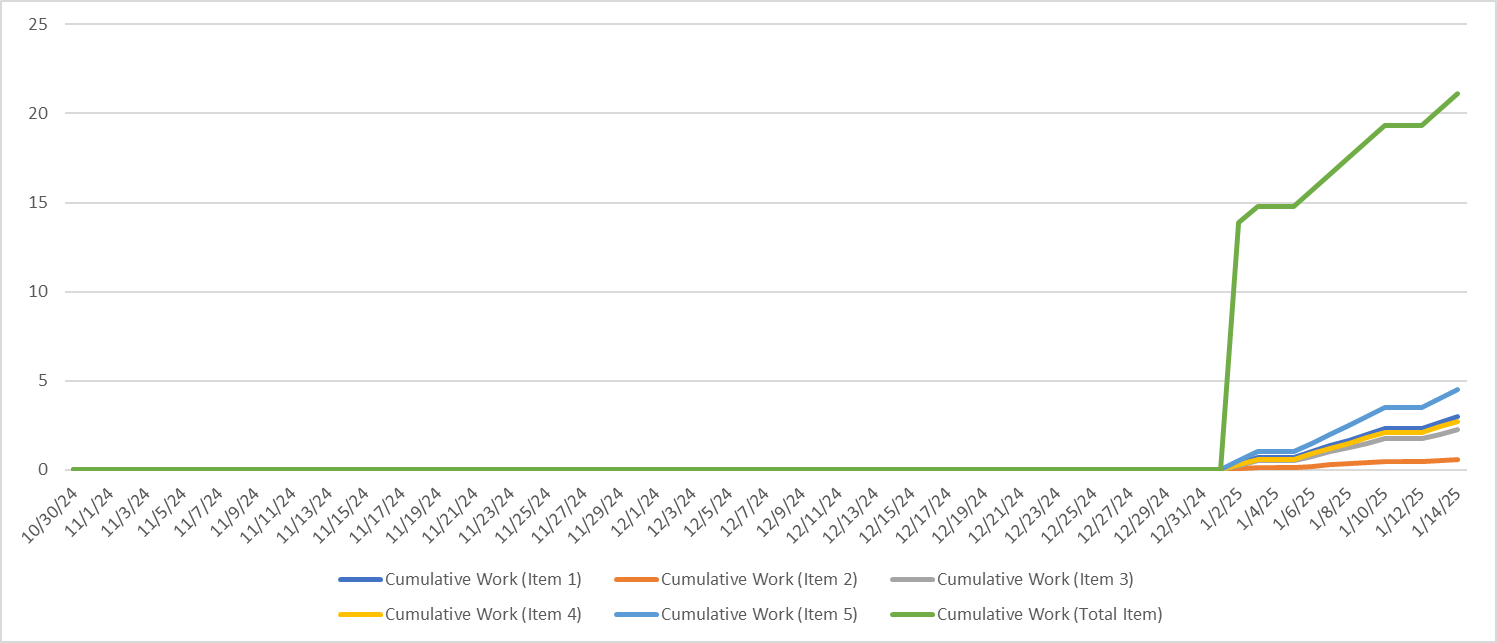
I know how to track the work for each for each separately, but when I try to group them (they are assigned the same group), it seems the work goes to 0.

MSP does not seem to sum up and aggregate the ressources together even so they have the same unit.

Are I am missing something?

Resources separately:
here trying to group them by material type:
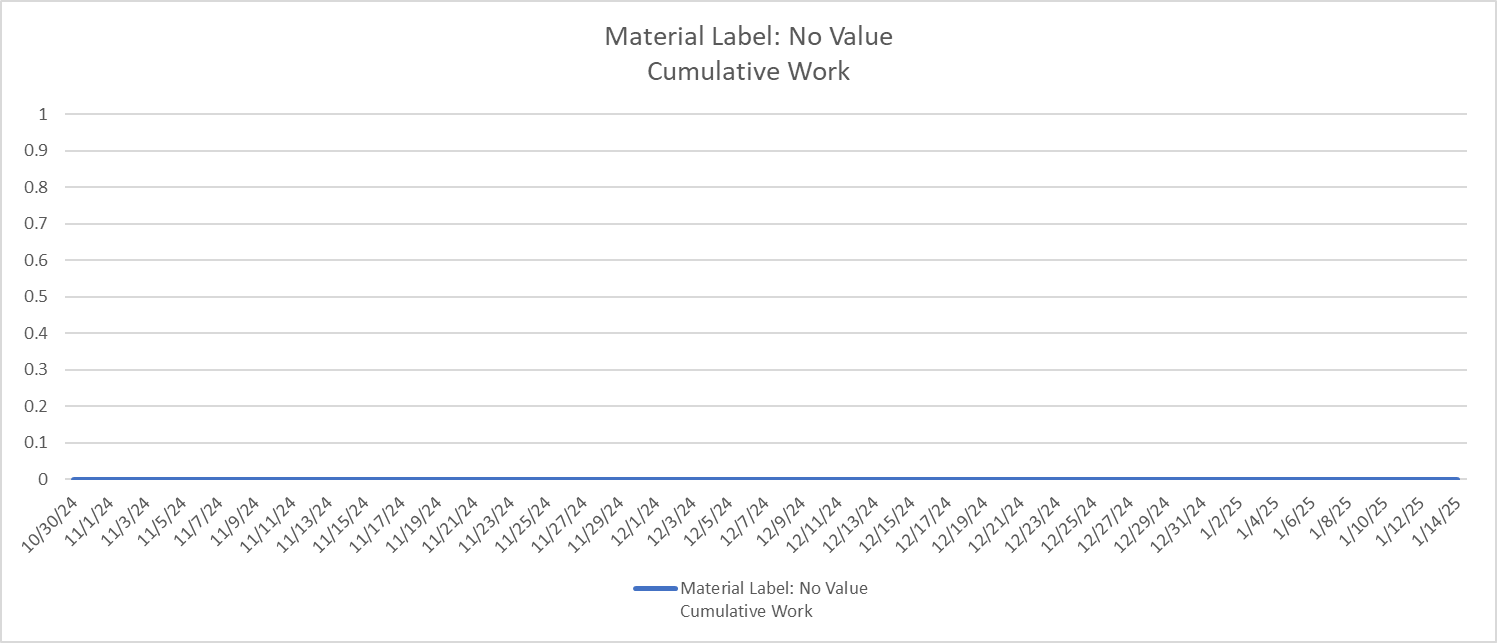
Regardless how I try to group them, it still flat 0.

Anybody can help?

Thank you.

Microsoft 365 and Office | Project | For business | Windows

Locked Question. This question was migrated from the Microsoft Support Community. You can vote on whether it's helpful, but you can't add comments or replies or follow the question.

0 comments No comments

Answer accepted by question author

John Project 49,710 Reputation points Volunteer Moderator
2024-10-30T22:43:24+00:00

Damien Deffieux,

You're welcome and thanks for the feedback.

To answer your question, no, this issues are not related. I think this is a case where there is actually a glitch in the Project app. Based on the case I cited about no values showing on the group line for percent allocation, the values showed if there was only one assignment but not for multiple assignments. So in my mind, that is a glitch.

John

Was this answer helpful?

1 person found this answer helpful.
0 comments No comments

Answer accepted by question author

John Project 49,710 Reputation points Volunteer Moderator
2024-10-30T19:51:18+00:00

Damien Deffieux,

I suspect it is a similar issue I encountered recently in another post on the Project Tech Community forum. In that case Project failed to show Percent Allocation for a grouped resource when multiple assignments are involved. I ended up writing a macro for the user that exported the data to Excel and produced the missing information.

John

Was this answer helpful?

1 person found this answer helpful.
0 comments No comments

Answer accepted by question author

Dale Howard [MVP] 29,860 Reputation points MVP Volunteer Moderator
2024-10-30T19:45:45+00:00

Damien --

I was worked long and hard to duplicate what you are trying to do with Material resources and then grouping them by their Material Label values. Following is the Resource Usage view of four Material resources, grouped by the Material Label value for each resource, and then displaying the Cumulative Work value for each resource and the total for all resources:

Notice how the total Cumulative Work row (outlined in red) shows NO VALUES. Creating a Dashboard Report with the same data produces the same result of NO VALUES, as shown below.

I am not sure why Microsoft Project does not allow the user to display the total Cumulative Work for all of the grouped Material resources, but it appears that this is a limitation of the software. And frankly, I am not able to produce any workaround for this situation. I even tried using both a custom Lookup Table and a custom Outline Code to replace the Material Label column, but neither approach worked as desired. Sorry, but hope this helps.

Was this answer helpful?

1 person found this answer helpful.
0 comments No comments

2 additional answers

Sort by: Most helpful
  1. Anonymous
    2024-10-30T21:47:34+00:00

    Hi John,

    Thank you for your input.

    I'll see if I can find another way around it.

    It is related to what we are discussing on the other thread of the baseline cumulative cost.

    Was this answer helpful?

    0 comments No comments
  2. Anonymous
    2024-10-30T21:45:48+00:00

    Damien --

    I was worked long and hard to duplicate what you are trying to do with Material resources and then grouping them by their Material Label values. Following is the Resource Usage view of four Material resources, grouped by the Material Label value for each resource, and then displaying the Cumulative Work value for each resource and the total for all resources:

    Image

    Notice how the total Cumulative Work row (outlined in red) shows NO VALUES. Creating a Dashboard Report with the same data produces the same result of NO VALUES, as shown below.

    Image

    I am not sure why Microsoft Project does not allow the user to display the total Cumulative Work for all of the grouped Material resources, but it appears that this is a limitation of the software. And frankly, I am not able to produce any workaround for this situation. I even tried using both a custom Lookup Table and a custom Outline Code to replace the Material Label column, but neither approach worked as desired. Sorry, but hope this helps.

    Hi Dale,

    Thank you for your input.

    Rather disappointing to see this limitation. I was hoping I was doing something wrong...

    Was this answer helpful?

    0 comments No comments