Microsoft Security | Intune | Configuration
Setting up and managing device configurations using Intune

This browser is no longer supported.
Upgrade to Microsoft Edge to take advantage of the latest features, security updates, and technical support.
' cx='32' cy='32' r='32' /%3E%3Ctext x='50%25' y='55%25' dominant-baseline='middle' text-anchor='middle' fill='%23FFF' %3EVS%3C/text%3E%3C/svg%3E)
My automation has been broken due to custom uri omasettingstring value become encrypted,
I've an automation to read this value and append anything required via azure app for a purpose.....
now the value is encrypted and application permissions are not working to get plain text value from omasetting (getOmaSettingPlainTextValue Method), which is working with my work account.
I've checked all permissions for app still its not working and providing me the response as "403 - Forbidden"
Any help is greatly appreciated.
Thankyou
Sreenivas
Setting up and managing device configurations using Intune

@Venkata Srinivasa Kumar Barathula Thanks for posting in our Q&A. From your description, I know that you want to use getOmaSettingPlainTextValue function via Graph API, but it gets 403 forbidden error. If there is anything misunderstanding, feel free to let us know.
For this issue, it is suggested to try the following actions:
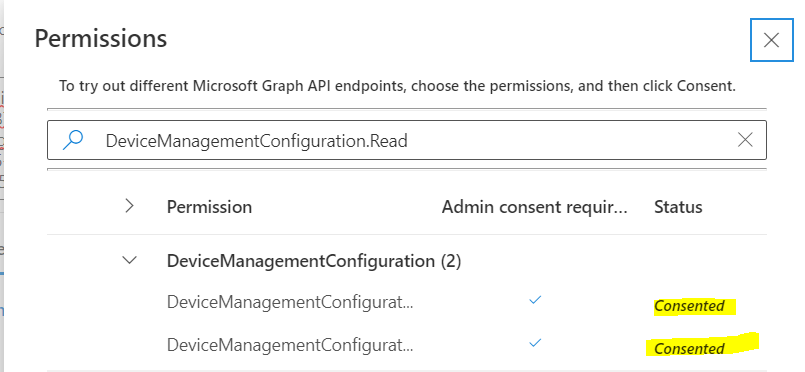
1.Please make sure that we add "DeviceManagementConfiguration.Read.All" and "DeviceManagementConfiguration.ReadWrite.All" in permissions of Graph.
2.Click on "F11" before we edit the OMA-URL settings. Then we will find the request URL about this custom profile. For example:
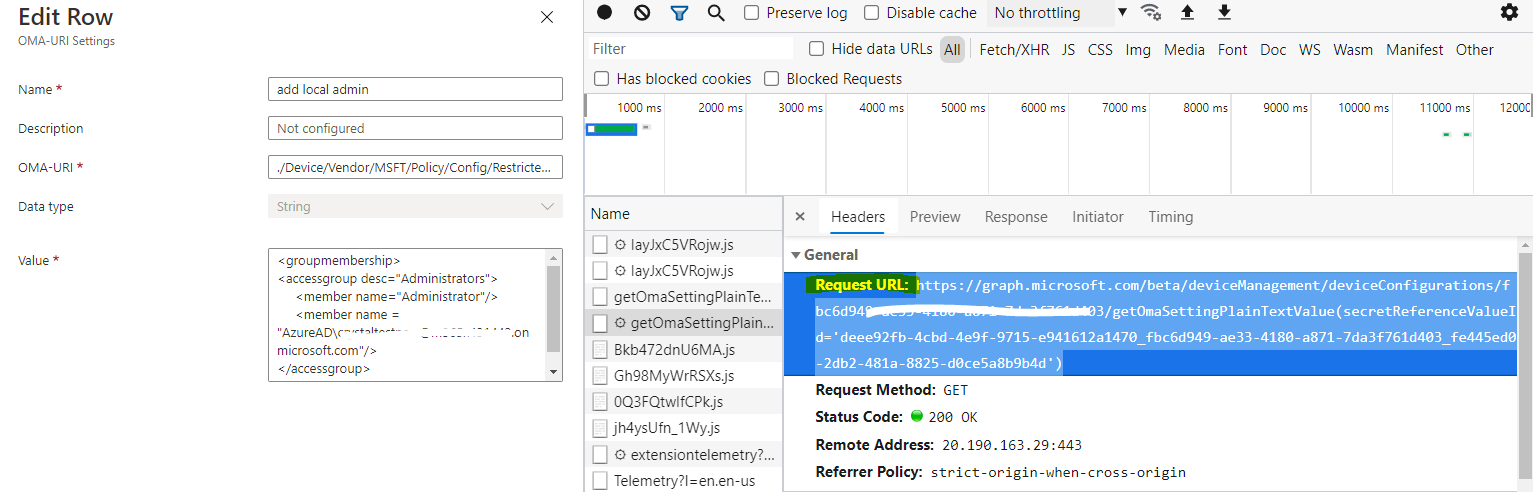
3.Please try to run the request URL in Graph and check if it is successful.
Hope it will help.
If the response is helpful, please click "Accept Answer" and upvote it.
Note: Please follow the steps in our documentation to enable e-mail notifications if you want to receive the related email notification for this thread.
@Venkata Srinivasa Kumar Barathula I am currently standing by for further update from you and would like to know how things are going. If you have any questions or concerns on the recent information I've provided you, please don't hesitate to let me know.