Outlook | Windows | Classic Outlook for Windows | For business
Using classic Outlook for Windows in business environments

This browser is no longer supported.
Upgrade to Microsoft Edge to take advantage of the latest features, security updates, and technical support.
' cx='32' cy='32' r='32' /%3E%3Ctext x='50%25' y='55%25' dominant-baseline='middle' text-anchor='middle' fill='%23FFF' %3EFD%3C/text%3E%3C/svg%3E)
Hi there,
I use multiple conditional formatting rules to highlight tasks in outlook that are due within x days (the closer the due date, the darker the font). This works fine with the condition "Due Date on or before x days".
However, it would be even better if I could add the condition "Due Date on or before x working days". Ideally, I would like to define these working days myself (for example by adding a rule like: working days = all weekdays except for Mondays every second week).
Is there a possibility to do this?
Kind regards,
F
Using classic Outlook for Windows in business environments
' cx='32' cy='32' r='32' /%3E%3Ctext x='50%25' y='55%25' dominant-baseline='middle' text-anchor='middle' fill='%23FFF' %3ECM%3C/text%3E%3C/svg%3E)
Hi @Fré Dralants ,
Welcome to our forum!
As I know, there's no such an option in Outlook client to achieve your requirement. And I have done a lot of research and searching but didn't find any useful clues.
it would be even better if I could add the condition "Due Date on or before x working days"
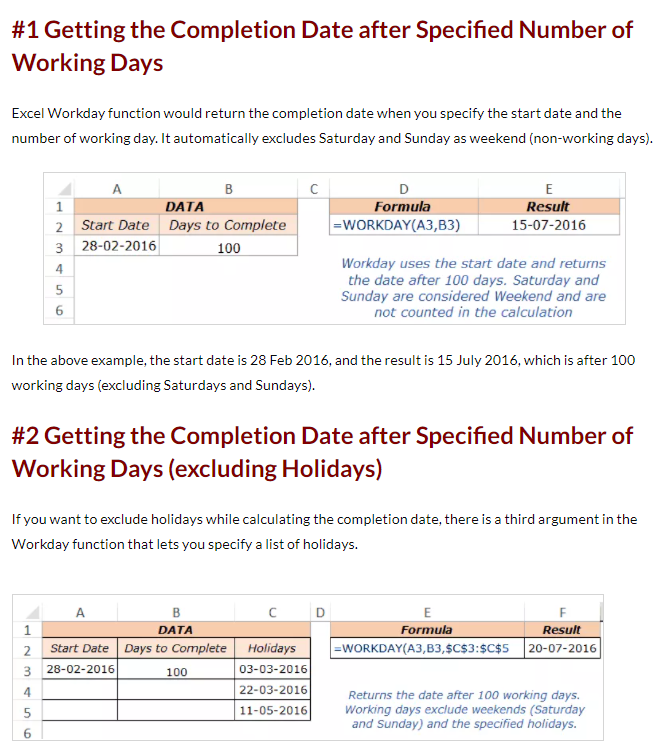
Considering that you need to set a date after X working days, perhaps a method to calculate the date after x workdays excluding specified weekend days and holidays will be helpful. For more information, please refer to: Excel WORKDAY Function | Formula Examples + FREE Video.
(Note: Since the web site is not hosted by Microsoft, the link may change without notice. Microsoft does not guarantee the accuracy of this information.)
Hope to help you!
If the response is helpful, please click "Accept Answer" and upvote it.
Note: Please follow the steps in our documentation to enable e-mail notifications if you want to receive the related email notification for this thread.
Hi @Fré Dralants ,
Just checking in to see if above information was helpful. If you have any further updates on this issue, please feel free to post back. If you think my reply is helpful to you, please remember to mark it as an answer. Warm thanks.