Share via

Disk full error while exporting powerpoint presentation

Anonymous
2024-10-26T07:01:46+00:00

Hi, I have a presentation (approx 80MB size) containing few attachments in excel files & photographs. The total folder size including presentation is approx 240MB. When I am trying to export the presentation to "Export to CD" option & saving in local disk (having approx 308GB free space), after saving few files its having an error saying the disk space is full. Is there's some fix as its technically impossible that a 400 MB folder can fillup complete 300GB space while exporting.

Microsoft 365 and Office | PowerPoint | For business | Windows

Locked Question. This question was migrated from the Microsoft Support Community. You can vote on whether it's helpful, but you can't add comments or replies or follow the question.

0 comments No comments

Answer accepted by question author

Anonymous
2024-10-29T04:47:50+00:00

Hi,

I appreciate the efforts you are taking to go deep in the issue.

The presentation has quite lot of linked graphs & tables & brief description in each slide; overall its quite confidential data & if I remove all confidential data, it will be only opening & last slide..can't share the presentation, apologies for this.

EDIT: Got the issue. One linked object was an attachment from outlook mail. The moment I removed it, it got exported flawlessly!

Was this answer helpful?

0 comments No comments

3 additional answers

Sort by: Most helpful
  1. Anonymous
    2024-10-28T10:57:13+00:00

    Hi,

    Thanks for your valuable feedback and sharing updates with us and I really appreciate your effort and your precious time doing. 

    And I appreciate your kind words.

    If it is convenient for you, could you please send sample copy of your document file to me so that I can look from my side, and I will check this behavior and help you to fix and verify the result with you.

    If there is confidential information, then you can send it to me in Private Message(PM). you can access PM from the top right corner of this page, as shown in image below:

    Note: remove any confidential information and share a sample file with us(for test purpose)

    Image

    Your understanding and patience will be highly appreciated. I hope that you are keeping safe and well!

    Sincerely,

    Waqas Muhammad

    Was this answer helpful?

    0 comments No comments
  2. Anonymous
    2024-10-28T04:48:59+00:00

    Hi! Thanks for responding.

    I tried it exporting other presentations as well. Presentation upto 20MB is exporting without any issue. I tried for 60MB presentation, same error is coming. Please find below screenshot.

    Was this answer helpful?

    0 comments No comments
  3. Anonymous
    2024-10-26T12:30:12+00:00

    Dear respected Shubhamv85,

    Good day! Thank you for posting to Microsoft Community. We are happy to help you.

    I’m sorry you’re having a problem but based on your description we can work together to resolve it.

    For the situation you encountered, we deeply understand the inconvenience caused and apologize for it.

    As per your description, may I know if you click on "Copy to Folder" and navigate to location are you able to save file to still getting a same error message?
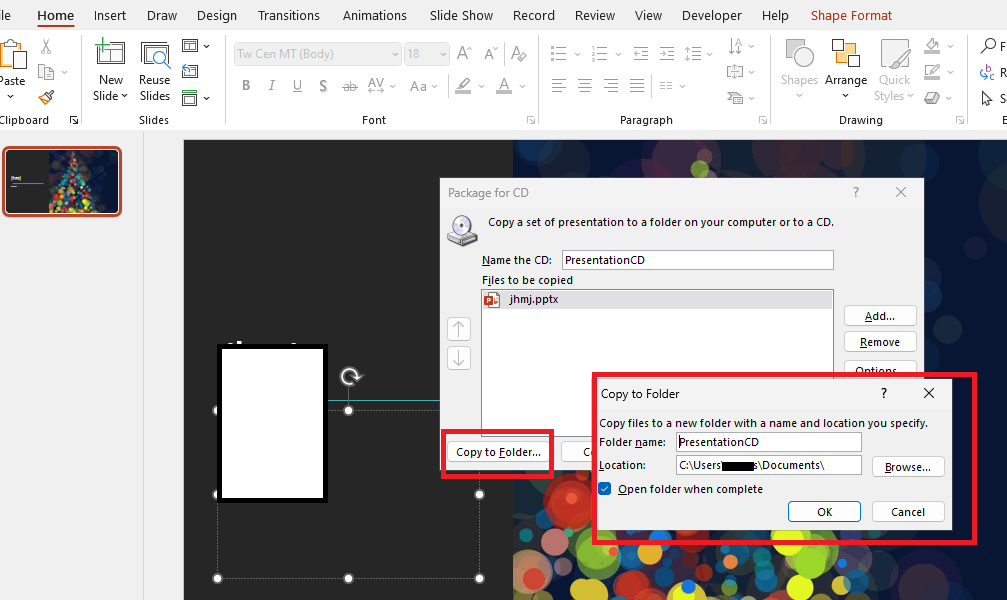
    Also, may I know does this occur on a specific PowerPoint file? if you create a new sample PowerPoint file (for test purpose) and verify the result with us. It will help for us to narrow down your problem.

    In the meantime, to confirm whether this is a bug in a specific version, please provide us the version information. To check version: Open PowerPoint>File>Account>Product Information and capture a full screenshot and share here and we will be tested on that version and verify the result with you.

    Please understand that our initial reply may not always immediately resolve the issue. However, with your help and more detailed information, we can work together to find a solution.

    I'm sorry and I apologize for that.

    Appreciate your patience and understanding and thank you for your time and cooperation.

    Sincerely,

    Waqas Muhammad

    Was this answer helpful?

    0 comments No comments