Hello,
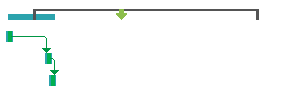
Below there is a picture of my MS project gant chart. The bars on the top belong to the summary task, and the three green bars below are the subtasks.
My issue is, that I would like the blue summary bar to reflect the subtasks exactly. So instead of having this one blue bar reaching from the beginning of the first task all the way to the end of the last task, I would like the blue summary bar to be split into 3 seperate bars and reflect the subtask durations.
Does this make sense? I would appreciate any help you have to offer.
Br, Casper
' cx='32' cy='32' r='32' /%3E%3Ctext x='50%25' y='55%25' dominant-baseline='middle' text-anchor='middle' fill='%23FFF' %3EA%3C/text%3E%3C/svg%3E)

' cx='32' cy='32' r='32' /%3E%3Ctext x='50%25' y='55%25' dominant-baseline='middle' text-anchor='middle' fill='%23FFF' %3EDH%3C/text%3E%3C/svg%3E)