Hello, 加一 五。
Welcome to Microsoft community.
Please don't worry, I will do everything I can to help you.
I understand your concern about Microsoft discontinuing support for the Web Viewer extension, especially considering its significant role in your teaching. I would like to confirm some specific details to better assist you:
- Regarding the Web Viewer plugin you mentioned, I noticed that Web View2 has the same lifecycle as Edge. Are you referring to the Web Viewer plugin as Web View2?
- Could you share the information you saw about the Web Viewer extension being discontinued in December 2024? Did you get this information from the following support article?-<m365admin.handsontek.net>
- Are you trying to view PPT documents in Edge? Since this plugin is applicable to both the web and client versions, I would like to confirm whether you are using the web or client version of PowerPoint.
Once I have obtained more information about the above, I will be able to provide you with more targeted assistance. Should you have any questions or require clarification, do not hesitate to reach out to me. I‘d like to do my utmost to assist you.
Best Regards,
Hannah.Z- MSFT |Microsoft Community Support Specialist
Hi, Hannah.Z:
Thanks for your reply.
I apologize for not describing the problem clearly, here are some more details.
The web viewer plug-in I am referring to is the PowerPoint plug-in in the "Office Add-in Store" after clicking the "Add-in" button in the start menu in the PowerPoint desktop application, as shown in the picture.
Perhaps the technical implementation of this add-in uses Edge's Web View2 (I'm not sure), but the question I raised is about the add-in in the picture.
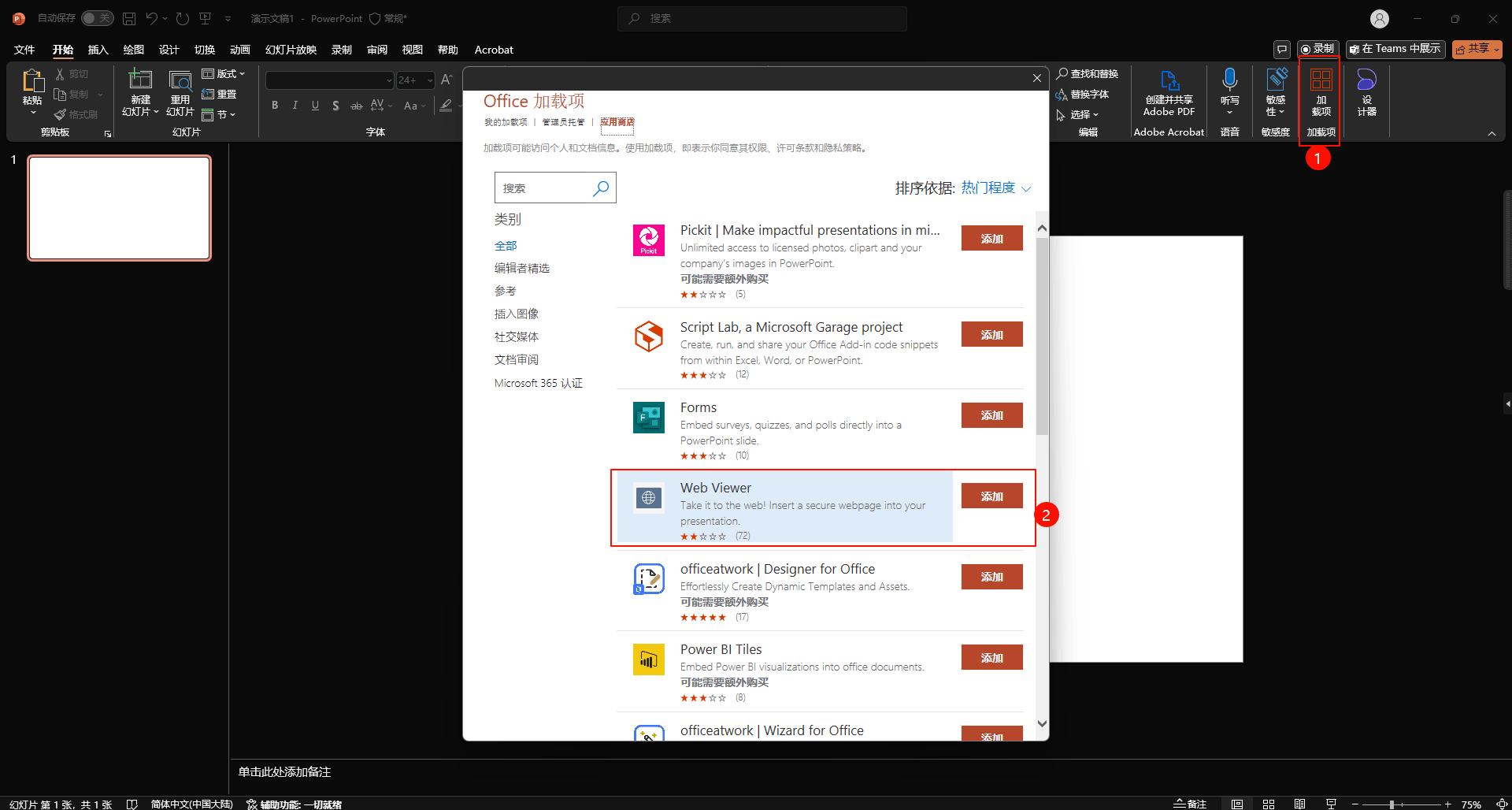
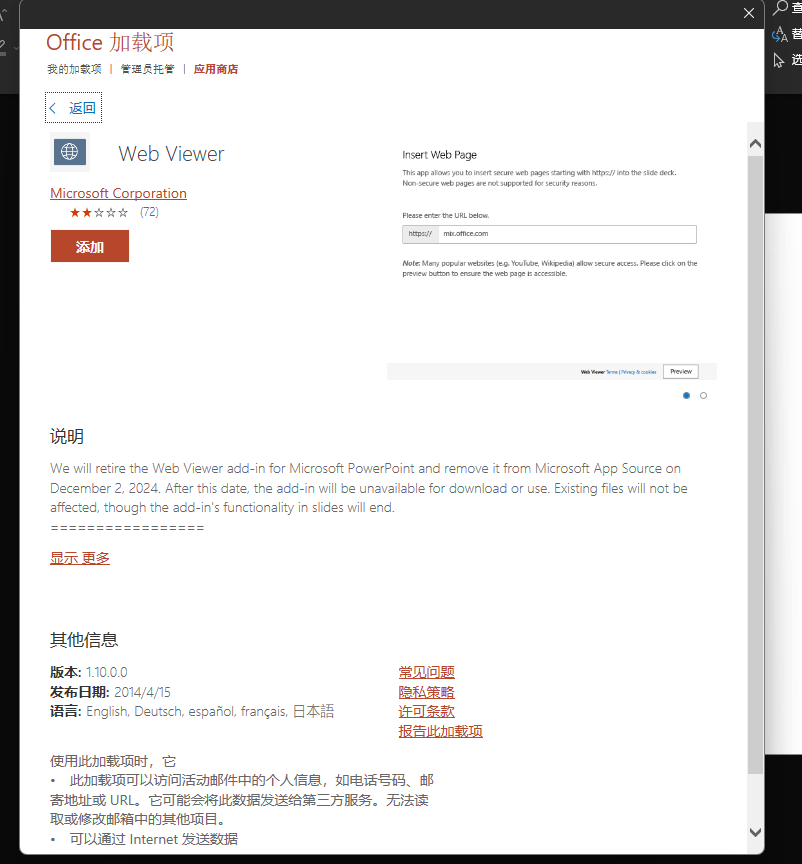
As the picture shows, a few days ago when I was organizing my teaching-related documents, I noticed that the introduction of the add-in had added a description of the icon. After being surprised, I searched for related documents and found the article you linked to.
I focus more on using the add-in in the powerpoint desktop application, which I also use in my usual teaching presentations.
When I open my ppt file on the school computer, the add-in automatically loads and I can start my presentation. But recently I noticed that there was an extra line of small text below the add-in after it loaded, which also told me that the extension will stop supporting in December 2024.
I was surprised and worried because it is already December, and I am worried about whether I can continue to use the add-in, and it would be better if it is because many of my existing PPT files use the add-in.
I noticed that the article you cited stated that "due to low usage, we will deactivate the add-on", but I would like to point out that there should be some people like me who rely on this extension. Although this number may be small, it is very important for us.
Therefore, I hope Microsoft can continue to support this extension. I don't need more additional updates, I just hope it can be installed and run normally. I think maybe Microsoft can point out in the introduction of the extension that "this extension is relatively old and may not run on some web pages" and allow users to continue to install and use the extension, but directly deactivating the extension is a disaster for users who rely on this extension - and Microsoft has not provided any other alternatives.
I guess maybe you will give the suggestion of "adding hyperlinks in PowerPoint and using the browser to jump to the relevant web page after clicking, instead of viewing the web page directly in PowerPoint", but I want to point out that this method cannot meet many of my needs - I believe that some people have the same needs.
Below I will give an example of how our class actually uses this plugin. For example, our class has a special PowerPoint file for storing daily homework. During evening self-study and self-study classes, I will show the PPT to the students.
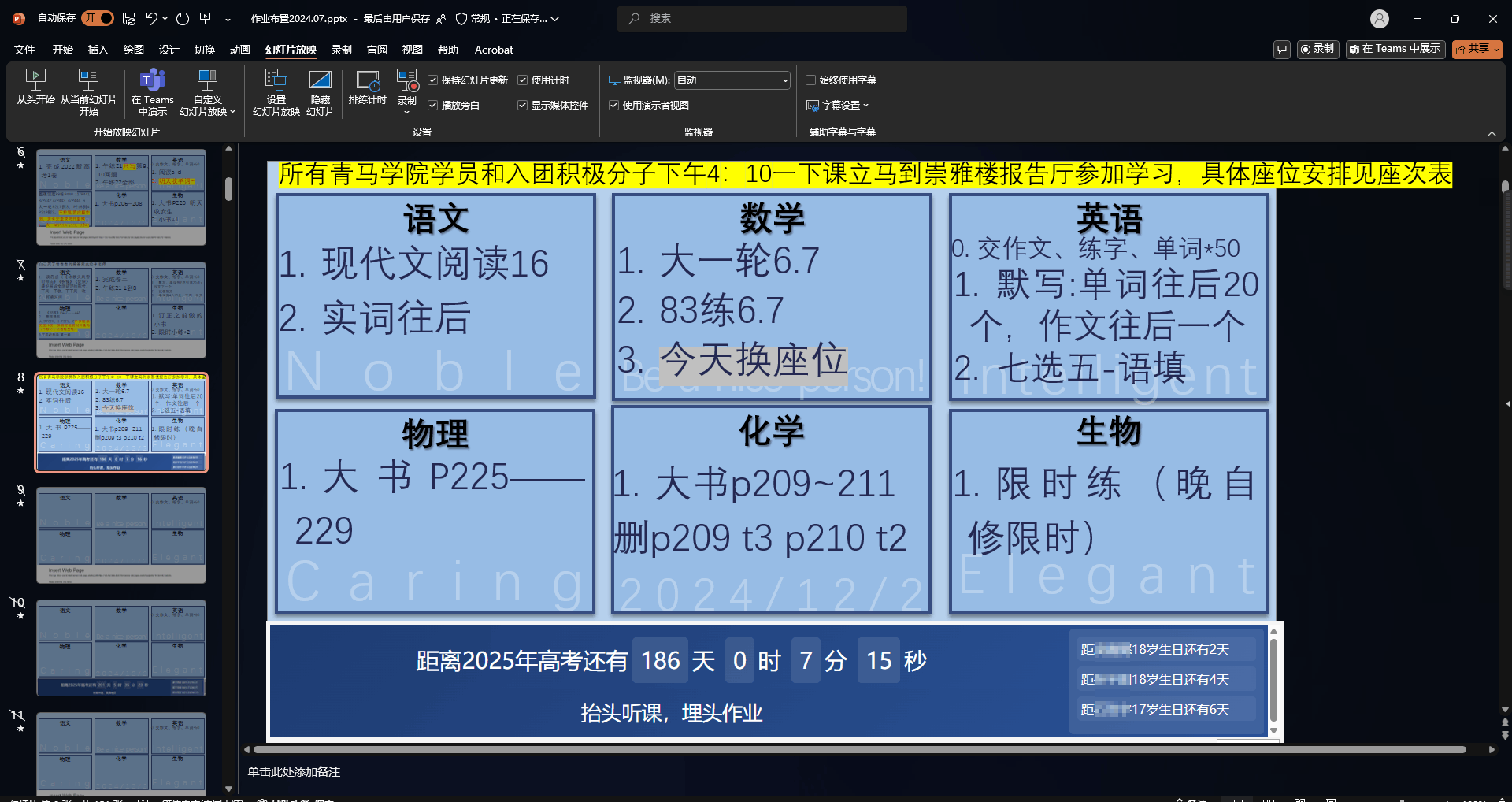
You can see that the box below is the web page presented using this extension. Through this extension, I can combine PPT elements with web pages. Use PPT's text boxes and graphics to present the relevant content of the day's homework, and use embedded web pages to present the countdown to the college entrance examination, classmates who have recently celebrated their birthdays, and some scrolling slogans - after all, these elements are very difficult to implement in PPT, but very simple to implement in web pages.
Through this example, you can see that this extension plays a vital role in achieving this effect. I have many other examples that use similar methods, which I will not expand on here one by one.
Now, I believe you can understand the problem I am talking about. You can also imagine the troubles of some other possible alternative solutions.
* Open the webpage with a hyperlink? I need to present both parts in PowerPoint at the same time.
* Open the webpage in the browser and then use the window to zoom it to show it together with the PowerPoint presentation page? This is really too troublesome, far less simple than just clicking the presentation button below.
Now, you should understand the vital role this extension plays for me and other people like me. What puzzles me is that Microsoft wants to remove this extension and does not provide any other alternatives to achieve similar effects, which makes me very worried.
So, all I hope is that Microsoft can keep the extension available all the time, and if there are few people using it, Microsoft can keep it available without any updates.
I believe this request is not difficult for Microsoft. I hope my request can be realized. Thank you.
' cx='32' cy='32' r='32' /%3E%3Ctext x='50%25' y='55%25' dominant-baseline='middle' text-anchor='middle' fill='%23FFF' %3EA%3C/text%3E%3C/svg%3E)

' cx='32' cy='32' r='32' /%3E%3Ctext x='50%25' y='55%25' dominant-baseline='middle' text-anchor='middle' fill='%23FFF' %3ESR%3C/text%3E%3C/svg%3E)