Microsoft 365 and Office | SharePoint | For business | Windows
A group of Microsoft Products and technologies used for sharing and managing content, knowledge, and applications.

This browser is no longer supported.
Upgrade to Microsoft Edge to take advantage of the latest features, security updates, and technical support.
' cx='32' cy='32' r='32' /%3E%3Ctext x='50%25' y='55%25' dominant-baseline='middle' text-anchor='middle' fill='%23FFF' %3EA%3C/text%3E%3C/svg%3E)
Within SharePoint I have tried the following.
To enable version labels in SharePoint and use them in Quick Parts within a Word document, follow these steps:
The above has been followed but when I open a new Word document, Insert Label is not showing via Quick Parts, Document Property. I have tried to find in support "Missing label in quick parts" without any luck. Anyone got some thoughts?
Locked Question. This question was migrated from the Microsoft Support Community. You can vote on whether it's helpful, but you can't add comments or replies or follow the question.
Hi Bill DouglasV,
I went through your post carefully and I understand your demand to add the version label into a Word document but currently the label option is not showing when you select Quick Parts>Document Property.
If my understanding is correct, I deployed the test environment for you and it seems like I failed to reproduce the same behavior. Below I attached a screenshot from my test for you and kindly confirm if I made any misunderstanding to your scenario. (Click pictures to zoom in)
In this situation, could you please share me some more detailed screenshots about the management policy settings for that SharePoint site and enabled labels details so that I can help to make deeper investigation for your setting environment? Below I attached some sample screenshots as reference.
Please correct me if I made any misunderstanding above and I will be here waiting for your updates.
Appreciate your time and patience. Hope you a nice day and stay safe!
Best Regards,
Mia
Hi Bill DouglasV,
I went through your post carefully and I understand your demand to add the version label into a Word document but currently the label option is not showing when you select Quick Parts>Document Property.
If my understanding is correct, I deployed the test environment for you and it seems like I failed to reproduce the same behavior. Below I attached a screenshot from my test for you and kindly confirm if I made any misunderstanding to your scenario. (Click pictures to zoom in)
In this situation, could you please share me some more detailed screenshots about the management policy settings for that SharePoint site and enabled labels details so that I can help to make deeper investigation for your setting environment? Below I attached some sample screenshots as reference.
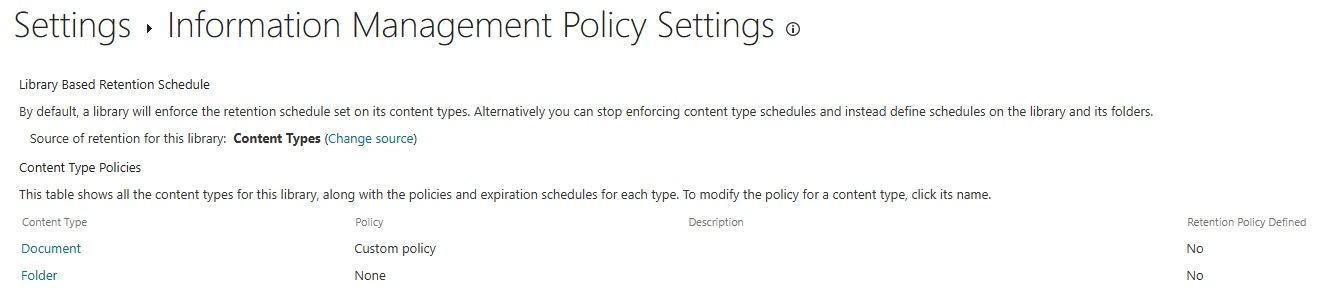
Please correct me if I made any misunderstanding above and I will be here waiting for your updates.
Appreciate your time and patience. Hope you a nice day and stay safe!
Best Regards,
Mia
I am facing the same problem. I verfifed that I have the exact same settings as Mia posted. But I am missing the label in doc properties as well.
Hi Wolfgang Daxwanger,
Since you mentioned you are also experiencing the similar issue, I tried to search in the community to confirm if this can be a server issue. But from this thread: Sensitivity Labels not available in Desktop Apps - Microsoft Community it seems like the label shows correctly in Word desktop app after 24h, so you may wait some time and check the updates.
Best Regards,
Mia