I am developping a C# VSTO add-in for PowerPoint.
In this add-in, I have a feature that updates a chart that is linked to an Excel chart.
This feature extends the PowerPoint built-in update of links.
What I am doing by code is to set the PowerPoint chart series to the formula retrieved from the Excel source chart series :
foreach (IMsoSeries series in chartToUpdate.SeriesCollection())
{
    var excelSeries = excelSeriesList[seriesIndex];
    seriesIndex++;
    series.XValues = excelSeries.CategoriesFormula;
    series.Values = excelSeries.ValuesFormula;
}
CategoriesFormula is something like "='DONNEES GRAPH RECAP'!$A$3:$B$20"
This code works great will all charts, except with the Treemap charts.
In Excel, I have this very simple treemap chart based on this data set:
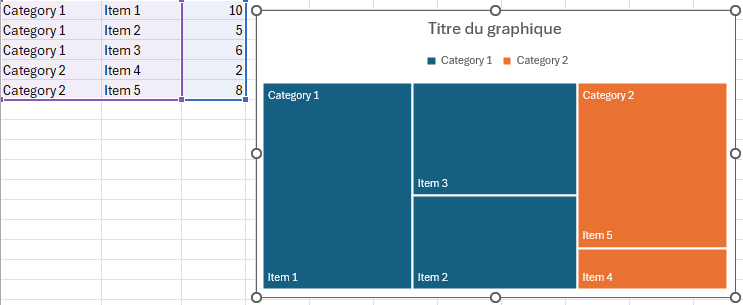
When copying the chart from Excel to PowerPoint, the result is at first as expected.
Now, when I am executing the update code above, even if data in Excel didn't change, the chart in PowerPoint is totally changed. It lose the information about the first columns (top level categories):

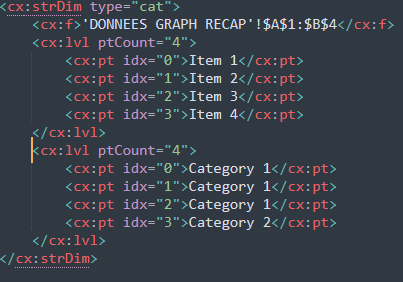
When looking at the OpenXML file, I can see that some information have been removed:
Before the update:
After the update:
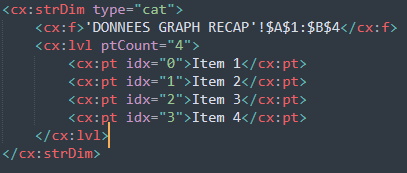
We can see that the information with "Category 1" and "Category 2" has been removed.
Do you know how to fix that?
' cx='32' cy='32' r='32' /%3E%3Ctext x='50%25' y='55%25' dominant-baseline='middle' text-anchor='middle' fill='%23FFF' %3EA%3C/text%3E%3C/svg%3E)
