Hello, Grant Verhoeven.
Welcome to Microsoft community.
According to your description, it seems that your wife might be identified as a minor account by the system due to an incorrect birthdate setting in her Microsoft account. She needs to be removed from the child account restrictions. To make her account without requiring "parental consent," you can try the following steps to resolve this issue:
Check if her account is an adult account
First, confirm that your wife's Microsoft account is indeed marked as an adult account. If the account is mistakenly marked as a minor account, the system will require parental assistance.
Steps:
- Log in to the MicrosoftFamily Safety website.
- Find your wife's account and check the account details. If it shows as "child," you need to change it to an adult account:
>It is recommended that the parent (you) log in using the parent's account at the following link: https://account.live.com/mykids.aspx
>Click 【Edit this child's personal info】and then change her birthdate.
If you have any problems modifying your wife's account in your family group, you can contact a Microsoft human support specialist to help you make changes one-on-one:
You need to follow the steps I provide below to contact support (I've taken screenshots of the key steps to make sure you're doing it correctly) You can choose to chat with support one-on-one online or wait for a support specialist to call you back to resolve your payment-related issues. They have the authority to directly assist you to modify to the correct date of birth.
One thing that needs to be explained is that I, as the forum agent, do not have the authority to help you verify the payment or refund directly, so as not to expose your private information to the forum, which is a platform for sharing and communicating publicly. This information would be left with chat support in a separate window:
Contact Microsoft Support:
- Visit this website: Contact - Microsoft Support
- Type in your problems in the search box there.( For instance, contact support.)
- Now click Get help, and Select Contact Support below.
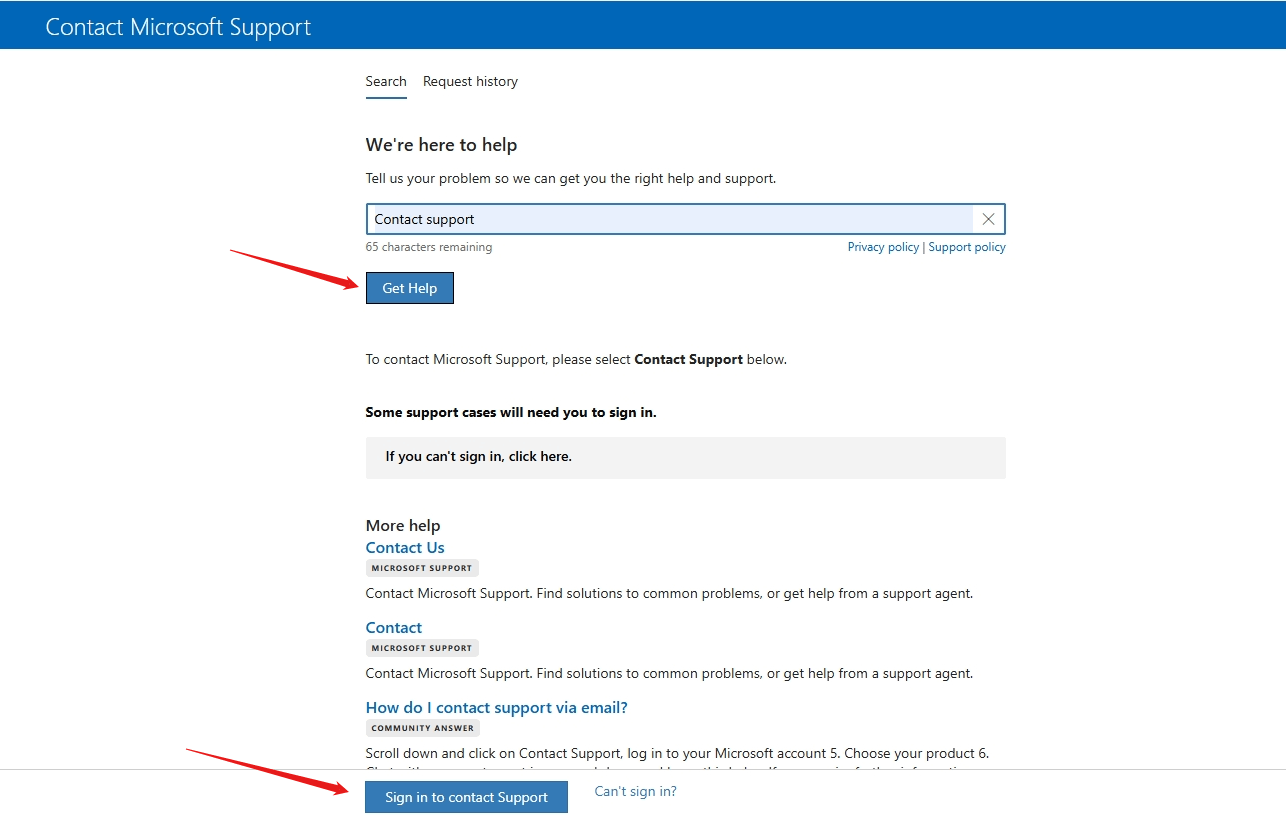
- Go to the Products and services tab, and choose either Other Products
- On the Category tab, choose Manage Profile information .
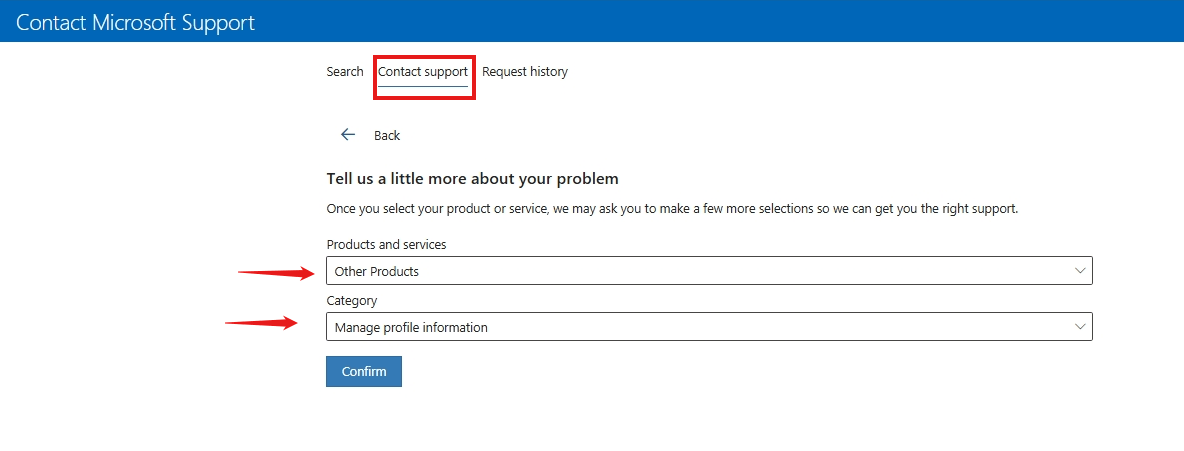
- Go to Confirm.
- Choose to chat with a support representative or request a callback.
Tips: If after completing the steps above, the page is not available, it may be a non-working day or non-working time, and it is recommended that you contact them during the page prompted working hours.
Feel free to share updates with me on how things are progressing after you've completed the aforementioned steps. Should you have any questions or require clarification, do not hesitate to reach out to me. I‘d like to do my utmost to assist you.
Best Regards,
Hannah.Z- MSFT |Microsoft Community Support Specialist
' cx='32' cy='32' r='32' /%3E%3Ctext x='50%25' y='55%25' dominant-baseline='middle' text-anchor='middle' fill='%23FFF' %3EA%3C/text%3E%3C/svg%3E)
