Azure Data Factory
An Azure service for ingesting, preparing, and transforming data at scale.
This browser is no longer supported.
Upgrade to Microsoft Edge to take advantage of the latest features, security updates, and technical support.
' cx='32' cy='32' r='32' /%3E%3Ctext x='50%25' y='55%25' dominant-baseline='middle' text-anchor='middle' fill='%23FFF' %3EDV%3C/text%3E%3C/svg%3E)
For a customer, I need to get data from a Web-API using Data Factory.
The cusromers partner has shared:
1) Certificate for mutual TLS
2) Client-ID and Client-Secret to retrieve OAUTH-token
I want to use the 'Copy-Activity' to get the data, but I have not been able to get this to work!
To prove I can do it with Azure Data Factory, I have implemented both:
** Success: Using a Web-Activity to retieve Token and Web-Activity to retieve api-data**
** Failed: Using a Web-Activity to retrieve Token and Copy-Activity to retieve api-data**
First I will show how I set up the succesfull pipeline (WHICH I DO NOT WANT TO USE!).
As shown here: both activities work correctly

The first activity gets the Bearer Token.
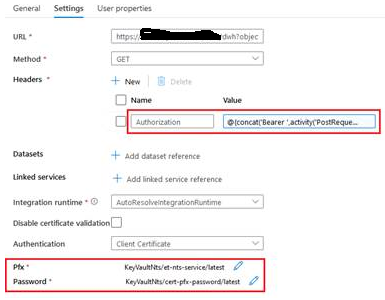
The second activity uses the Bearer Token
The second activity also uses the Certificate supplied by the Customers' Partner:
 ]3
]3
Please notice that both the Token and Certificate are filled in.
Finally, I get the Json data from the API.
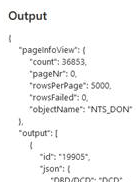
Great! Only, I do not want to use this, because I want to directly load into SQL Server and not pre-stage in a storage account or something.
Next I will show method 2, which I cant get to work!!
As shown, the first activity gets the Token, but the second activity (Copy) fails:

To enter the certificate, I need to use a HTTP Linked Service. So I set that up:
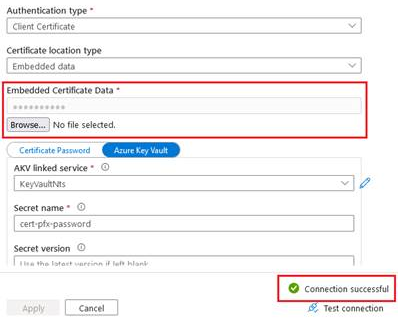
Notice that the test states: 'Connection Successful'
Next I set up the Dataset:
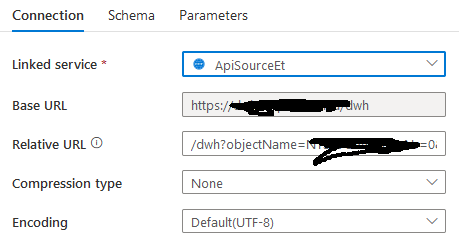
And finally the Copy-Activity:
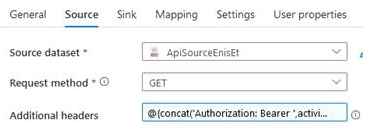
And when I run the pipeline, the response is a HTTP 403.
Please note that I have an other customer, which does not use a certificate, where this pipeline does work!
This leads me to believe that this combination: 1) HTTP Linked Service 2) Certificate 3) Additional Authorization Header does not work.
It looks to me, that in the background, the request does not use the additional header somehow.
But,... I can not prove this. Even went so far to try and capture/decipher the packages using WireShark, but that out side of my skill-set.
My theory is, that the header is being omitted somehow, due to the option 'certificate' in the HTTP Linked Service.
I've been struggling with this for a week now. Think I tried everything within my reach.
Is it possible for a MS Support engineer to reach out to me and show me what I am doing wrong? Or confirm that Azure Data Factory does not support this?
Thank you.
BR,
David
' cx='32' cy='32' r='32' /%3E%3Ctext x='50%25' y='55%25' dominant-baseline='middle' text-anchor='middle' fill='%23FFF' %3EMM%3C/text%3E%3C/svg%3E)
Hello @David van der Velden and welcome to Microsoft Q&A. Thank you for your detailed research and process.
Your theory of the Bearer header somehow not getting passed correctly for that specific combination sounds very plausible to me. I cannot yet say for certain whether that is the case. I am not part of the ADF development team.
I plan to test your theory by using an Azure Function app. The app will require a certification, like yours does. The app will read all headers and echo them in the response body. This way I can see what is being sent. Function App isn't my area of expertise, and I have never used a cert with it before, so this might take a day or two. (Assuming it can use certs, need to check.)
Once I have proof, I can involve the development team.
I seem to vaugely recall a similar situation, long ago, where the combination of multiple methods didn't work. That might have been using a different dataset.
@David van der Velden , just to clarify,
You are using HTTP dataset for source, and SQL on sink. The SQL has no issues, correct? The 403 is coming from the HTTP source side, right?
Hi Martin,
Thanks for your reply.
Last week I have submitted a support ticket for this.
Just came off call with member of product team.
I have shared my screen and showed the case in detail.
His first conclusion was that there was something not working correctly in the HTTP-Linked Service and how it uses the certificate.
He will investigate further and will come back to me.
I will post conclusion here when I have it.