ScottBrunton,
MacGyver approach? Yeah, I've got a MacGyver fix fer ya, unless of course you really love your arduous approach.
This is how I understand your issue. A task Text field is populated with data. You would like to group on that data by having the Task Text field appear on the Assignment Text field of the Resource Usage view. Correct?
Okay, here's what you do. Use the following VBA code to translate Task Text1 field data to both the Task and Resource Assignment Text1 fields. This code was written by fellow MVP Jan Demesmaeker as one of our Project MVP FAQs way back when.
Sub Task_CF_To_Resource_Usage()
Dim Reso As Resource
Dim Task_As As Assignment
Dim Reso_As As Assignment
Dim Job As Task
For Each Job In ActiveProject.Tasks
If Not Job Is Nothing Then
For Each Task_As In Job.Assignments
Task_As.Text1 = Job.Text1
Set Reso = ActiveProject.Resources(Task_As.ResourceID)
For Each Reso_As In Reso.Assignments
If Reso_As.TaskID = Job.ID Then
Reso_As.Text1 = Task_As.Text1
End If 'TaskID
Next Reso_As
Next Task_As
End If 'Nothing
Next Job
End Sub
Once that is in place, you can now group on the Assignment Text1 field of the Resource Usage view
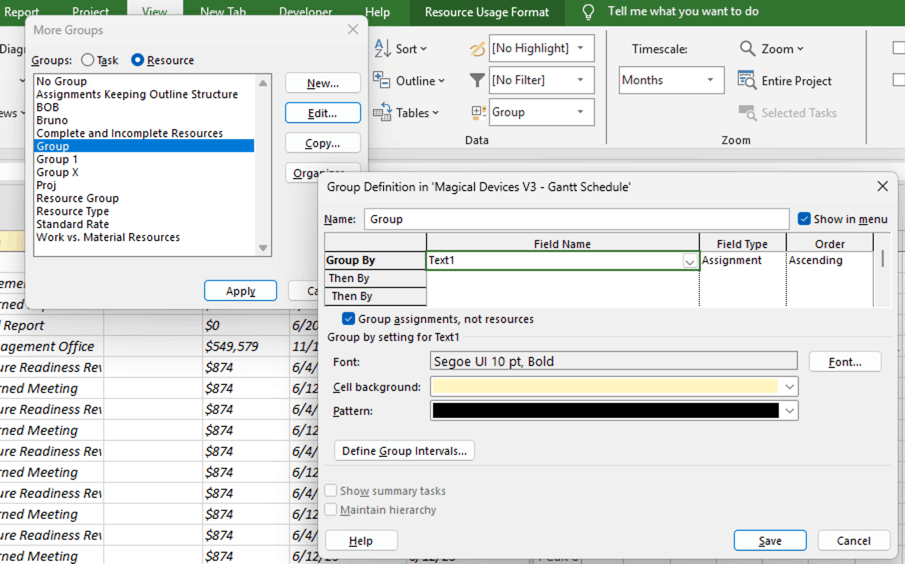
That should do it.
Please be advised that this forum is shutting down for active input on July 16th, so if you need further assistance on this, respond quickly
John
' cx='32' cy='32' r='32' /%3E%3Ctext x='50%25' y='55%25' dominant-baseline='middle' text-anchor='middle' fill='%23FFF' %3EA%3C/text%3E%3C/svg%3E)

' cx='32' cy='32' r='32' /%3E%3Ctext x='50%25' y='55%25' dominant-baseline='middle' text-anchor='middle' fill='%23FFF' %3EJP%3C/text%3E%3C/svg%3E)