Developer technologies | .NET | Xamarin
A Microsoft framework for building cross-platform mobile apps using .NET and C# with native performance and user interfaces.
This browser is no longer supported.
Upgrade to Microsoft Edge to take advantage of the latest features, security updates, and technical support.
' cx='32' cy='32' r='32' /%3E%3Ctext x='50%25' y='55%25' dominant-baseline='middle' text-anchor='middle' fill='%23FFF' %3EHD%3C/text%3E%3C/svg%3E)
Hello
I am trying to wrap my head around MVVM and Interfaces. It doesn't all make sense to me yet. In the app below I have 3 xaml ENTRY controls and the data from that control I want to pass to a list. I would very much appreciate if someone could give me some idea on how to code this problem correctly.
thank you in advance.
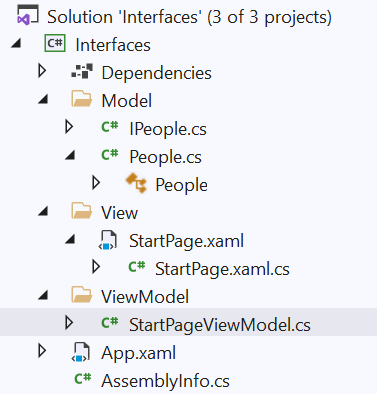
[StartPage.xaml]
<ContentPage.Content>
<StackLayout Margin="20">
<Entry Placeholder="First Name"></Entry>
<Entry Placeholder="Last Name" Text="{Binding LastName}"></Entry>
<Entry Placeholder="EmailAddress"></Entry>
<Button Text="Save"
Command="{Binding saveCommand}"></Button>
</StackLayout>
</ContentPage.Content>
[StartPage.xaml.cs]
using Interfaces.Model;
using Interfaces.ViewModel;
using System;
using System.Collections.Generic;
using System.Linq;
using System.Text;
using System.Threading.Tasks;
using Xamarin.Forms;
using Xamarin.Forms.Xaml;

namespace Interfaces.View
{
    [XamlCompilation(XamlCompilationOptions.Compile)]
    public partial class StartPage : ContentPage
    {
        public StartPage()
        {
            InitializeComponent();
            BindingContext = new StartPageViewModel();
        }
    }
}
[IPeople.cs]
namespace Interfaces.Model
{
    public interface IPeople
    {
        string EmailAddress { get; set; }
        string FirstName { get; set; }
        string LastName { get; set; }
    }
}
[People.cs]
using System;
using System.Collections.Generic;
using System.Text;

namespace Interfaces.Model
{

        public class People : IPeople
        {
            private string _firstName;
            public string FirstName
            {
                get { return _firstName; }
                set { _firstName = value; }
            }
            private string _lastName;
            public string LastName
            {
                get { return _lastName; }
                set { _lastName = value; }
            }

            private string _emailAddress;
            public string EmailAddress
            {
                get { return _emailAddress; }
                set { _emailAddress = value; }
            }
        }
    }
[StartPageViewModel.cs]
using Interfaces.Model;
using System;
using System.Collections.Generic;
using System.Text;
using System.Windows.Input;
using Xamarin.Forms;

namespace Interfaces.ViewModel
{
    public class StartPageViewModel
    {

        public ICommand saveCommand { get; set;}

        public StartPageViewModel()
        {
            saveCommand = new Command(Save);
        }

        private void Save()
        {
            List<IPeople> person = People();
        }

        private static List<IPeople> People()
        {
            List<IPeople> output = new List<IPeople>();

            // get data from xaml ENTRY control

            return output;
        }
    }
}
' cx='32' cy='32' r='32' /%3E%3Ctext x='50%25' y='55%25' dominant-baseline='middle' text-anchor='middle' fill='%23FFF' %3EKW%3C/text%3E%3C/svg%3E)
Hi HeinzDeubler-1084,
Welcome to our Microsoft Q&A platform!
You only need to define the corresponding properties in the ViewModel.
StartPage.xaml
<StackLayout Margin="20">
    <Entry Placeholder="First Name" Text="{Binding FirstName}"></Entry>
    <Entry Placeholder="Last Name" Text="{Binding LastName}"></Entry>
    <Entry Placeholder="EmailAddress" Text="{Binding EmailAddress}"></Entry>
    <Button Text="Save"
            Command="{Binding saveCommand}"></Button>
</StackLayout>
StartPageViewModel.cs
public class StartPageViewModel
{
    public string FirstName { get; set; }
    public string LastName { get; set; }
    public string EmailAddress { get; set; }

    List<IPeople> person = new List<IPeople>();

    public ICommand saveCommand { get; set; }

    public StartPageViewModel()
    {
        saveCommand = new Command(Save);
    }

    private void Save()
    {
        person.Add(new People
        {
            FirstName = FirstName,
            LastName = LastName,
            EmailAddress = EmailAddress
        });
    }
}
Regards,
Kyle
If the response is helpful, please click "Accept Answer" and upvote it.
Note: Please follow the steps in our documentation to enable e-mail notifications if you want to receive the related email notification for this thread.