SQL Server Integration Services
A Microsoft platform for building enterprise-level data integration and data transformations solutions.
This browser is no longer supported.
Upgrade to Microsoft Edge to take advantage of the latest features, security updates, and technical support.
' cx='32' cy='32' r='32' /%3E%3Ctext x='50%25' y='55%25' dominant-baseline='middle' text-anchor='middle' fill='%23FFF' %3EBP%3C/text%3E%3C/svg%3E)
I have a SSIS package that is trying to load the information from a csv file into a SQL Server table. The DB Connection is defined as an ADO.NET connection and I have parameterized the connection string. See the screenshots below.


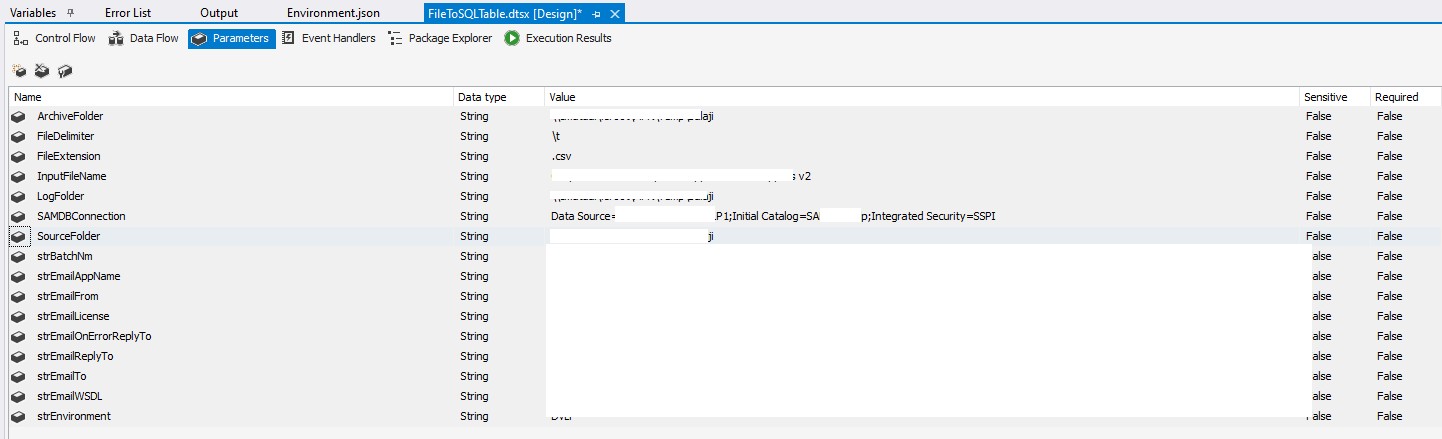
Below is the code snippet that I am using to establish the DB connection in the C# script task.
SqlConnection myADONETConnection = new SqlConnection();
myADONETConnection = (SqlConnection)(Dts.Connections["$Package::SAMDBConnection"].AcquireConnection(Dts.Transaction) as SqlConnection);
The code and the entire project builds without any problems. However, when I run the package, I am getting the below error message.
System.Data.SqlClient.SqlException (0x80131904): A network-related or instance-specific error
occurred while establishing a connection to SQL Server. The server was not found or was not
accessible. Verify that the instance name is correct and that SQL Server is configured to
allow remote connections. (provider: SQL Network Interfaces, error: 26 - Error Locating
Server/Instance Specified)
at System.Data.SqlClient.SqlInternalConnectionTds..ctor(DbConnectionPoolIdentity identity,
SqlConnectionString connectionOptions, SqlCredential credential, Object providerInfo, String
newPassword, SecureString newSecurePassword, Boolean redirectedUserInstance,
SqlConnectionString userConnectionOptions, SessionData reconnectSessionData, DbConnectionPool
pool, String accessToken, Boolean applyTransientFaultHandling,
SqlAuthenticationProviderManager sqlAuthProviderManager)
at System.Data.SqlClient.SqlConnectionFactory.CreateConnection(DbConnectionOptions options,
DbConnectionPoolKey poolKey, Object poolGroupProviderInfo, DbConnectionPool pool, DbConnection
owningConnection, DbConnectionOptions userOptions)
at System.Data.ProviderBase.DbConnectionFactory.CreatePooledConnection(DbConnectionPool pool,
DbConnection owningObject, DbConnectionOptions options, DbConnectionPoolKey poolKey,
DbConnectionOptions userOptions)
at System.Data.ProviderBase.DbConnectionPool.CreateObject(DbConnection owningObject,
DbConnectionOptions userOptions, DbConnectionInternal oldConnection)
at System.Data.ProviderBase.DbConnectionPool.UserCreateRequest(DbConnection owningObject,
DbConnectionOptions userOptions, DbConnectionInternal oldConnection)
at System.Data.ProviderBase.DbConnectionPool.TryGetConnection(DbConnection owningObject,
UInt32 waitForMultipleObjectsTimeout, Boolean allowCreate, Boolean onlyOneCheckConnection,
DbConnectionOptions userOptions, DbConnectionInternal& connection)
at System.Data.ProviderBase.DbConnectionPool.TryGetConnection(DbConnection owningObject,
TaskCompletionSource`1 retry, DbConnectionOptions userOptions, DbConnectionInternal&
connection)
at System.Data.ProviderBase.DbConnectionFactory.TryGetConnection(DbConnection
owningConnection, TaskCompletionSource`1 retry, DbConnectionOptions userOptions,
DbConnectionInternal oldConnection, DbConnectionInternal& connection)
at System.Data.ProviderBase.DbConnectionInternal.TryOpenConnectionInternal(DbConnection
outerConnection, DbConnectionFactory connectionFactory, TaskCompletionSource`1 retry,
DbConnectionOptions userOptions)
at System.Data.ProviderBase.DbConnectionClosed.TryOpenConnection(DbConnection outerConnection,
DbConnectionFactory connectionFactory, TaskCompletionSource`1 retry, DbConnectionOptions
userOptions)
at System.Data.SqlClient.SqlConnection.TryOpenInner(TaskCompletionSource`1 retry)
at System.Data.SqlClient.SqlConnection.TryOpen(TaskCompletionSource`1 retry)
at System.Data.SqlClient.SqlConnection.Open()
at Microsoft.SqlServer.Dts.Runtime.ManagedHelper.GetManagedConnection(String
assemblyQualifiedName, String connStr, Object transaction)
at Microsoft.SqlServer.Dts.Runtime.ConnectionManager.AcquireConnection(Object txn)
at ST_1d4a35a96e484ef884dbd7beb30de13d.ScriptMain.Main()
ClientConnectionId:00000000-0000-0000-0000-000000000000
Error Number:-1,State:0,Class:20
Can someone help? When I double click the SAMDBConnection connection manager in the package and click on "Test Connection" button, I am getting the same error message. If I don't use parameterization, the connection is successful and it connects to the hard coded DB without any issues. However, that is not an option since I need to deploy the job into multiple SSIS servers (Dev, QA and PROD) and I need to parameterize the connection parameters. I will be using Microsoft Azure TFS build and release pipelines to build and deploy the package into multiple SSIS servers. I need to supply the DB connection parameters as part of the release definition for this job.
One change I am noticing is that I am accessing the other variables using the statement Dts.Variables["$Package:FileDelimiter"].Value and in this case I am accessing it as Dts.Connections["$Package::SAMDBConnection"].AcquireConnection and I am not sure if this is correct.
Sorry for the long post. I am a Salesforce person and SSIS is not my cup of tea.
Please help.

Hi @Balaji Pooruli ,
Have you set a protection level of the package?
access-control-for-sensitive-data-in-packages
You may refer this to see if it it helpful.
https://www.hansmichiels.com/2016/11/19/using-sensitive-parameters-ssis-series/
Regards,
Zoe
If the answer is helpful, please click "Accept Answer" and upvote it.
Note: Please follow the steps in our documentation to enable e-mail notifications if you want to receive the related email notification for this thread.
Hot issues October