Developer technologies | .NET | .NET Runtime
.NET: Microsoft Technologies based on the .NET software framework. Runtime: An environment required to run apps that aren't compiled to machine language.
This browser is no longer supported.
Upgrade to Microsoft Edge to take advantage of the latest features, security updates, and technical support.
' cx='32' cy='32' r='32' /%3E%3Ctext x='50%25' y='55%25' dominant-baseline='middle' text-anchor='middle' fill='%23FFF' %3EA%3C/text%3E%3C/svg%3E)
I wrote programs with VS 2019 on VB and C# that targeted the .NET 4.7.2 framework
On a new computer where I have VS 2019 as well, the target frameworks available are .NET 5.0 and .NET Core
How can I set VS 2019 on this new computer to target .NET 4.7.2 framework ?
I have installed the developer pack for .NET 4.7.2 found at https://dotnet.microsoft.com/download/visual-studio-sdks?utm_source=getdotnetsdk&utm_medium=referral on this new computer
However, .NET 4.7.2 still does not show as available in VS 2019 Project Properties/ Application / Target Framework
' cx='32' cy='32' r='32' /%3E%3Ctext x='50%25' y='55%25' dominant-baseline='middle' text-anchor='middle' fill='%23FFF' %3EXZ%3C/text%3E%3C/svg%3E)
Hi @ansalc ,
As suggested by Castorix31, make sure the project template you create is .NET Framework instead of .NET Core(or .NET5), and you cannot directly change the 'Target Framework' from .NET Core to .NET Framework.
Besides, you can refer to the following document to determine if. Net framework 4.7.2 is installed.
How to: Determine which .NET Framework versions are installed
Hope it could be helpful.
Best Regards,
Xingyu Zhao
*
If the answer is helpful, please click "Accept Answer" and upvote it.
Note: Please follow the steps in our documentation to enable e-mail notifications if you want to receive the related email notification for this thread.
As per the link above, my computer has .NET Framework 4.8 installed (528372 DWORD shows in the Registry)
But my problem persists. I cannot select .NET 4.7.2 in the project template at creation in Visual Studio. It does not show.
The first note at https://learn.microsoft.com/en-us/dotnet/framework/migration-guide/versions-and-dependencies mentions: ".NET Framework 4.8 is the last version of .NET Framework. .NET Framework is serviced monthly with security and reliability bug fixes. .NET Framework will continue to be included with Windows, with no plans to remove it. You don't need to migrate your .NET Framework apps, but for new development, use .NET 5 or later"
Notice: "for new development, use .NET 5 or later" does this mean that the option to target a lower framework for new projects is unavailable in VS if the computer in which VS is installed has .NET 4.8 or higher?
That does not seem to be the case either. If I go to an older computer which has also .NET 4.8, VS 2019 does allow me to target .NET 4.7.2 in the project template.
Hi @ansalc ,
does this mean that the option to target a lower framework for new projects is unavailable in VS
No, you can still target the framework to lower versions.
For example.
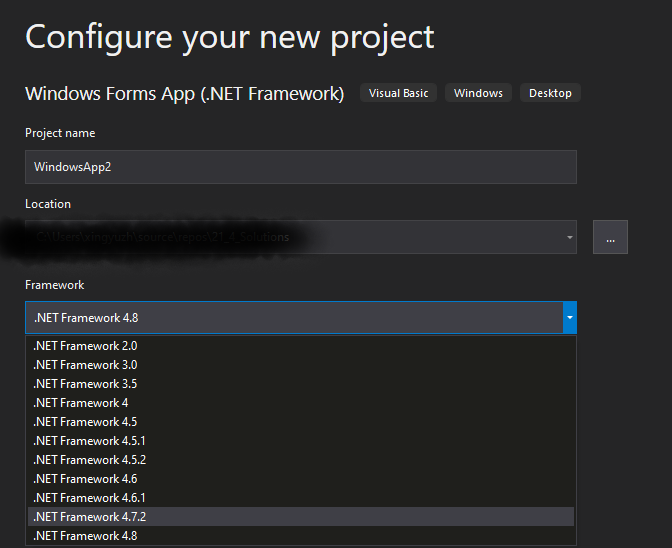
Try reinstalling .NET Framework 4.7.2 or use .NET Framework 4.8 instead.
See : Version compatibility
This is what I see.
It happens exactly the same on two different machines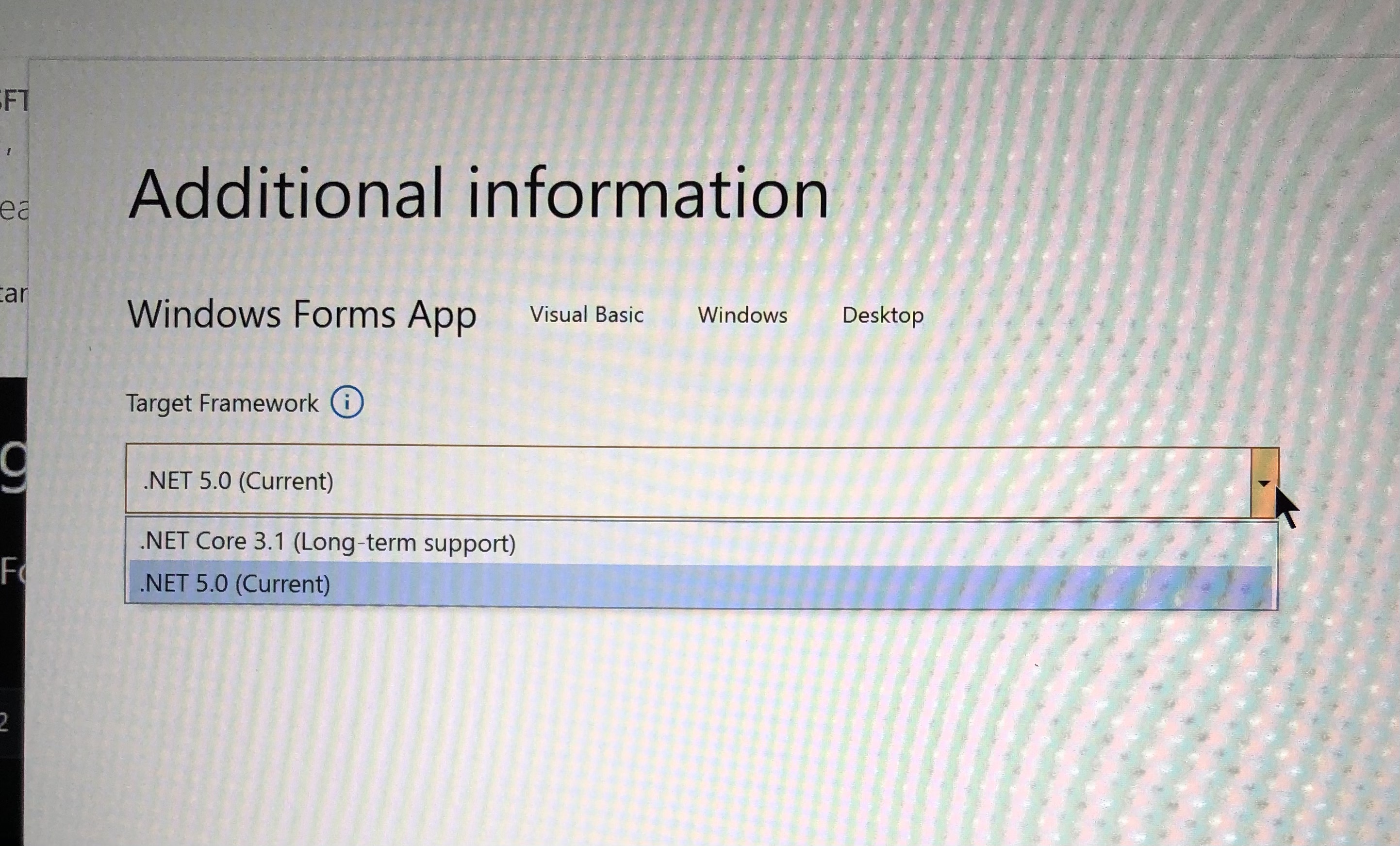
For a WPF App (.Net Framework) I do see other options, so 4.7.2 is installed properly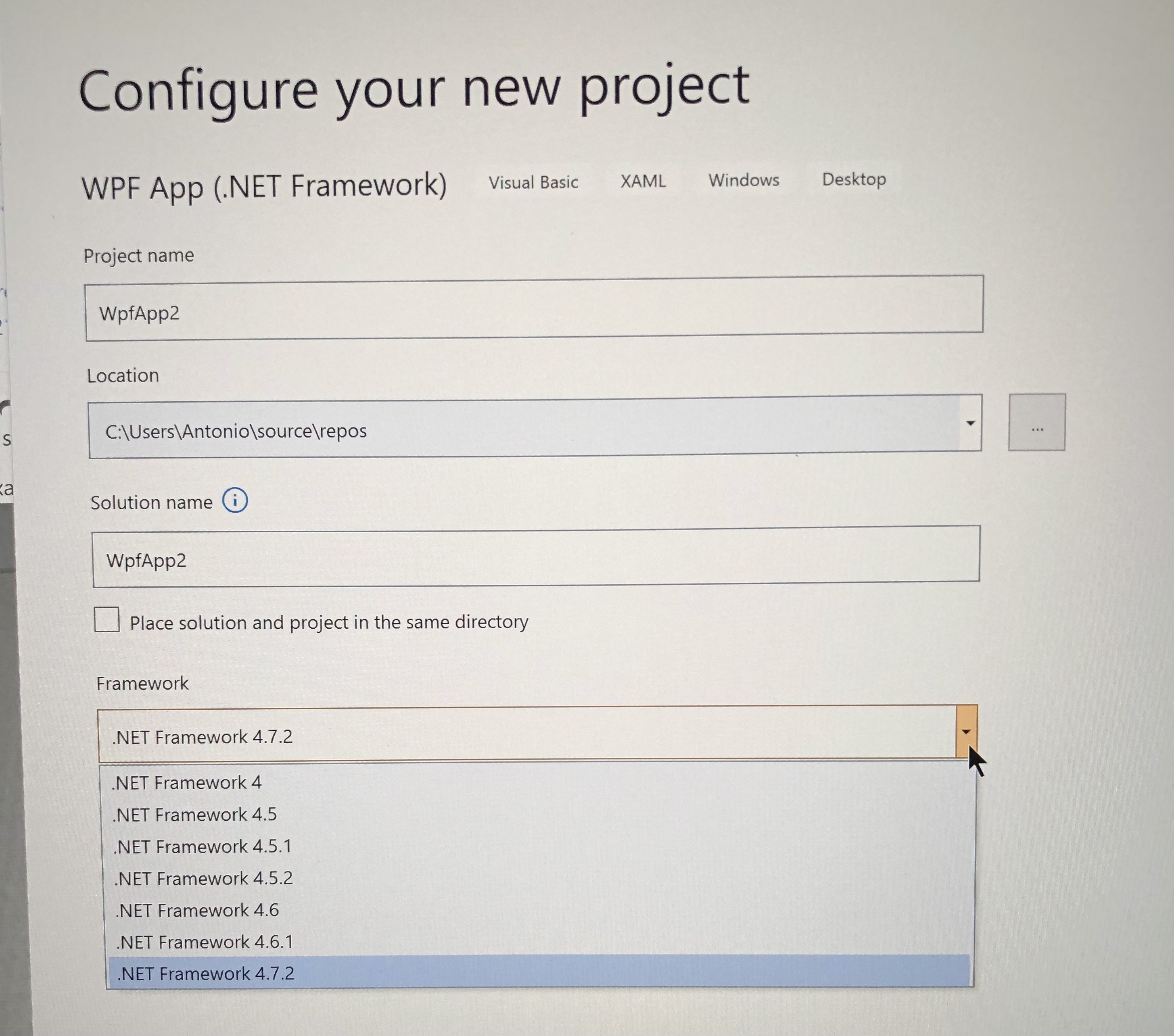

The first screen is Windows Form App with .NET (Core)
(instead of .NET Framework)
' cx='32' cy='32' r='32' /%3E%3Ctext x='50%25' y='55%25' dominant-baseline='middle' text-anchor='middle' fill='%23FFF' %3EBS%3C/text%3E%3C/svg%3E)
run visual studio installer, pick vs 2019 modify. then pick asp.net and web development.
on the right, under Installation Details, select the out dated frameworks you want.
II tried that already.
VS Installer already shows .NET 4.7.2 installed but it does not show when creating a project
When you create a new project, do you choose the .NET Framework template, like :
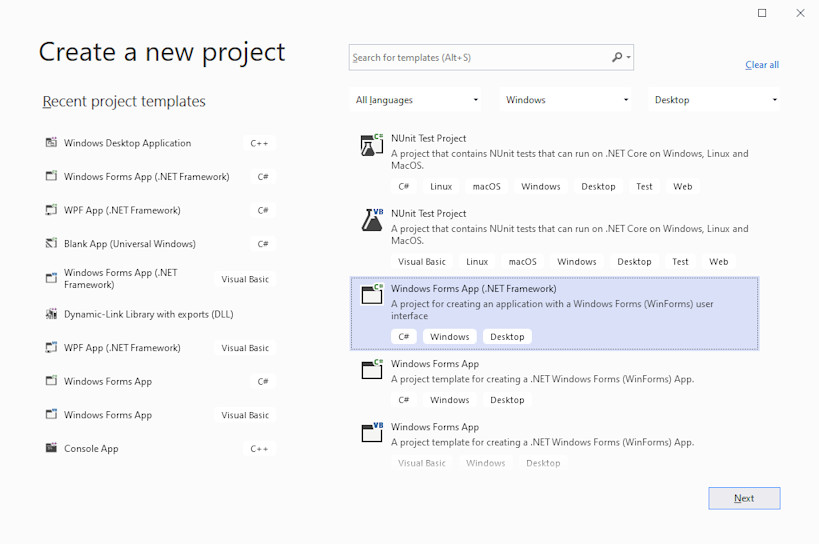
Yes, when I create a project I use the appropriate template and there I can choose the Target Framework, but 4.7.2 does not show
But you wrote
"the target frameworks available are .NET 5.0 and .NET Core"
Those are .NET, not .NET Framework (the template below the .NET Framework selected on the picture)
Thank you Castorix31. When I select .NET Framework templates they do show the framework I am looking for.
' cx='32' cy='32' r='32' /%3E%3Ctext x='50%25' y='55%25' dominant-baseline='middle' text-anchor='middle' fill='%23FFF' %3EM%3C/text%3E%3C/svg%3E)
I also struggled with the same issue. I've figured out this solution works for me great for .NET 4.x, .NET 5 and .NET 7 on multiple OSes:
<PropertyGroup>
  <FrameworkDescription>$([System.Runtime.InteropServices.RuntimeInformation]::FrameworkDescription.ToLower())</FrameworkDescription>
  <TargetFramework Condition="$(FrameworkDescription.Contains('net 7'))">net7</TargetFramework>
  <TargetFramework Condition="$(FrameworkDescription.Contains('net 6'))">net6</TargetFramework>
  <TargetFramework Condition="$(FrameworkDescription.Contains('net 5'))">net5</TargetFramework>
  <TargetFramework Condition="$(FrameworkDescription.Contains('mono'))">net461</TargetFramework>
</PropertyGroup>