Microsoft Office Online Server
Microsoft on-premises server product that runs Office Online. Previously known as Office Web Apps Server.
616 questions
This browser is no longer supported.
Upgrade to Microsoft Edge to take advantage of the latest features, security updates, and technical support.
' cx='32' cy='32' r='32' /%3E%3Ctext x='50%25' y='55%25' dominant-baseline='middle' text-anchor='middle' fill='%23FFF' %3EPI%3C/text%3E%3C/svg%3E)
Hi
Just a quick question; Is this maybe a bug?
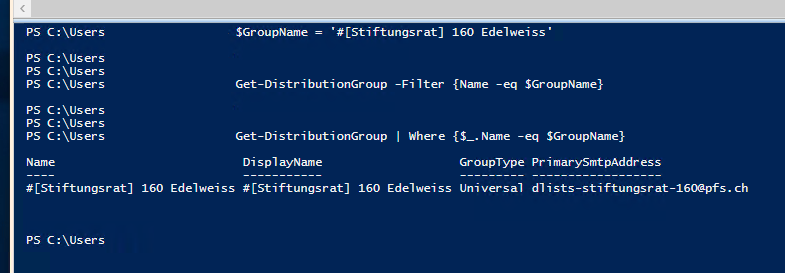
With the -Filter parameter, no matching group is found but with "Where" the desired group is found.

Hi @PFS IT ,
please try this (not tested):
Get-DistributionGroup -Filter "Name -eq '$GroupName'"
----------
(If the reply was helpful please don't forget to upvote and/or accept as answer, thank you)
Regards
Andreas Baumgarten
' cx='32' cy='32' r='32' /%3E%3Ctext x='50%25' y='55%25' dominant-baseline='middle' text-anchor='middle' fill='%23FFF' %3ERM%3C/text%3E%3C/svg%3E)
The -Filter takes a string as an argument, not a code block. It's a good idea to consult the help for a cmdlet (either online or using help cmdlet-name).
Follow Andreas' advice. ;-)
Yeah, I just assumed it should be a code block because with many other cmdlets, it is one. First time seeing the -Filter parameter being used with quotation marks :) Learning never stops.

Hello PFSIT,
The Filter parameter indeed takes strings and not code blocks, so it should be between quotes, also would like to introduce you to the tested properties to be applicable for the Filter parameter in Exchange.
https://learn.microsoft.com/en-us/powershell/exchange/filter-properties?view=exchange-ps
Hope this may be helpful for you,
Best regards,