Community Center | Not monitored
Tag not monitored by Microsoft.

This browser is no longer supported.
Upgrade to Microsoft Edge to take advantage of the latest features, security updates, and technical support.
' cx='32' cy='32' r='32' /%3E%3Ctext x='50%25' y='55%25' dominant-baseline='middle' text-anchor='middle' fill='%23FFF' %3EPS%3C/text%3E%3C/svg%3E)
I'm experiencing an issue where connected devices are not discovered after computer restart. When it happens there's an error message in the k4aviewer
find_libusb_device(). libusb device(s) are all unavailable. Is the device beeing used by another application?
Most of the time it works, but once in a while it will happen (pretty rarely though so hard to track down). I haven't found a pattern yet. I've looked in the troubleshooting section but I think I have a supported host controller?
This is how it looks in the device manager when it is working
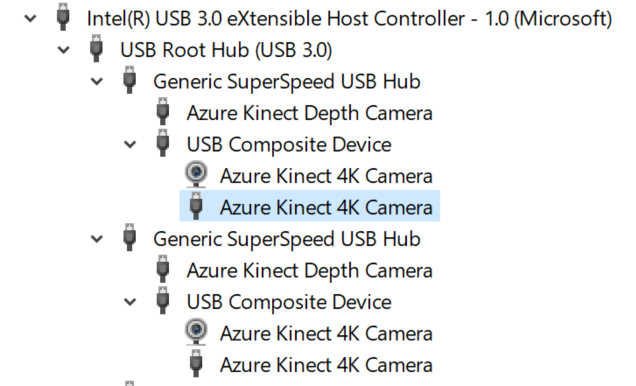
Is anyone else experiencing this issue or have tips for what might cause it?
Tag not monitored by Microsoft.
The usb controller shows an error in the device manager when the kinects don't work: "Unknown USB Device ()Set Address Failed"

' cx='32' cy='32' r='32' /%3E%3Ctext x='50%25' y='55%25' dominant-baseline='middle' text-anchor='middle' fill='%23FFF' %3EQ%3C/text%3E%3C/svg%3E)
Hello @PatrikSvensson-5712 , Thanks for reaching out to us!, Sorry that I missed acknowledging sooner over here. I am checking with my team on this. Please stay tuned.

@PatrikSvensson-5712 you always use the same USB port or occasionally change it? Thanks
Hi,
they are always connected to the same port. I only unplug them and plug them back in (same port) when I get this error, that fixes the issue. I want to use this for an installation that should autostart each day, so unplugging and plugging back in is not an option. That's just how I fix the issue now while developing.
Hello @Patrik Svensson , Just checking back, could you please let us know if you need further help in this matter.
Hello @Patrik Svensson , We are aware of the similar Github issue: PG team is working on it. Please provide us with the below information.
What machine model is the host?
Which OS build is running on host?
Which usb port of host does AKinect connect to?
Hello @Patrik Svensson , Just checking back, could you please let us know if you need further help in this matter.
Hello @Patrik Svensson ,Please accept the below helpful responses as 'Answer', which will be helpful to others as well with similar question.
Hello @Patrik Svensson , Just checking back, could you please let us know if you need further help in this matter. Please accept the below helpful responses as 'Answer', which will be helpful to others as well with similar question, so that we can close this thread.
@Patrik Svensson while we actively are investigating this issue and working towards a fix, can the following workarounds work for your scenario?
1) Reboot PC with camera disconnected
2) Issue a reset to the camera after the PC reboot. Restart the camera firmware via: AzureKinectFirmwareTool.exe -r
Thank you!
The bug is being tracked here. Please follow-up there: https://github.com/microsoft/Azure-Kinect-Sensor-SDK/issues/1283
Thanks!
@Patrik Svensson in order to try to reproduce the issue can you let us know the following info:
Thank you! :)
Hi.
I have not tried this workaround since I only had the issue on our development hardware. After switching to the production setup I have not experienced this issue anymore. I will try the suggested workaround on our dev machine and report back if it works, so we can close this issue. My problem was also that it would only happen occasionally, so I cannot reproduce the issue consistently, and it will be hard to say if it works without testing over a longer period.
Regarding point 2, it says 'Issue a reset to the camera' and also 'restart the camera firmware' - is that the same thing, done using 'AzureKinectFirmwareTool.exe -r'?
Sorry for the late replies.
/Patrik