Microsoft 365 and Office | SharePoint Server | For business
A family of Microsoft on-premises document management and storage systems.

This browser is no longer supported.
Upgrade to Microsoft Edge to take advantage of the latest features, security updates, and technical support.
' cx='32' cy='32' r='32' /%3E%3Ctext x='50%25' y='55%25' dominant-baseline='middle' text-anchor='middle' fill='%23FFF' %3EKN%3C/text%3E%3C/svg%3E)
Hi,
I'm trying to create a new modern page with a Display Library Webpart.
The issue is that the command bar doesn't show up when a document is selected.
The "Show command bar" is missing in the webpart properties.
I want to be able to edit a document properties from my new modern SitePage.
I reproduced my step in SPO. It works fine but not on my SP2019 on-premise.
Thanks.
A family of Microsoft on-premises document management and storage systems.
Answer accepted by question author

Hi @Kevin Nguyen ,
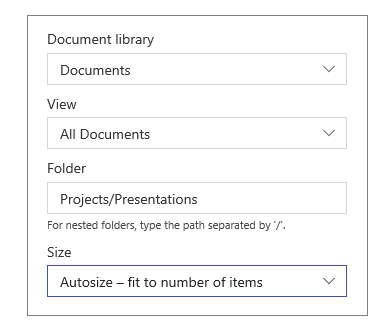
Unfortunate though it is, command bar is currently not supported in the document library web part of the SharePoint Server 2019 modern page. As the snapshot shown in this article: Use the Document Library web part, there is no "Show command bar" option in the edit web part window.
If an Answer is helpful, please click "Accept Answer" and upvote it.
Note: Please follow the steps in our documentation to enable e-mail notifications if you want to receive the related email notification for this thread.
Is ther any update on this thread? I'm looking forward to your reply.