Microsoft Security | Intune | Enrollment
Registering devices with Intune for management and policy enforcement

This browser is no longer supported.
Upgrade to Microsoft Edge to take advantage of the latest features, security updates, and technical support.
' cx='32' cy='32' r='32' /%3E%3Ctext x='50%25' y='55%25' dominant-baseline='middle' text-anchor='middle' fill='%23FFF' %3EA%3C/text%3E%3C/svg%3E)
Hello,
I need to sync computers account from on-prem AD to Azure AD.
I have AD connect 2.0.10 single server.
I need to enable AAD Hybrid AD Joined for computers for Intune
I plan to enable device on connector
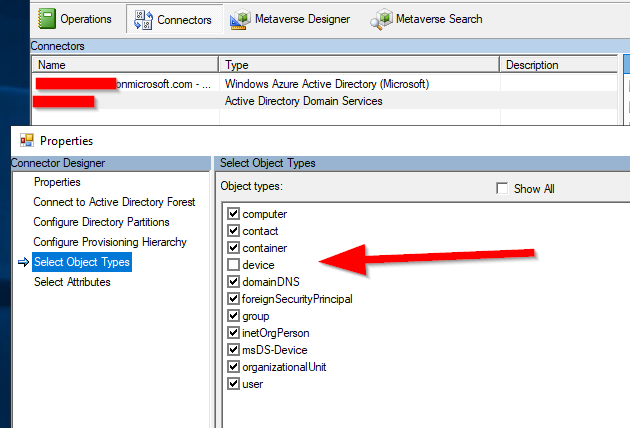
and configure Hybrid Azure AD join
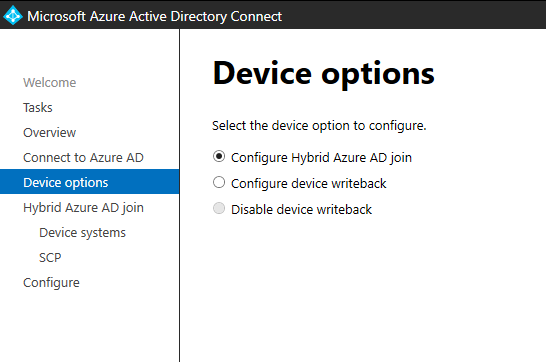
Is this a right way to configure on-prem computer accounts syncronization to Azure AD(Hybrid AD Joined)?
Any advice?
If I enable this option what can I expect for my on-prem environment?
Is there anything I need to pay attention in this process?
My Intune consultant is not so good to give me advice :-)
Thank you
' cx='32' cy='32' r='32' /%3E%3Ctext x='50%25' y='55%25' dominant-baseline='middle' text-anchor='middle' fill='%23FFF' %3ETB%3C/text%3E%3C/svg%3E)
@fsdg did you enable the devices ? if yes did it cause any harm on your environment?
Thanks.
' cx='32' cy='32' r='32' /%3E%3Ctext x='50%25' y='55%25' dominant-baseline='middle' text-anchor='middle' fill='%23FFF' %3EN%3C/text%3E%3C/svg%3E)
You don't need devices selected in the object types. You can just run through the wizard in your screenshot to configure hybrid azure ad join. That will create an SCP in AD for computers to automatically hybrid azure ad join (make sure that you're syncing the OU that the devices are in). However before you do this, you can also do a controlled validation to test before you enable it for all devices. See https://learn.microsoft.com/en-us/azure/active-directory/devices/hybrid-azuread-join-plan . I would suggest reading all the official docs before you make changes.

@Andy I am currently standing by for further update from you and would like to know how things are going. Is the information that Nick provided helpful to you? If yes, please accept his answer.
If you have any questions or concerns on the recent information I've provided you, please don't hesitate to let us know.