SQL Server Integration Services
A Microsoft platform for building enterprise-level data integration and data transformations solutions.
This browser is no longer supported.
Upgrade to Microsoft Edge to take advantage of the latest features, security updates, and technical support.
' cx='32' cy='32' r='32' /%3E%3Ctext x='50%25' y='55%25' dominant-baseline='middle' text-anchor='middle' fill='%23FFF' %3EVB%3C/text%3E%3C/svg%3E)
There are three Excel privacy levels: Private, Organizational, Public. When Excel's privacy level is Public I can get data using Integration Services -> Data Flow -> Excel task.
When Excel's privacy levels is Organizational or Private, I can't get data. When I open Excel task, Excel's sheet's cannot be seen. It looks like empty file.
All I'm doing locally. I can open Excel file and see all data, change privacy level.
How to fix it?

Hi @V B ,
Have you tried to set the query opinion with ignore the privacy levels and potentially improve performance?
If this does not work, you may change the excel privacy level to Public or None.
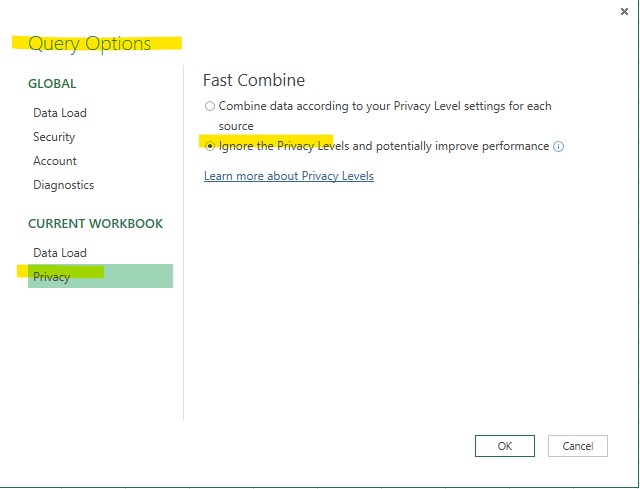
Details you may refer: set-privacy-levels-power-query
Regards,
Zoe
If the answer is helpful, please click "Accept Answer" and upvote it.
Note: Please follow the steps in our documentation to enable e-mail notifications if you want to receive the related email notification for this thread.
Hot issues October