Microsoft Teams | Microsoft Teams for business | Other
Additional features, settings, or issues not covered by specific Microsoft Teams categories

This browser is no longer supported.
Upgrade to Microsoft Edge to take advantage of the latest features, security updates, and technical support.
' cx='32' cy='32' r='32' /%3E%3Ctext x='50%25' y='55%25' dominant-baseline='middle' text-anchor='middle' fill='%23FFF' %3ETC%3C/text%3E%3C/svg%3E)
General channel only, cannot access meeting notes.
Other channels can access meeting notes.
Can I fix it?
Additional features, settings, or issues not covered by specific Microsoft Teams categories
' cx='32' cy='32' r='32' /%3E%3Ctext x='50%25' y='55%25' dominant-baseline='middle' text-anchor='middle' fill='%23FFF' %3EA%3C/text%3E%3C/svg%3E)
Hi @tarou chabi ,
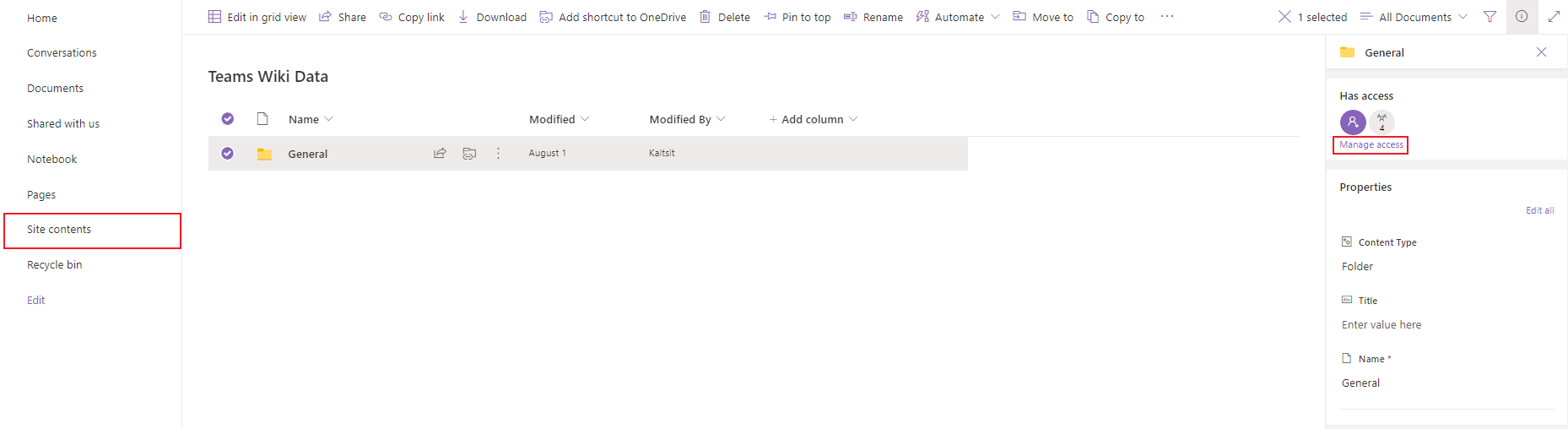
Please navigate to the Sharepoint site and see the assigned permissions of the documents.
The meeting notes in the General channel should be in:
Site contents > Teams Wiki Data > General(channel name) > MeetingNoteName.mht
You can manually add yourself to the access member list and assign direct access permission and try.
Best regards,
Lou
If the response is helpful, please click "Accept Answer" and upvote it.
Note: Please follow the steps in our documentation to enable e-mail notifications if you want to receive the related email notification for this thread.
Hi @tarou chabi ,
Do the suggestions above help? If the issue has been resolved, please click “Accept as answer” to mark the helpful reply as an answer, this will make answer searching in the forum easier and be beneficial to other community members as well.
If you are still stuck in this issue, please feel free to post your questions.
Regards,
Lou
If the response is helpful, please click "Accept Answer" and upvote it.
Note: Please follow the steps in our documentation to enable e-mail notifications if you want to receive the related email notification for this thread.