Developer technologies | XAML
A language based on Extensible Markup Language (XML) that enables developers to specify a hierarchy of objects with a set of properties and logic.
This browser is no longer supported.
Upgrade to Microsoft Edge to take advantage of the latest features, security updates, and technical support.
' cx='32' cy='32' r='32' /%3E%3Ctext x='50%25' y='55%25' dominant-baseline='middle' text-anchor='middle' fill='%23FFF' %3EAK%3C/text%3E%3C/svg%3E)
I am working on Wpf application and want to get latitude and longitude(EXACT) of desktop when mark attendance
and save them to database.Can anyone help for the same
Thanks in Advance
' cx='32' cy='32' r='32' /%3E%3Ctext x='50%25' y='55%25' dominant-baseline='middle' text-anchor='middle' fill='%23FFF' %3EHL%3C/text%3E%3C/svg%3E)
You could refer to the following methods to get the latitude and longitude and save it to the database.
The code of xaml:
<StackPanel>
        <TextBox Name="txtId" Width="200" Height="30"></TextBox>
        <TextBox Name="txtLatitude" Width="200" Height="30"></TextBox>
        <TextBox Name="txtLongitude" Width="200" Height="30"></TextBox>
        <Button Name="load" Click="load_Click">load</Button>
    </StackPanel>
The code of xaml.cs:
public partial class MainWindow : Window
  {
    public MainWindow()
    {
      InitializeComponent();
      GetLocationEvent();
    }
    GeoCoordinateWatcher watcher;
    public void GetLocationEvent()
    {
      this.watcher = new GeoCoordinateWatcher();
      this.watcher.PositionChanged += new EventHandler<GeoPositionChangedEventArgs<GeoCoordinate>>(watcher_PositionChanged);
      bool started = this.watcher.TryStart(false, TimeSpan.FromMilliseconds(20000));

    }
    void watcher_PositionChanged(object sender, GeoPositionChangedEventArgs<GeoCoordinate> e)
    {
      PrintPosition(e.Position.Location.Latitude, e.Position.Location.Longitude);
    }
    void PrintPosition(double Latitude, double Longitude)
    {
      MessageBox.Show("latitude" + Latitude + "longitude" + Longitude);
      txtLatitude.Text = Latitude.ToString();
      txtLongitude.Text = Longitude.ToString();
    }

    private void load_Click(object sender, RoutedEventArgs e)
    {
      SqlConnection con = new SqlConnection(@"constr");
      SqlCommand cmd = new SqlCommand(@"INSERT INTO [dbo].[LocationTable]([Id],[Latitude],[Longitude])VALUES('" + int.Parse(txtId.Text) + "','" + float.Parse(txtLatitude.Text)+"','"+float.Parse(txtLongitude.Text)+"')",con);
      con.Open();
      cmd.ExecuteNonQuery();
      MessageBox.Show("Data created successfully");
      con.Close();
    }
  }
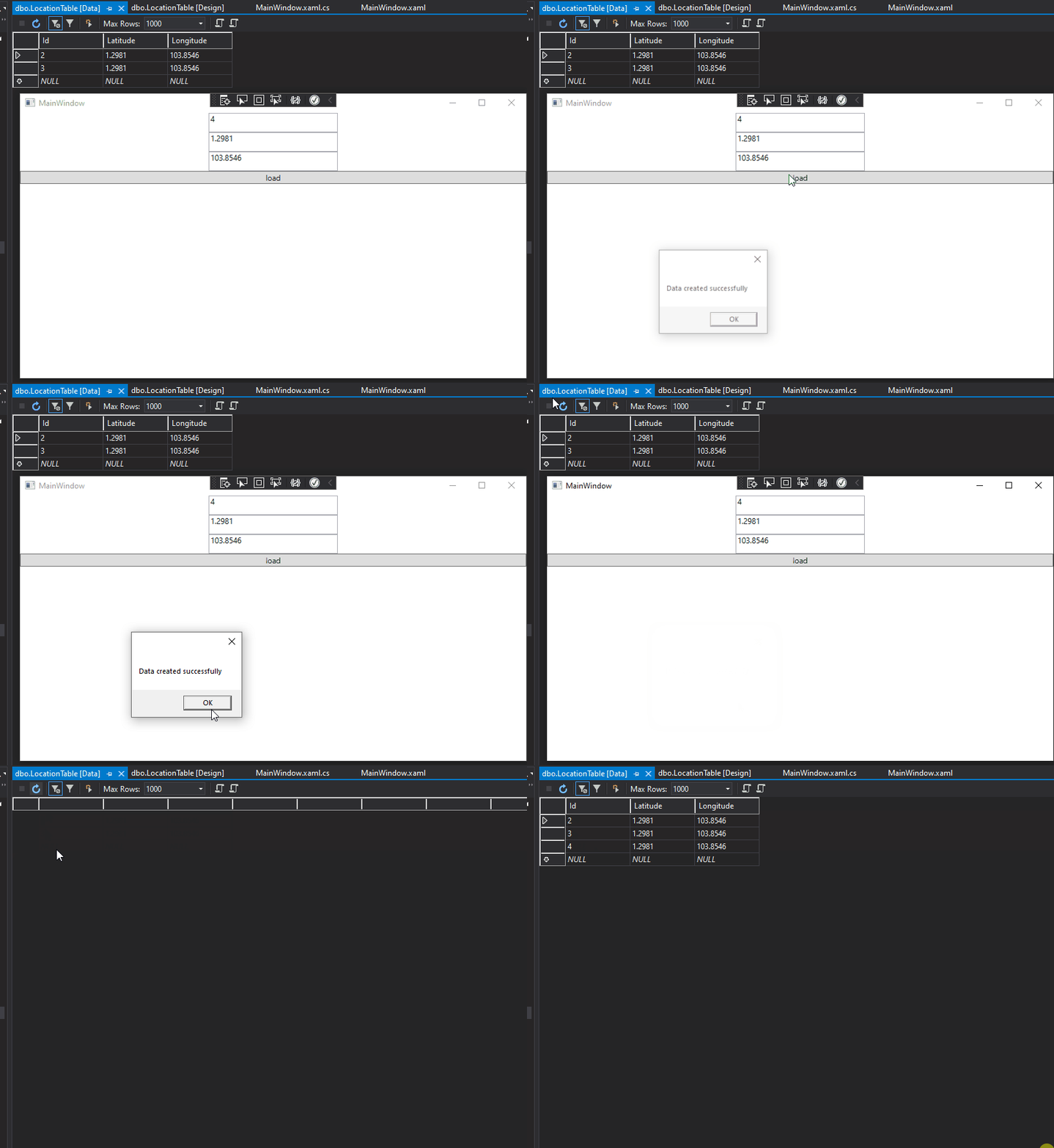
The picture of result:
If the response is helpful, please click "Accept Answer" and upvote it.
Note: Please follow the steps in our [documentation][5] to enable e-mail notifications if you want to receive the related email notification for this thread.
[5]: https://learn.microsoft.com/en-us/answers/articles/67444/email-notifications.html
Thanks for answer
In this how to ensure that watched longitude and latitude is exactly matched on google map with address
Hi,@anil kumar . I tested and found that my location is also nearly 30 different from Google Maps( Latitude: 31.329601 Longitude: 120.434238). It may be because there is no gps sensor. You could try to refer here.