Makepri has a /projectroot command line option, this is the root for the pri resources. This doesn't have to point at the same directory as anything else. So one option is to put your resources in a subdirectory that /projectroot will point to.
Another option is to use a file which names the files that you want to be referenced by the .pri file.
<?xml version="1.0" encoding="utf-8"?>
<resources targetOsVersion="10.0.0" majorVersion="1">
  <index root="\" startIndexAt="resources\resourcefiles.resfiles">
    <default>
      <qualifier name="Language" value="en-GB" />
      <qualifier name="Contrast" value="standard" />
      <qualifier name="Scale" value="100" />
      <qualifier name="HomeRegion" value="001" />
      <qualifier name="TargetSize" value="256" />
      <qualifier name="LayoutDirection" value="LTR" />
      <qualifier name="DXFeatureLevel" value="DX9" />
      <qualifier name="Configuration" value="" />
      <qualifier name="AlternateForm" value="" />
      <qualifier name="Platform" value="UAP" />
    </default>
    <indexer-config type="RESFILES" qualifierDelimiter="." />
  </index>
<!-- Other indexer configurations-->
</resources>
The .resfiles that is being referenced is just a plain text file that contains a relative path to the resource.
Images\BadgeLogo.scale-100.png
Images\BadgeLogo.scale-125.png
Images\BadgeLogo.scale-150.png
Images\BadgeLogo.scale-200.png
Images\BadgeLogo.scale-400.png
Images\LargeTile.scale-100.png
Images\LargeTile.scale-125.png
Images\LargeTile.scale-150.png
Images\LargeTile.scale-200.png
Images\LargeTile.scale-400.png
Images\LockScreenLogo.scale-100.png
Images\LockScreenLogo.scale-125.png
Images\LockScreenLogo.scale-150.png
Images\LockScreenLogo.scale-200.png
Images\LockScreenLogo.scale-400.png
Images\SmallTile.scale-100.png
Images\SmallTile.scale-125.png
Images\SmallTile.scale-150.png
Images\SmallTile.scale-200.png
Images\SmallTile.scale-400.png
Images\SplashScreen.scale-100.png
Images\SplashScreen.scale-125.png
Images\SplashScreen.scale-150.png
Images\SplashScreen.scale-200.png
Images\SplashScreen.scale-400.png
Images\Square150x150Logo.scale-100.png
Images\Square150x150Logo.scale-125.png
Images\Square150x150Logo.scale-150.png
Images\Square150x150Logo.scale-200.png
Images\Square150x150Logo.scale-400.png
Images\Square44x44Logo.scale-100.png
Images\Square44x44Logo.scale-125.png
Images\Square44x44Logo.scale-150.png
Images\Square44x44Logo.scale-200.png
Images\Square44x44Logo.scale-400.png
Images\Square44x44Logo.targetsize-16.png
Images\Square44x44Logo.targetsize-24.png
Images\Square44x44Logo.targetsize-32.png
Images\Square44x44Logo.targetsize-48.png
Images\Square44x44Logo.targetsize-256.png
Images\StoreLogo.scale-100.png
Images\StoreLogo.scale-125.png
Images\StoreLogo.scale-150.png
Images\StoreLogo.scale-200.png
Images\StoreLogo.scale-400.png
Images\Wide310x150Logo.scale-100.png
Images\Wide310x150Logo.scale-125.png
Images\Wide310x150Logo.scale-150.png
Images\Wide310x150Logo.scale-200.png
Images\Wide310x150Logo.scale-400.png
Images\BadgeLogo.theme-dark_scale-100.png
Images\BadgeLogo.theme-dark_scale-125.png
Images\BadgeLogo.theme-dark_scale-150.png
Images\BadgeLogo.theme-dark_scale-200.png
Images\BadgeLogo.theme-dark_scale-400.png
Images\LargeTile.theme-dark_scale-100.png
Images\LargeTile.theme-dark_scale-125.png
Images\LargeTile.theme-dark_scale-150.png
Images\LargeTile.theme-dark_scale-200.png
Images\LargeTile.theme-dark_scale-400.png
Images\LockScreenLogo.theme-dark_scale-100.png
Images\LockScreenLogo.theme-dark_scale-125.png
Images\LockScreenLogo.theme-dark_scale-150.png
Images\LockScreenLogo.theme-dark_scale-200.png
Images\LockScreenLogo.theme-dark_scale-400.png
Images\SmallTile.theme-dark_scale-100.png
Images\SmallTile.theme-dark_scale-125.png
Images\SmallTile.theme-dark_scale-150.png
Images\SmallTile.theme-dark_scale-200.png
Images\SmallTile.theme-dark_scale-400.png
Images\SplashScreen.theme-dark_scale-100.png
Images\SplashScreen.theme-dark_scale-125.png
Images\SplashScreen.theme-dark_scale-150.png
Images\SplashScreen.theme-dark_scale-200.png
Images\SplashScreen.theme-dark_scale-400.png
Images\Square150x150Logo.theme-dark_scale-100.png
Images\Square150x150Logo.theme-dark_scale-125.png
Images\Square150x150Logo.theme-dark_scale-150.png
Images\Square150x150Logo.theme-dark_scale-200.png
Images\Square150x150Logo.theme-dark_scale-400.png
Images\Square44x44Logo.theme-dark_scale-100.png
Images\Square44x44Logo.theme-dark_scale-125.png
Images\Square44x44Logo.theme-dark_scale-150.png
Images\Square44x44Logo.theme-dark_scale-200.png
Images\Square44x44Logo.theme-dark_scale-400.png
Images\Square44x44Logo.theme-dark_targetsize-16.png
Images\Square44x44Logo.theme-dark_targetsize-24.png
Images\Square44x44Logo.theme-dark_targetsize-32.png
Images\Square44x44Logo.theme-dark_targetsize-48.png
Images\Square44x44Logo.theme-dark_targetsize-256.png
Images\StoreLogo.theme-dark_scale-100.png
Images\StoreLogo.theme-dark_scale-125.png
Images\StoreLogo.theme-dark_scale-150.png
Images\StoreLogo.theme-dark_scale-200.png
Images\StoreLogo.theme-dark_scale-400.png
Images\Wide310x150Logo.theme-dark_scale-100.png
Images\Wide310x150Logo.theme-dark_scale-125.png
Images\Wide310x150Logo.theme-dark_scale-150.png
Images\Wide310x150Logo.theme-dark_scale-200.png
Images\Wide310x150Logo.theme-dark_scale-400.png
Images\Square44x44Logo.altform-lightunplated_targetsize-16.png
Images\Square44x44Logo.altform-lightunplated_targetsize-24.png
Images\Square44x44Logo.altform-lightunplated_targetsize-32.png
Images\Square44x44Logo.altform-lightunplated_targetsize-48.png
Images\Square44x44Logo.altform-lightunplated_targetsize-256.png
Images\Square44x44Logo.altform-unplated_targetsize-16.png
Images\Square44x44Logo.altform-unplated_targetsize-24.png
Images\Square44x44Logo.altform-unplated_targetsize-32.png
Images\Square44x44Logo.altform-unplated_targetsize-48.png
Images\Square44x44Logo.altform-unplated_targetsize-256.png
The base is the project root.
If you want to keep using folder, the best you can do is put things in a subdirectory and change root to point at that subdirectory.
<?xml version="1.0" encoding="utf-8"?>
<resources targetOsVersion="10.0.0" majorVersion="1">
  <!-- Starts looking for the resources in the FolderResource subdirectory-->
  <index root=".\FolderResource" startIndexAt=".\">
    <default>
      <qualifier name="Language" value="en-GB" />
      <qualifier name="Contrast" value="standard" />
      <qualifier name="Scale" value="100" />
      <qualifier name="HomeRegion" value="001" />
      <qualifier name="TargetSize" value="256" />
      <qualifier name="LayoutDirection" value="LTR" />
      <qualifier name="DXFeatureLevel" value="DX9" />
      <qualifier name="Configuration" value="" />
      <qualifier name="AlternateForm" value="" />
      <qualifier name="Platform" value="UAP" />
    </default>
    <indexer-config type="folder" foldernameAsQualifier="true" filenameAsQualifier="true" qualifierDelimiter="." />
    <indexer-config type="resw" convertDotsToSlashes="true" />
  </index>
</resources>
This subdirectory is isolated from the project root, but it is placed in the resources tree at the expected location. A .pri generated from this dumped using priconfig dump shows the following:
<?xml version="1.0" encoding="UTF-8" standalone="yes"?>
<PriInfo>
	<ResourceMap name="Test" version="1.0" primary="true">
		<Qualifiers>
			<AlternateForm>LIGHTUNPLATED,UNPLATED</AlternateForm>
			<Scale>100,125,150,200,400</Scale>
			<TargetSize>256,16,24,32,48</TargetSize>
			<Theme>DARK</Theme>
		</Qualifiers>
		<ResourceMapSubtree name="Files">
			<ResourceMapSubtree name="Images">
				<NamedResource name="BadgeLogo.png" uri="ms-resource://Test/Files/Images/BadgeLogo.png">
					<Candidate qualifiers="Theme-DARK, Scale-400" isDefault="true" type="Path">
						<Value>.\Images\BadgeLogo.theme-dark_scale-400.png</Value>
					</Candidate>
					<Candidate qualifiers="Theme-DARK, Scale-200" isDefault="true" type="Path">
						<Value>.\Images\BadgeLogo.theme-dark_scale-200.png</Value>
					</Candidate>
					<Candidate qualifiers="Theme-DARK, Scale-150" isDefault="true" type="Path">
						<Value>.\Images\BadgeLogo.theme-dark_scale-150.png</Value>
					</Candidate>
					<Candidate qualifiers="Theme-DARK, Scale-125" isDefault="true" type="Path">
						<Value>.\Images\BadgeLogo.theme-dark_scale-125.png</Value>
					</Candidate>
					<Candidate qualifiers="Theme-DARK, Scale-100" isDefault="true" type="Path">
						<Value>.\Images\BadgeLogo.theme-dark_scale-100.png</Value>
					</Candidate>
					<Candidate qualifiers="Scale-400" isDefault="true" type="Path">
						<Value>.\Images\BadgeLogo.scale-400.png</Value>
					</Candidate>
					<Candidate qualifiers="Scale-200" isDefault="true" type="Path">
						<Value>.\Images\BadgeLogo.scale-200.png</Value>
					</Candidate>
					<Candidate qualifiers="Scale-150" isDefault="true" type="Path">
						<Value>.\Images\BadgeLogo.scale-150.png</Value>
					</Candidate>
					<Candidate qualifiers="Scale-125" isDefault="true" type="Path">
						<Value>.\Images\BadgeLogo.scale-125.png</Value>
					</Candidate>
					<Candidate qualifiers="Scale-100" isDefault="true" type="Path">
						<Value>.\Images\BadgeLogo.scale-100.png</Value>
					</Candidate>
				</NamedResource>
...
So the resources are indexed properly in the tree.
If makepri is run with the following command line:
makepri new -pr G:\xamlcmdline -cf resources\priconfig-folder.xml -of out.pri -in Test -v -o
With the following directory structure:
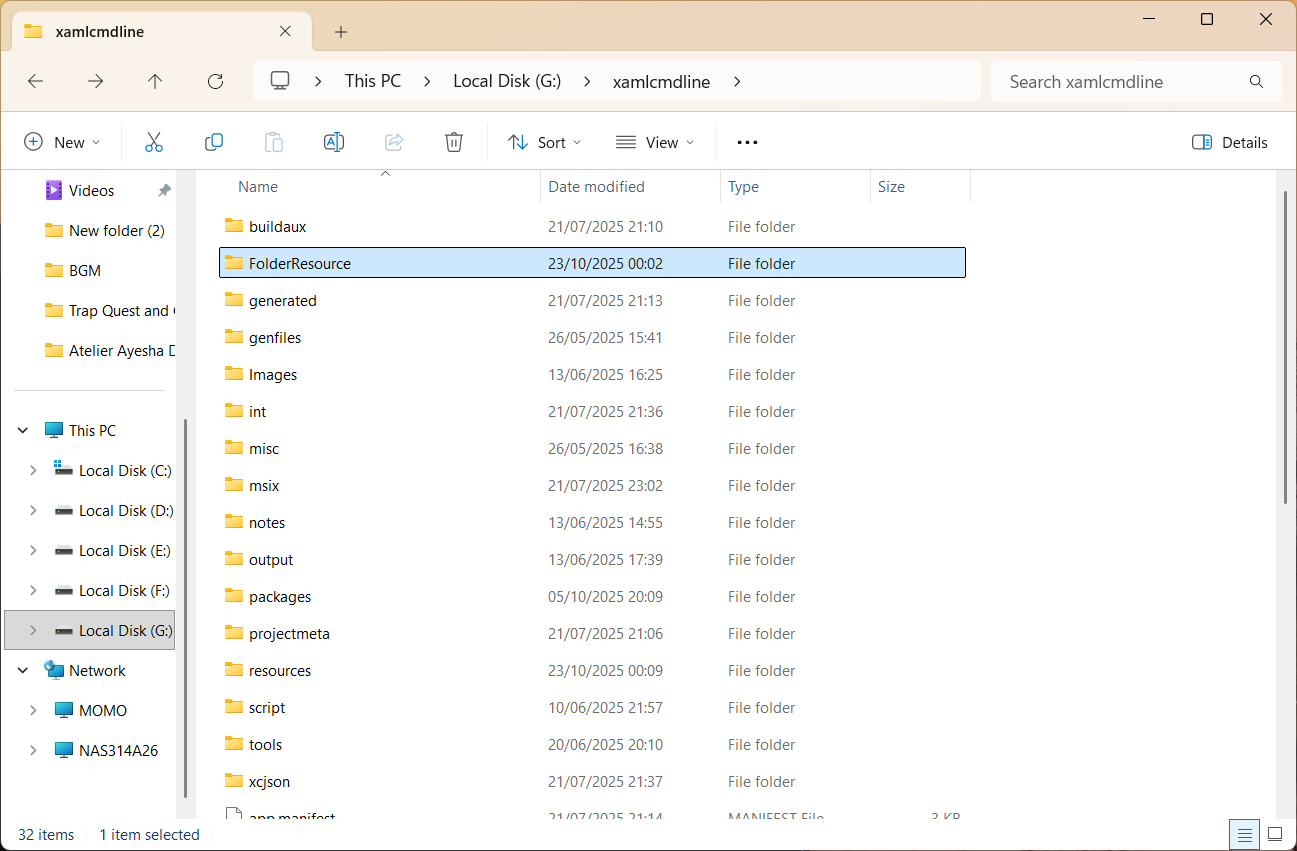
Then it has no issues doing what you want.
Two major notes here. First, even though I am using the Images directory, the name is irrelevant. Assets is just as good a name, and the directory names are user definable. Secondly, the pri config file can contain multiple indexer configuration sections. An example of one of the main ones that I use for projects is:
<?xml version="1.0" encoding="utf-8"?>
<resources targetOsVersion="10.0.0" majorVersion="1">
  <index root="\" startIndexAt="resources\filtered.layout.resfiles">
    <default>
      <qualifier name="Language" value="en-GB" />
      <qualifier name="Contrast" value="standard" />
      <qualifier name="Scale" value="100" />
      <qualifier name="HomeRegion" value="001" />
      <qualifier name="TargetSize" value="256" />
      <qualifier name="LayoutDirection" value="LTR" />
      <qualifier name="DXFeatureLevel" value="DX9" />
      <qualifier name="Configuration" value="" />
      <qualifier name="AlternateForm" value="" />
      <qualifier name="Platform" value="UAP" />
    </default>
    <indexer-config type="RESFILES" qualifierDelimiter="." />
  </index>
  <index root="\" startIndexAt="resources\resources.resfiles">
    <default>
      <qualifier name="Language" value="en-GB" />
      <qualifier name="Contrast" value="standard" />
      <qualifier name="Scale" value="100" />
      <qualifier name="HomeRegion" value="001" />
      <qualifier name="TargetSize" value="256" />
      <qualifier name="LayoutDirection" value="LTR" />
      <qualifier name="DXFeatureLevel" value="DX9" />
      <qualifier name="Configuration" value="" />
      <qualifier name="AlternateForm" value="" />
      <qualifier name="Platform" value="UAP" />
    </default>
    <indexer-config type="RESW" convertDotsToSlashes="true" />
    <indexer-config type="RESJSON" />
    <indexer-config type="RESFILES" qualifierDelimiter="." />
  </index>
  <index root="\" startIndexAt="resources\pri.resfiles">
    <default>
      <qualifier name="Language" value="en-GB" />
      <qualifier name="Contrast" value="standard" />
      <qualifier name="Scale" value="100" />
      <qualifier name="HomeRegion" value="001" />
      <qualifier name="TargetSize" value="256" />
      <qualifier name="LayoutDirection" value="LTR" />
      <qualifier name="DXFeatureLevel" value="DX9" />
      <qualifier name="Configuration" value="" />
      <qualifier name="AlternateForm" value="" />
      <qualifier name="Platform" value="UAP" />
    </default>
    <indexer-config type="PRI" />
    <indexer-config type="RESFILES" qualifierDelimiter="." />
  </index>
  <index root="resources\embed" startIndexAt="embed.resfiles">
    <default>
      <qualifier name="Language" value="en-GB" />
      <qualifier name="Contrast" value="standard" />
      <qualifier name="Scale" value="100" />
      <qualifier name="HomeRegion" value="001" />
      <qualifier name="TargetSize" value="256" />
      <qualifier name="LayoutDirection" value="LTR" />
      <qualifier name="DXFeatureLevel" value="DX9" />
      <qualifier name="Configuration" value="" />
      <qualifier name="AlternateForm" value="" />
      <qualifier name="Platform" value="UAP" />
    </default>
    <indexer-config type="RESFILES" qualifierDelimiter="." />
    <indexer-config type="EMBEDFILES" />
  </index>
</resources>
The first section is to handle image and other file resources. The second is to handle .resw files. The third is to add .pri files from sub components or the main application if the packaging step is separate from the build step. The fourth is for the resources that you wish to embed into the .pri file.
' cx='32' cy='32' r='32' /%3E%3Ctext x='50%25' y='55%25' dominant-baseline='middle' text-anchor='middle' fill='%23FFF' %3ES%3C/text%3E%3C/svg%3E)

' cx='32' cy='32' r='32' /%3E%3Ctext x='50%25' y='55%25' dominant-baseline='middle' text-anchor='middle' fill='%23FFF' %3ETD%3C/text%3E%3C/svg%3E)
' cx='32' cy='32' r='32' /%3E%3Ctext x='50%25' y='55%25' dominant-baseline='middle' text-anchor='middle' fill='%23FFF' %3EHV%3C/text%3E%3C/svg%3E)
' cx='32' cy='32' r='32' /%3E%3Ctext x='50%25' y='55%25' dominant-baseline='middle' text-anchor='middle' fill='%23FFF' %3EDR%3C/text%3E%3C/svg%3E)