SharePoint Server
A family of Microsoft on-premises document management and storage systems.
2,298 questions
This browser is no longer supported.
Upgrade to Microsoft Edge to take advantage of the latest features, security updates, and technical support.
' cx='32' cy='32' r='32' /%3E%3Ctext x='50%25' y='55%25' dominant-baseline='middle' text-anchor='middle' fill='%23FFF' %3EK%3C/text%3E%3C/svg%3E)
Hi
How do I apply json formatting to a large lookup column that contains many lookup items per row. The rows are growing because of the size of the lookup column.

Hi @Kalpana ,
I used below JSON code to display lookup items in one field up to 6.
{
  "$schema": "https://developer.microsoft.com/json-schemas/sp/v2/column-formatting.schema.json",
  "elmType": "div",
  "style": {
        "display": "block"
  },
  "children": [
    {
      "elmType":"div",
      "forEach": "test in @currentField",
      "txtContent": "=if(loopIndex('test') < 6, '[$test.lookupValue]', '')"
    }
  ]
}
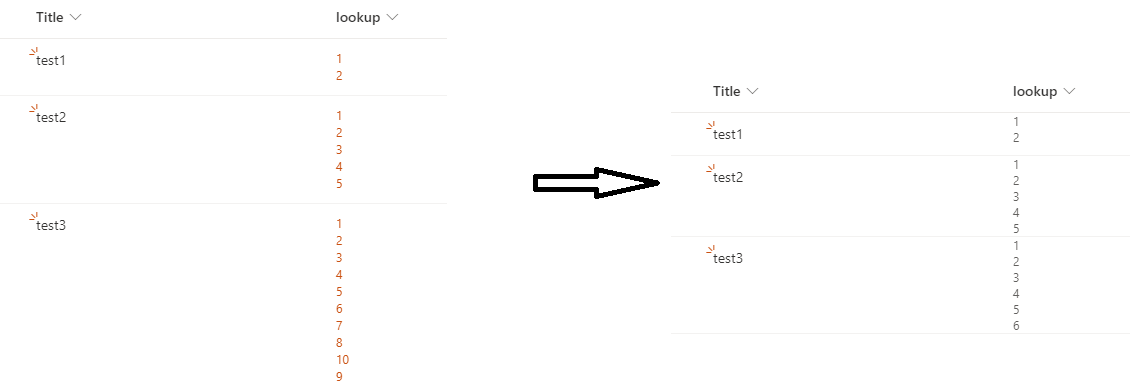
Note that you will be not able to redirect to the lookup item by clicking on it after applying the JSON formatting, it can only show the values of lookup items.
If an Answer is helpful, please click "Accept Answer" and upvote it.
Note: Please follow the steps in our documentation to enable e-mail notifications if you want to receive the related email notification for this thread.
@Kalpana ,
I'm checking how things are going on this thread. Is there any update? Please feel free to let me know if you still need any help.

@Kalpana Have you tried Allen's reply? If not, please have a try and let's know the result. :)
If you have any questions, please feel free to reply.