


RasDial error with Powershell

lewid 1 Reputation point
2021-09-21T13:02:14.813+00:00

Hi there

I'm trying to rewrite and improve a script to connect to a VPN in case you are outside a network and do some other stuff. It's a saved Windows VPN connection. Connecting manually via the settings works, but when I want to connect to the VPN with my script (PowerShell) with "rasdial $vpnName" I get the following output/error (in German):

Verbindung herstellen mit VPN-Name...
Benutzername und Kennwort werden überprüft...

RAS-Fehler 619 - Es konnte keine Verbindung mit dem Remotecomputer hergestellt werden, sodass der für diese Verbindung verwendete Port geschlossen wurde.

Weitere Hilfe zu diesem Fehler erhalten Sie folgendermaßen:
Geben Sie folgendes ein: "hh netcfg.chm"
Klicken Sie in der Hilfe auf "Fehlersuche" und dann auf "Fehlermeldungen" und auf "619".

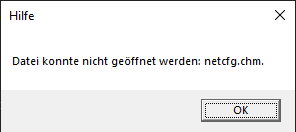
So just a 619 error but when I want to get further information and type "hh netcfg.chm" i get following window saying it can't open the file:
134001-image.png

Can't really find any further information on the internet or any solutions that actually help.
Another weird thing is that it did work in my old script but when i run that one again i get the same error. Could this have to do something with a recent Windows update or something similar?

Windows for business | Windows Client for IT Pros | Networking | Network connectivity and file sharing
Windows for business | Windows Server | User experience | PowerShell
0 comments No comments
{count} votes

1 answer

Sort by: Most helpful
  1. Limitless Technology 40,056 Reputation points
    2021-09-21T17:01:34.057+00:00

    Hello @WidmerLeonhard-5617

    The error in English reads as: "Error 619: A connection to the remote computer could not be established, so the port used for this connection was closed." Maybe you can find more information with that string.

    On the other hand, in my experience, this corresponds either with:

    • restriction to connect (on the destination side)
    • wrong user/password or lack of permissions
    • GRE disabled on router (depending on the router, there are even firmware issues regarding this tunneling)
    • Other firewall/security settings

    I guess that in your case, the question is also:
    Was the script working before improvements?
    Does the VPN connect successfully when run manually (without the script)?
    Do you see any error in Event viewer either on the source or destination of the connection?
    Have you tried to take some network trace at the moment of running the script?

    Hope this is helpful for you, Best regards.

    --If the the reply is helpful, please Upvote and Accept as answer--


Your answer

Answers can be marked as 'Accepted' by the question author and 'Recommended' by moderators, which helps users know the answer solved the author's problem.