Unable to uninstall Microsoft visual c++2022 redistributable ARM64

Titus 0 Reputation points
2025-11-05T23:09:22.3533333+00:00

Hello,

Lately I've been having problems with the Adobe creative cloud, it would not start anymore, showing a problem to be with 0xc000007b.

So I started to work down the stream, tried to uninstall Creative cloud with all the other Adobe applications, etc. which did not help.

Then I worked on deleting everything that has to do with Microsoft visual redistributables, where I found the culprit I think, Microsoft Visual C++ 2022 Redistributable (ARM64) - v14.38.33130 it wouldn't repair or uninstall at all.

And that is where I hit the wall, I'm unable to uninstall it or repair it, once I try both of those error is prompted microsoftVisual
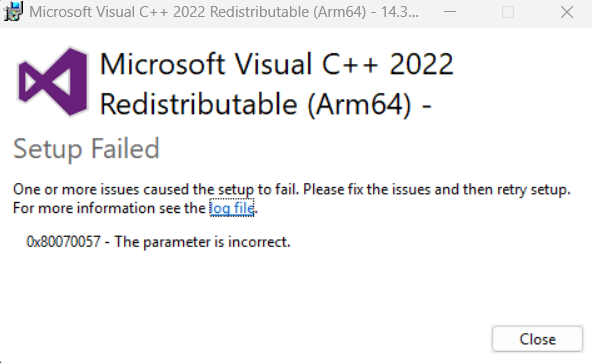
Tried to look for an uninstall tool for such software, but couldn't find it.

Any tips?

Windows for home | Other | Apps
0 comments No comments
{count} votes

3 answers

Sort by: Most helpful
  1. Ferdinand Nanalig 26,465 Reputation points Independent Advisor
    2025-11-06T01:30:04.34+00:00

    Hi, I am an independent advisor and welcome to Microsoft Q&A.

    Let me help you with this issue.

    Please try to run the installer for Microsoft Visual C++ 2022 Redistributable (ARM64) - v14.38.33130 and install it. Once it is done installing, restart the machine and try the uninstallation again.

    Let me know if it works. Thanks!


  2. Ferdinand Nanalig 26,465 Reputation points Independent Advisor
    2025-11-06T17:25:28.6533333+00:00

    Click the log file and see what is causing the error when removing it.

    Thanks. microsoftVisual

    0 comments No comments

  3. Kedarnath 0 Reputation points
    2025-11-19T09:14:06.63+00:00

    Adobe has now released an official solution for crashes on ARM64‑based Windows devices caused by incorrect Visual C++ runtime files. You can download and run the Visual C++ Runtime repair tool from Adobe’s support page here: https://helpx.adobe.com/acrobat/desktop/troubleshoot/performance-issues/acrobat-crashes-arm64-windows.html

    After running the tool and restarting your device, the runtime errors should be resolved. Thanks again for bringing this to attention.

    Thanks!

    0 comments No comments

Your answer

Answers can be marked as 'Accepted' by the question author and 'Recommended' by moderators, which helps users know the answer solved the author's problem.

