Share via

Activate Microsoft 365 on a second computer

Andrew Mager 0 Reputation points
2025-12-15T16:15:46.66+00:00

I have have Microsoft 365 subscription renewed on my MacOS laptop and I want to also use it on my iMac, however when I try to use on the iMac is asked me to activate 365. When I try to activate, it says my account doesn't exist

Microsoft 365 and Office | Install, redeem, activate | For home | MacOS
0 comments No comments

2 answers

Sort by: Most helpful
  1. Sumit D - IA 170.7K Reputation points Independent Advisor
    2025-12-15T16:50:02.2466667+00:00

    Hi Andrew,

    You can use your 365 subscription on multiple devices. Maybe the license files need to be removed.

    Via https://support.microsoft.com/en-us/office/how-to-remove-office-license-files-on-a-mac-b032c0f6-a431-4dad-83a9-6b727c03b193

    Download and run the license removal tool

    1. Download the license removal tool.
    2. Open the .pkg file from your Mac's Downloads folder.

    Note: If you get an "unidentified developer" error, try opening the file by holding Control + clicking the file > Open.

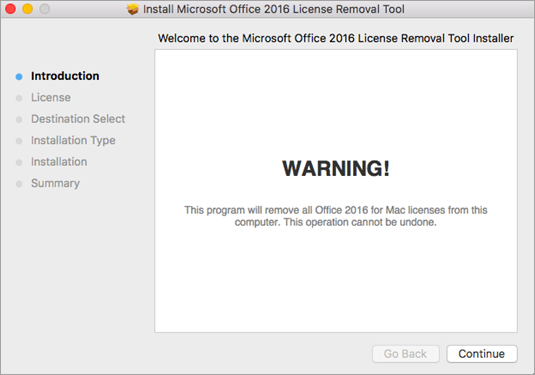
    1. Select Continue and follow the prompts in the setup wizard.

    Caution: We recommend you double-check that you have the correct account info ready by logging into Office.com/signin and checking for the license you want to activate with.

    Click continue and follow the prompts on the installer.

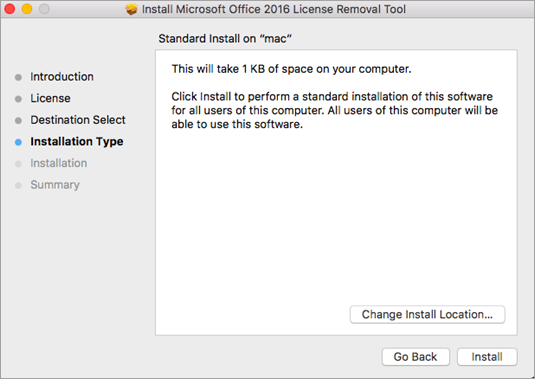
    1. When you're ready to complete the license removal, select Install. You may need to enter your Mac's local admin account password.

    After the tool successfully removes licenses, select Close.

    Click Install on the tool to remove licenses.

    1. Now open any Office app and sign in to activate with the email account associated with your Microsoft 365 for Mac license. If you're troubleshooting an issue, you may need to reinstall Office before signing in.

    After you've successfully activated, restart your computer and then you're good to go!

    Note: If your account has both a Microsoft 365 for Mac license and a one-time purchase associated with it, you'll be prompted to choose which license you want to activate with. We recommend always choosing Microsoft 365 for Mac if available.

    1. Uninstall the License Removal Tool by dragging the Microsoft_Office_License_Removal file from Finder > Downloads to Trash.

    I’m eager to hear back and work together to find a solution.

    Was this answer helpful?

    0 comments No comments

  2. AI answer

    2025-12-15T16:16:00.1966667+00:00

    To activate Microsoft 365 on your iMac after renewing your subscription on your MacBook, follow these steps:

    1. Sign Out and Sign Back In: Open any Microsoft 365 app (like Word) on your iMac. Click on your name or profile picture at the top, select Sign out, and then sign back in using the same account you used on your MacBook. Ensure you are using your Work or School account if applicable, not a personal Microsoft account.
    2. Check Account Status: If you receive an error stating that your account doesn't exist, verify that you are using the correct email address associated with your Microsoft 365 subscription. You can check your account details by visiting the Microsoft 365 account page.
    3. Uninstall and Reinstall Microsoft 365: If the issue persists, consider uninstalling Microsoft 365 from your iMac and then reinstalling it. You can find instructions on how to uninstall Office for Mac in the Microsoft support documentation.
    4. Contact Support: If none of the above steps work, you may need to contact Microsoft support for further assistance regarding your account status.

    These steps should help you resolve the activation issue on your iMac.


    References:
    AI-generated content may be incorrect. Read our transparency notes for more information.

    Was this answer helpful?

Your answer

Answers can be marked as 'Accepted' by the question author and 'Recommended' by moderators, which helps users know the answer solved the author's problem.