Hi @WindowsGeek
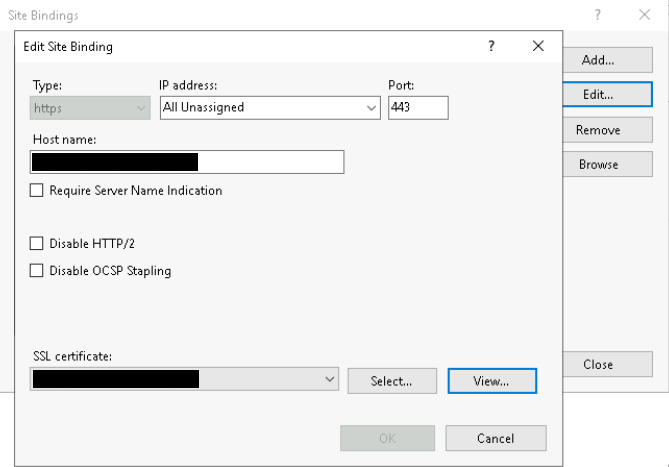
You need to enable ssl if you want to use https in iis.
- Open Internet Information Services Manager.
- In the Connections panel on the left, under Sites, select the site for which you want to enable SSL.
- In the Actions panel on the right, under Edit Site, select Bindings.
- In the Site Bindings dialog box: click Add. then in the Add Site Binding dialog box: in Type, select https. In SSL certificate, select an appropriate certificate from available choices. click OK, click Close.
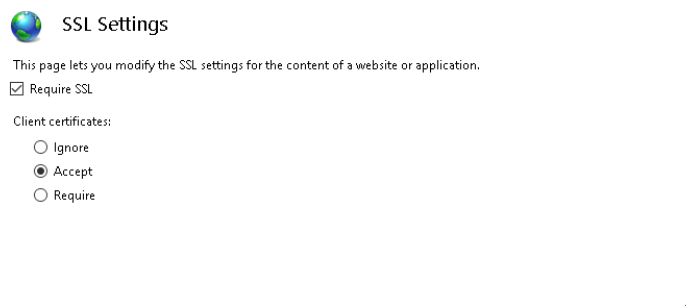
- In the Connections panel on the left, under Sites, double-click
SSL Settings.
- In the SSL Settings page: select the
Require SSL check box, under Client certificate, select Accept.
- In the Actions panel on the right, click Apply to save your changes.
More information you can refer to this link: How to Set Up SSL on IIS.
If the answer is helpful, please click "Accept Answer" and upvote it.
Note: Please follow the steps in our documentation to enable e-mail notifications if you want to receive the related email notification for this thread.
' cx='32' cy='32' r='32' /%3E%3Ctext x='50%25' y='55%25' dominant-baseline='middle' text-anchor='middle' fill='%23FFF' %3EW%3C/text%3E%3C/svg%3E)


' cx='32' cy='32' r='32' /%3E%3Ctext x='50%25' y='55%25' dominant-baseline='middle' text-anchor='middle' fill='%23FFF' %3ESW%3C/text%3E%3C/svg%3E)