
I ran into the same issue but after I disabled Windows antivirus it started to work. Re-enabling the Windows antivirus causes error to repeat.
This browser is no longer supported.
Upgrade to Microsoft Edge to take advantage of the latest features, security updates, and technical support.
' cx='32' cy='32' r='32' /%3E%3Ctext x='50%25' y='55%25' dominant-baseline='middle' text-anchor='middle' fill='%23FFF' %3EE%3C/text%3E%3C/svg%3E)
When I try to run windows configuration designer any ideas?, see attached picture
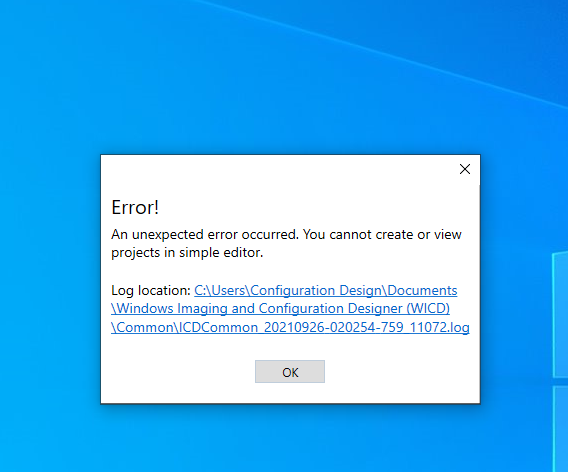
' cx='32' cy='32' r='32' /%3E%3Ctext x='50%25' y='55%25' dominant-baseline='middle' text-anchor='middle' fill='%23FFF' %3ERA%3C/text%3E%3C/svg%3E)
I advise you to look into the log file and from there you might find the clue of what causing this issue.
' cx='32' cy='32' r='32' /%3E%3Ctext x='50%25' y='55%25' dominant-baseline='middle' text-anchor='middle' fill='%23FFF' %3EDK%3C/text%3E%3C/svg%3E)
I had the same problem i just turned on Controlled folder access in windows Security
' cx='32' cy='32' r='32' /%3E%3Ctext x='50%25' y='55%25' dominant-baseline='middle' text-anchor='middle' fill='%23FFF' %3EM%3C/text%3E%3C/svg%3E)
I ran into the same issue but after I disabled Windows antivirus it started to work. Re-enabling the Windows antivirus causes error to repeat.
' cx='32' cy='32' r='32' /%3E%3Ctext x='50%25' y='55%25' dominant-baseline='middle' text-anchor='middle' fill='%23FFF' %3EMB%3C/text%3E%3C/svg%3E)
That did the trick for me! Thank you so much!
' cx='32' cy='32' r='32' /%3E%3Ctext x='50%25' y='55%25' dominant-baseline='middle' text-anchor='middle' fill='%23FFF' %3ECA%3C/text%3E%3C/svg%3E)
Great find, thank you. Worked for me too. Can confirm turning Windows AV on still breaks the app upon launching.
Turning off Real-Time Protection was enough if anyone wants to leave the rest of the stuff on in the Virus and Threat Protection submenu.
' cx='32' cy='32' r='32' /%3E%3Ctext x='50%25' y='55%25' dominant-baseline='middle' text-anchor='middle' fill='%23FFF' %3EJ%3C/text%3E%3C/svg%3E)
You can add an Exclusion to your Virus & Threat Protection settings so you don't have to leave the Real-Time Protection off. Be sure to use the full path to the icd.exe when adding the exclusion.
' cx='32' cy='32' r='32' /%3E%3Ctext x='50%25' y='55%25' dominant-baseline='middle' text-anchor='middle' fill='%23FFF' %3EJW%3C/text%3E%3C/svg%3E)
I can also confirm that disabling Windows Defender Antivirus real-time protection fixed this problem for me. Go to Settings | Update & Security | Windows Security | Virus & threat protection, then click 'Manage Settings', and then disable Real-time protection.
' cx='32' cy='32' r='32' /%3E%3Ctext x='50%25' y='55%25' dominant-baseline='middle' text-anchor='middle' fill='%23FFF' %3EAS%3C/text%3E%3C/svg%3E)
Thanks for the exact steps. Did this and everything is working as expected.
9/26/2021 4:10:49 PM Info ICD Started
9/26/2021 4:10:55 PM Error Could not start ICD web server. Exception: System.Reflection.TargetInvocationException: Exception has been thrown by the target of an invocation. ---> System.IO.DirectoryNotFoundException: Could not find a part of the path 'C:\Users\Eddie Schellens\AppData\Local\Microsoft\WICD{E4D8C4D1-6FA4-4436-9CDF-3C0236AA124F}\WebContent\Scenarios\BulkEnrollment\js\filters.js'.
at System.IO.__Error.WinIOError(Int32 errorCode, String maybeFullPath)
at System.IO.File.InternalCopy(String sourceFileName, String destFileName, Boolean overwrite, Boolean checkHost)
at System.IO.FileInfo.CopyTo(String destFileName, Boolean overwrite)
at Microsoft.Windows.ICD.Common.Tools.CopyDirectories(DirectoryInfo diSource, DirectoryInfo diTarget, Boolean overwrite)
at Microsoft.Windows.ICD.Common.Tools.CopyDirectories(String sourceDir, String targetDir, Boolean overwrite)
at Microsoft.Windows.ICD.WebApi.Server.WebContentBuilder.InitializeWebContent()
at Microsoft.Windows.ICD.WebApi.Server.WebContentBuilder..ctor()
at Microsoft.Windows.ICD.WebApi.Server.WebApiServer.StageWebContentFolder()
at Microsoft.Windows.ICD.WebApi.Server.WebApiServer.Configuration(IAppBuilder appBuilder)
--- End of inner exception stack trace ---
at System.RuntimeMethodHandle.InvokeMethod(Object target, Object[] arguments, Signature sig, Boolean constructor)
at System.Reflection.RuntimeMethodInfo.UnsafeInvokeInternal(Object obj, Object[] parameters, Object[] arguments)
at System.Reflection.RuntimeMethodInfo.Invoke(Object obj, BindingFlags invokeAttr, Binder binder, Object[] parameters, CultureInfo culture)
at Owin.Loader.DefaultLoader.<>c__DisplayClass12.<MakeDelegate>b__b(IAppBuilder builder)
at Owin.Loader.DefaultLoader.<>c__DisplayClass1.<LoadImplementation>b__0(IAppBuilder builder)
at Microsoft.Owin.Hosting.Engine.HostingEngine.ResolveApp(StartContext context)
at Microsoft.Owin.Hosting.Engine.HostingEngine.Start(StartContext context)
at Microsoft.Owin.Hosting.Starter.DirectHostingStarter.Start(StartOptions options)
at Microsoft.Owin.Hosting.Starter.HostingStarter.Start(StartOptions options)
at Microsoft.Owin.Hosting.WebApp.StartImplementation(IServiceProvider services, StartOptions options)
at Microsoft.Owin.Hosting.WebApp.Start(StartOptions options)
at Microsoft.Owin.Hosting.WebApp.StartTStartup
at Microsoft.Windows.ICD.WebApi.Server.WebApiServer.StartServer()
System.IO.DirectoryNotFoundException: Could not find a part of the path 'C:\Users\Eddie Schellens\AppData\Local\Microsoft\WICD{E4D8C4D1-6FA4-4436-9CDF-3C0236AA124F}\WebContent\Scenarios\BulkEnrollment\js\filters.js'.
at System.IO.__Error.WinIOError(Int32 errorCode, String maybeFullPath)
at System.IO.File.InternalCopy(String sourceFileName, String destFileName, Boolean overwrite, Boolean checkHost)
at System.IO.FileInfo.CopyTo(String destFileName, Boolean overwrite)
at Microsoft.Windows.ICD.Common.Tools.CopyDirectories(DirectoryInfo diSource, DirectoryInfo diTarget, Boolean overwrite)
at Microsoft.Windows.ICD.Common.Tools.CopyDirectories(String sourceDir, String targetDir, Boolean overwrite)
at Microsoft.Windows.ICD.WebApi.Server.WebContentBuilder.InitializeWebContent()
at Microsoft.Windows.ICD.WebApi.Server.WebContentBuilder..ctor()
at Microsoft.Windows.ICD.WebApi.Server.WebApiServer.StageWebContentFolder()
at Microsoft.Windows.ICD.WebApi.Server.WebApiServer.Configuration(IAppBuilder appBuilder)
Have you tried it on other system?
Make sure you have updated your Windows.
Are you using SSD or HDD hard disk?

Hi @Eddie
I would suggest you, check the Current Windows Configuration Designer limitations from here
https://learn.microsoft.com/en-us/windows/configuration/provisioning-packages/provisioning-install-icd
--------------
--If the reply is helpful, please Upvote and Accept as answer--
' cx='32' cy='32' r='32' /%3E%3Ctext x='50%25' y='55%25' dominant-baseline='middle' text-anchor='middle' fill='%23FFF' %3ERM%3C/text%3E%3C/svg%3E)
Running into the same thing.
I'm not seeing the WICD folder in "C:\Users*username*\AppData\Local\Microsoft\'
My guess is that it fails to write in during install or as an update on launch.
I was trying this since the version in the ADK was giving me issues on company systems.
Could be that the store version is the insider build im seeing in the ADK options or for server / win 11 maybe.
The current regular version of the ADK im seeing is for 2004 and the WICD version is 10.0.1904.1. The store version is 20xx.17xx
I have the same problem. Tested on 3 different computers and I get the same message on every single one of them.
I have tried to reinstall, repair, etc with no luck.
My colleague tried to install it, and he can run it with no problems. We have the exact same windows version etc...
"10/5/2021 2:32:18 PM Error Could not start ICD web server. Exception: System.Reflection.TargetInvocationException: Exception has been thrown by the target of an invocation. ---> System.IO.DirectoryNotFoundException: Could not find a part of the path 'C:\Users\Markus\AppData\Local\Microsoft\WICD{E4D8C4D1-6FA4-4436-9CDF-3C0236AA124F}\WebContent\Scenarios\BulkEnrollment\js\filters.js'."