Hi,
I upgrade my Visual Studio 2026 from version 18.1.0 to 18.1.1 today morning.
I don't know if it from the upgrade.
But the folders of the projects change from Gis to Git and also solutions and all namespaces in all the files as follow:
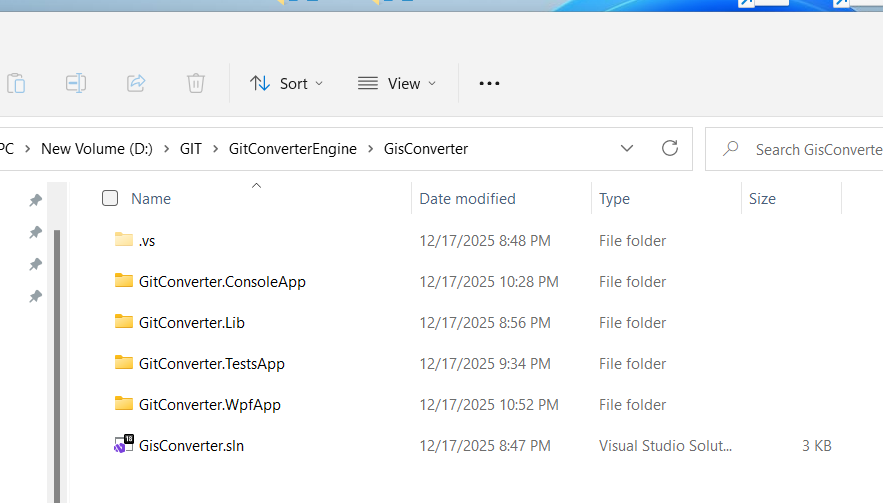
I renamed all projects and solutions and fixed all the namespaces to starts with Gis instead of Git successfully.
I tried to rename also these folder in picture, but the projects not loaded to the solution.
Please see : https://app.screencast.com/zUfcu6NVgqc2d
1.Is it possible to rename it to start With Gis instead of Git ?
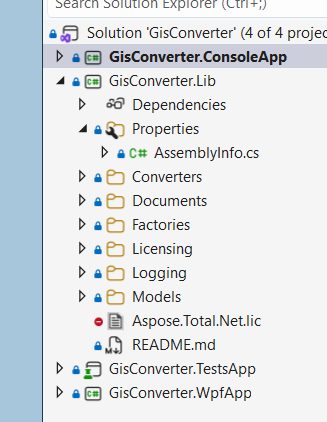
2.Why The files are in projects , after pushed them to Git in blue color, when I over them,
it said there are checked in, is it by design ?
Your quick answer will be appreciated.
' cx='32' cy='32' r='32' /%3E%3Ctext x='50%25' y='55%25' dominant-baseline='middle' text-anchor='middle' fill='%23FFF' %3ED%3C/text%3E%3C/svg%3E)