SUMMARY
Our MFC VC++ based desktop application (OmniServer) is crashing unexpectedly and showing the errors related to amsi.dll, and our application crashes in the Windows event viewer logs and application crash dump logs, indicating a stack overflow error. Currently, our customers are seeing the application crash on their systems, but we are unable to reproduce the issue internally despite many attempts by multiple parties; therefore, we lack a test environment for reproducing, troubleshooting, and debugging the issue.
We have thousands of OmniServer users who have been leveraging the software for many years, and only with a more recent release (3.3-004) has this problem started to appear - so, it seems that it may have been introduced at some point, but we are struggling to identify the root cause.
Customers are running into issues after some period of application run. This can be anywhere from days to weeks. OmniServer also has the option to be installed as a service - in this case, the crash occurs on startup after a reboot.
We have collected application crash dump logs from the customer for debugging and analysis.
COMMON FACTORS
From the users who have come forward with this issue, these are the consistent elements between their environments:
Windows Server 2022
Virtual machine
OmniServer 3.3-004 or later*
- Crashing seems to correlate with Windows Defender security updates
*The previous version of our application (OmniServer) works fine on the systems (customers have been using our application for many years), but with the recent version we seeing the issues described.
CONTEXT
Environment details from one of the customers experiencing the issue -
OS - Windows Server 2022 build 10.0.20348.2849
HyperV VM
Amsi.dll version: 10.0.20348.2849
LOGS
As shown in the image below, Windows Event Viewer -> Application log gives errors related to AMSI.DLL and our application (OSRVPOLL.exe).
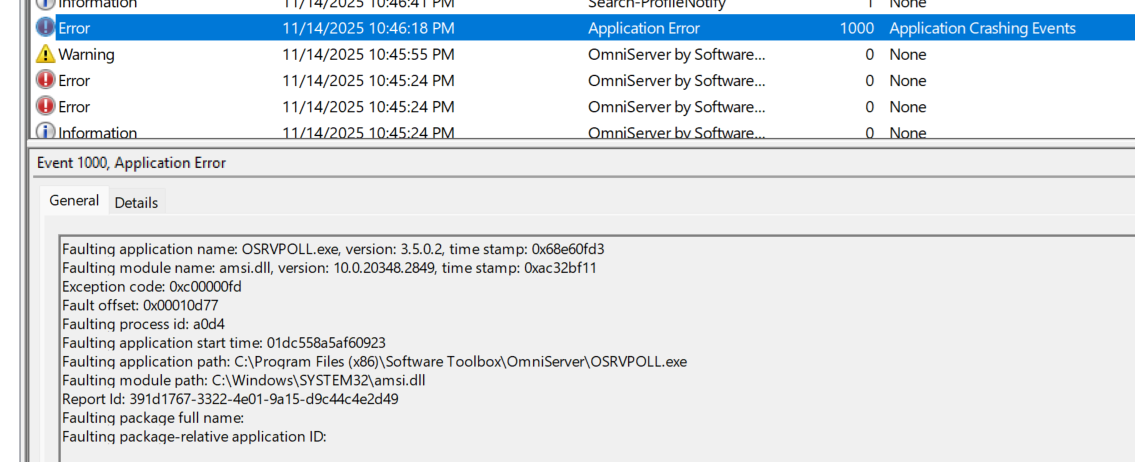
Below is the text of the above image for reference.
Faulting application name: OSRVPOLL.exe, version: 3.5.0.2, time stamp: 0x68e60fd3
Faulting module name: amsi.dll, version: 10.0.20348.2849, time stamp: 0xac32bf11
Exception code: 0xc00000fd
Fault offset: 0x00010d77
Faulting process id: 0x8130
Faulting application start time: 0x01dc558aa9944d24
Faulting application path: C:\Program Files (x86)\Software Toolbox\OmniServer\OSRVPOLL.exe
Faulting module path: C:\Windows\SYSTEM32\amsi.dll
Report Id: f1f8f596-cf34-4ddb-96a5-33652ec4ffc0
Faulting package full name:
Faulting package-relative application ID:
For details about errors and stack traces from the crash dump logs see attachment crashDumpStacktrace.txt
As given in above stack trace, we are getting errors related to AMSI.DLL indicating stack overflow.
OSrvDialogAbortableMessageBox() calls in stack trace is from our application. From the OSrvDialogAbortableMessageBox() calls in the stack trace (text file attached), it seems some dialog message is invoked for displaying an error. But this message box never appears and is not at all visible to user; therefore, we are unable to track the reason that the application is crashing.
Our customer are seeing these application crashes randomly and they show similar errors in the crash dump logs across multiple customers(systems). All of the crash dumps we have collected have been consistent in content, and the stack traces always look pretty much the same.
We tried debugging a crash dump file in WinDbg by loading the OmniServer project symbols, and Microsoft Symbol Servers. In WinDbg, we are seeing the Call stack details Call stack details.pdf attachment(Call Stack Details.pdf). The call stack did not give source code references to our application project source code; therefore, we are not sure if our application is causing the stack overflow or not, and we are therefore not able to point which code in our project source is causing the application crash.
OUR THOUGHTS
Based on the stack trace it looks like OmniServer may have some recursive behavior around the message box being invoked, which invokes the malware interface to investigate it. Due to the accumulation of resources, we then see the crash with the AMSI DLL.
However, OmniServer runs fine for quite a while before these crash events, so we are struggling to determine what kicks off the message box calls in the first place. From our research, it seems like Windows Defender security updates are pushed quite regularly to systems - some of which can cause more rigorous scans to occur on the system. So, we are trying to determine which side seems to start the behavior.
Does this sound accurate to you? If there are any misunderstandings in our understanding above, I would appreciate if you could correct it.
QUESTIONS
It would be great help to have feedback from Microsoft Support on how we can investigate the involvement of the AMSI component in this issue. To better understand and isolate the issue, we would greatly appreciate guidance on the following:
- How can we determine why AMSI is being invoked in these scenarios?
- Are there diagnostic tools, logging settings, or tracing mechanisms that can help attribute AMSI calls back to their source?
- Are there any known issues, regressions, or bugs involving specific AMSI.DLL versions (such as 10.0.20348.2849) that could result in stack overflow conditions?
- Based on the call stack and crash signature, does our interpretation appear accurate?
- If not, what aspects should we reconsider?
- What additional troubleshooting steps or instrumentation would you recommend to determine whether OmniServer or AMSI is initiating the recurrence leading to the overflow?
- Could any recent Windows Updates, Defender definitions, or security-related components explain the sudden onset of these crashes across multiple customer systems?
Are there any windows updates(KBs), components, drivers, modules, files that are resulting the application crash you could imagine from errors? Any help to resolve this issue would be much appreciated as our customers are directly affected in production due to these app crashes.
CONCLUSION
In summary, we are looking for guidance on how to gain insight into the issues we are seeing being exposed by the AMSI DLL. If needed, we can provide additional information required. Thank you for your time and support - I look forward to your assistance in finding the root cause of the issue and resolving the issue.
Thank you!
' cx='32' cy='32' r='32' /%3E%3Ctext x='50%25' y='55%25' dominant-baseline='middle' text-anchor='middle' fill='%23FFF' %3EPL%3C/text%3E%3C/svg%3E)
' cx='32' cy='32' r='32' /%3E%3Ctext x='50%25' y='55%25' dominant-baseline='middle' text-anchor='middle' fill='%23FFF' %3ESA%3C/text%3E%3C/svg%3E)