Share via

PShell Variables are colored brown (like strings) instead of Red Orange

Charles Chung 21 Reputation points
2021-09-27T20:29:35.443+00:00

Hello All,

First time posting here. We recently created a new server as a repository for all our PowerShell scripts and Scheduled tasks.

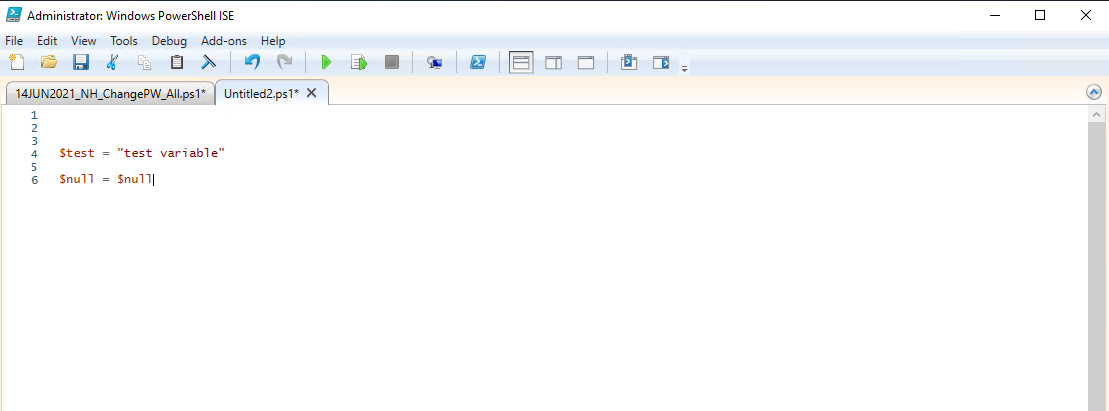
When I opened Powershell ISE for the first time and opened a script, I noticed that all the variables are the same color (brown) as string text.

I checked and confirmed the color was set correctly to "Orange Red" when navigating to ...Tools -> Options -> Color and Fonts Tab -> Console Tokens -> Variable

The sample also shows the variables colored correctly, but the script continues to show all the variables as brown.

I thought that maybe there was a quote that wasn't closed somewhere, but that doesn't seem to be the case.

I even opened a new ps1 file and confirmed this finding by making random variables.

Does anyone have any suggestions as to what could be causing this issue?135692-2021-09-27-16-27-27-remote-desktop-manager-usac-po.png135702-2021-09-27-16-26-56-remote-desktop-manager-usac-po.png
Windows for business | Windows Server | User experience | PowerShell
0 comments No comments

Answer accepted by question author

Limitless Technology 40,106 Reputation points
2021-09-28T09:56:46.227+00:00

Hello @Charles Chung

Unfortunately Microsoft doesn't support Powershell ISE anymore. Replacement is Visual Studio Code with the Powershell Extension.

Source: https://learn.microsoft.com/en-us/powershell/scripting/windows-powershell/whats-new/what-s-new-in-the-powershell-50-ise?view=powershell-7.1#:~:text=There%20is%20no%20support%20for,Code%20with%20the%20PowerShell%20Extension.

Hope this helps with your query,

----------------

--If the reply is helpful, please Upvote and Accept as answer--

Was this answer helpful?

0 comments No comments

1 additional answer

Sort by: Most helpful
  1. Rich Matheisen 48,116 Reputation points
    2021-09-27T21:33:10.167+00:00

    Shouldn't you be using the Script Pane and not the Console Pane choice?

    Also, the Powershell ISE support was ended some time ago. You'll be better off using something else. Some folks like NotePad++. I use VS Code. I used to use Visual Studio. All of those are good choices -- plus you get multiple language support, and even stuff like CSV editors!

    Was this answer helpful?

    0 comments No comments

Your answer

Answers can be marked as 'Accepted' by the question author and 'Recommended' by moderators, which helps users know the answer solved the author's problem.

