Microsoft 365 and Office | Visio | For business | Windows
A professional diagramming tool that helps users visualize complex information through easy-to-understand diagrams.

This browser is no longer supported.
Upgrade to Microsoft Edge to take advantage of the latest features, security updates, and technical support.
' cx='32' cy='32' r='32' /%3E%3Ctext x='50%25' y='55%25' dominant-baseline='middle' text-anchor='middle' fill='%23FFF' %3EAS%3C/text%3E%3C/svg%3E)
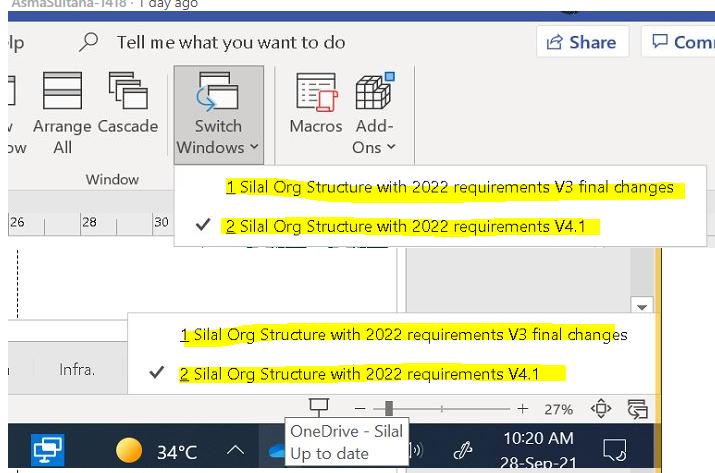
Everytime i open one visio file the previous version also opens with it as another window. I dont want that. Can someone assist me on how to disable this.
A professional diagramming tool that helps users visualize complex information through easy-to-understand diagrams.
' cx='32' cy='32' r='32' /%3E%3Ctext x='50%25' y='55%25' dominant-baseline='middle' text-anchor='middle' fill='%23FFF' %3EB%3C/text%3E%3C/svg%3E)
I think in my case I had a visio file in auto recover mode all the time. These steps helped me clear that.
Close Visio, if it open.
Using Windows Explorer navigate to the folder %userprofile%\Local Settings\Application Data\Microsoft\Visio.
Edit the AutoRecover11.ini file in notepad, select all text and delete and save it.
Open Visio again and it should not open the second file anymore.

Hi @Asma Sultana ,
Do you mean you want to open Visio files in separate windows?
Please try this method:
•Open Microsoft Visio from the start menu.
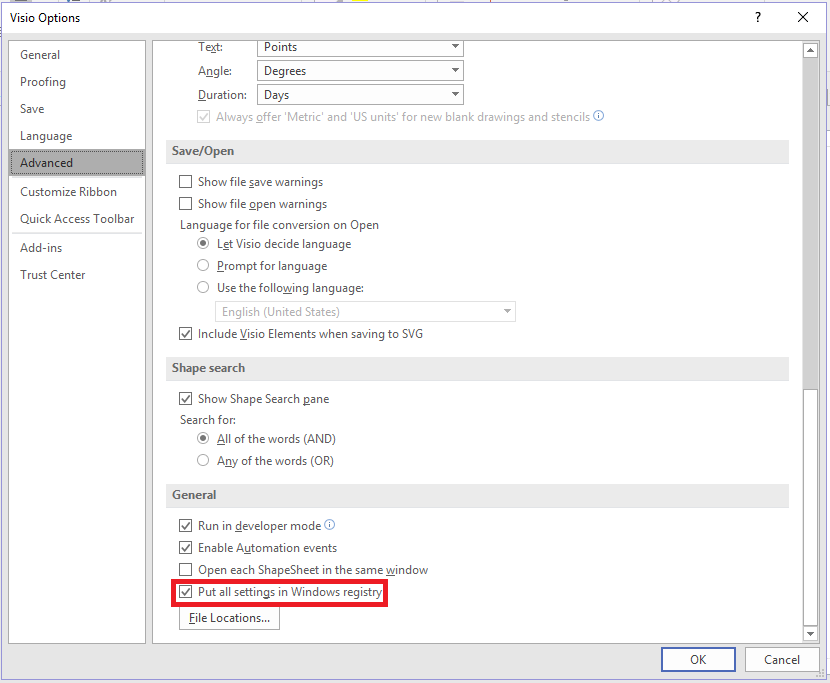
•Go to File > Options > Advanced. Scroll down to the General section and enable an option called "Put all settings in Windows registry". Save changes and close Visio.
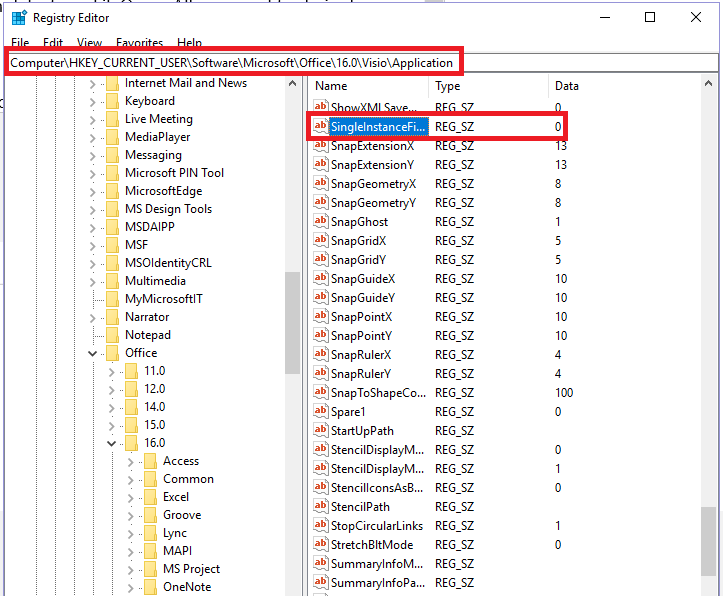
•Open Windows registry editor (regedit.exe), navigate to HKEY_CURRENT_USER\Software\Microsoft\Office\16.0\Visio\Application and modify a String type entry called SingleInstanceFileOpen. All you need to do is change the value from 1 to 0.
•Close the registry editor and try to open couple of Microsoft Vision documents by double clicking on them. They should now open in individual windows.
If the response is helpful, please click "Accept Answer" and upvote it.
Note: Please follow the steps in our documentation to enable e-mail notifications if you want to receive the related email notification for this thread.
But i don't want them open in individual windows. I don't want multiple windows opening at all.
Could you be a bit more precise to explain your requirement so that I can get more accurate solutions to this problem. I’m glad to help and follow up your reply?
when i open the latest edited visio file. It open the previous version as well. How do i disable it from opening the previous version?