Developer technologies | .NET | Other
Microsoft Technologies based on the .NET software framework. Miscellaneous topics that do not fit into specific categories.
This browser is no longer supported.
Upgrade to Microsoft Edge to take advantage of the latest features, security updates, and technical support.
' cx='32' cy='32' r='32' /%3E%3Ctext x='50%25' y='55%25' dominant-baseline='middle' text-anchor='middle' fill='%23FFF' %3EN%3C/text%3E%3C/svg%3E)
Hi
I currently have a BindingSource object on my form that is populated by a class of properties. Each control has its DataBinding EditValue set as the BindingSource.Field.
However the BindingSource Control is giving design time render issues and my controls become invisible and the only way to see them is to close the form class and re-open it. When i delete the BindingSource control i dont have this render issue.
I thought it would be better to create the BindingSource at runtime and set each controls DataBinding EditValue to the BindingSource but i cant get it right. If you look at this image, you can see the EditValue is set to the xxxBindingSource._Finish-color2 field. In code, EditValue is not available as an assignable property

i can create the BindingSource when my form opens
Private bs As New BindingSource
I can assign a BindingList as the DataSource (the same binding list i am assigning to the BindingSource Control Datasource)
bs.DataSource = JBindingList
I tried this appraoch but nothing happens-
TxtType.DataBindings.Add(New Binding("Text", bs, "_Finish_color2"))
but nothing happens so, what is the right way to assign a BindingSource field to a control in code?
Thanks
' cx='32' cy='32' r='32' /%3E%3Ctext x='50%25' y='55%25' dominant-baseline='middle' text-anchor='middle' fill='%23FFF' %3EMT%3C/text%3E%3C/svg%3E)
Generally the easiest thing to do is bind it via the designer. Then look at the generated code.
In your case the syntax looks correct but I'm concerned about the property you're binding to. You really have a property called _Finish_color2 that is public facing? This looks like a field name to me. But if the name is wrong I would expect the binding to fail. But if you're doing that binding in the OnLoad then the exception is silently eaten and you wouldn't know.
Hey
Thanks for the reply. Binding via the Designer is the easier option but for whatever reason, my controls turn invisible in Design Time whenever there is a BindingSource present. Im not sure why that is..
In regard to property, this is more of an annoyance than anything. Im working from a legacy database set that was originally constructed some 25 yrs ago in Access, converted to SQL and im sort of stuck with it. I wrote a Property Class to store the collected data to Bind it to my form for 2 reasons
I named the Properties in the Class the same as the fields in the dataset so that when i added the Bindingsource Control, i could select the Property by the name that would be recognised by everyone. Its not so friendly using BindingSource in a coded approach.
I wanted to add a coded example of my Property Class but there is a limit of 1600 characters for my reply so i cant im afraid!
Thanks
Binding is a runtime feature, not design time. At design time the binding wouldn't/shouldn't run. So, for example, if you bind a textbox to an expression then at design time it would be empty because there is no data yet. For Winforms you can emulate runtime binding support by looking at the DesignMode propert but for simple data binding like you're doing it generally isn't worth it. Where you might find it used is if someone is using a DataGridView with auto-generated columns and they want to see some sample data. In that case at design time they would point the binding source to design-time data instead of the actual data.
   //Sample class that you might return from your data layer to represent data in the database, a file, or wherever your data is stored
   public class MyData
   {
      public int Id { get; set; }
      public string Name { get; set; }
   }
Hey
Thanks for the reply. Im not looking for any Binding at Design Time, The control itself on the form somehow interfered with the other controls on the form at design time that made them all disappear from design view. In runtime, i can see them but in design time they randomly went invisible. Removing the BindingSource resolved the issue but moved the requirement to code instead.
My Class as a sample is as below (as an image because even the smallest amount of code exceeds the limit.. How do people provide solutions i wonder ha ha )
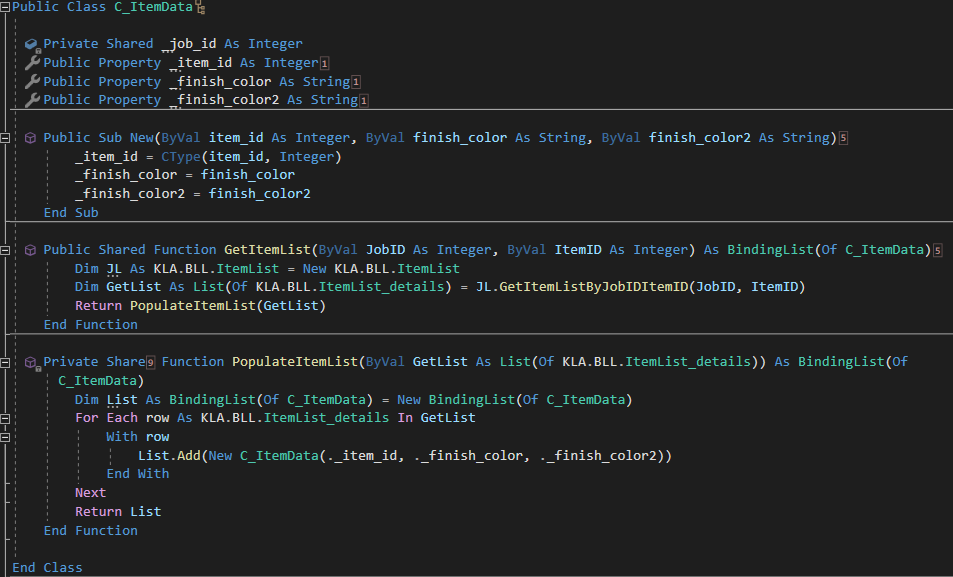
I then instantiate like this so that i can pass it as a BindingList to each UserControl that needs to use the dataset
Private _ItemList As BindingList(Of C_ItemData) = C_ItemData.GetItemList(job_id, item_id)
or like this if i only need it once
MyBindingList.DataSource = C_ItemData.GetItemList(job_id, item_id)
My theory - at design time your binding is throwing an exception. That causes the remainder of the initialization to not happen and therefore your other controls are not created. Since this is happening at load time Winforms silently eats the exceptions so you never know.
Move the call to GetItemList into the OnLoad of your form if it is not yet there and only call it if DesignMode is false. Then close and reopen the designer to see if the problem goes away.