Exchange | Exchange Server | Management
The administration and maintenance of Microsoft Exchange Server to ensure secure, reliable, and efficient email and collaboration services across an organization.
This browser is no longer supported.
Upgrade to Microsoft Edge to take advantage of the latest features, security updates, and technical support.

Hi,
Env= TWO Ex 2013 both with CAS+MB roles
server 1 and server 2
Autodiscover was not working and
I also recreated the auto discover virtual directory on one server let say server 2
getting error as below
Attempting to send an Autodiscover POST request to potential Autodiscover URLs.
Autodiscover settings weren't obtained when the Autodiscover POST request was sent.
Additional Details
Elapsed Time: 257 ms.
Test Steps
The Microsoft Connectivity Analyzer is attempting to retrieve an XML Autodiscover response from URL https://autodiscover.domain.com:443/Autodiscover/Autodiscover.xml for user user@keyman .com.
The Microsoft Connectivity Analyzer failed to obtain an Autodiscover XML response.
Additional Details
A Web exception occurred because an HTTP 413 - 413 response was received from Unknown. HTTP Response Headers: X-FEServer: server2 Connection: close Content-Length: 0 Date: xxxxxx 17:15:48 GMT Server: Microsoft-IIS/8.5 X-Powered-By: ASP.NET
Elapsed Time: 257 ms.
WHY THIS WEB EXCEPTION?
i have two autodiscover public dns entries
autodisover.domain.com === A record
CNAME entry is autodiscover.domain.com ===mail.domain.com
Hi,
I sorted out this as firewall was blocking auto discover from CAS to Mailboxes
Test-outlookwebservices and test-outlookconnectivity gave me this insight.
Allowing port 443 worked.

I would suggest you use Outlook "Test Email AutoConfiguration" function to test the Exchange Autodiscover, because the Microsoft Connectivity Analyzer isn't stable recently. In order to verify the external connection, you need to use a computer outside the domain to verify the autodiscover.
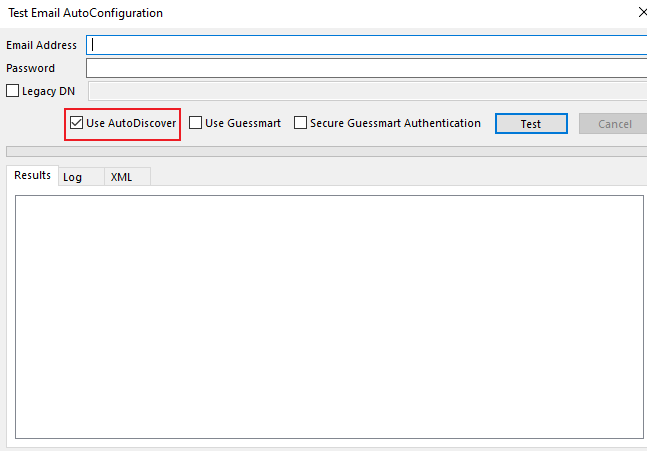
The Log label will show you the Autodiscover lookup process.
By the way, I think the CNAME isn't needed, It increases the number of hops for DNS resolution.
If the response is helpful, please click "Accept Answer" and upvote it.
Note: Please follow the steps in our documentation to enable e-mail notifications if you want to receive the related email notification for this thread.