Developer technologies | .NET | Xamarin
A Microsoft framework for building cross-platform mobile apps using .NET and C# with native performance and user interfaces.
This browser is no longer supported.
Upgrade to Microsoft Edge to take advantage of the latest features, security updates, and technical support.
' cx='32' cy='32' r='32' /%3E%3Ctext x='50%25' y='55%25' dominant-baseline='middle' text-anchor='middle' fill='%23FFF' %3EJ%3C/text%3E%3C/svg%3E)
Using Visual Studio 2019 on Windows, I am having some problems with running an Android project.
First off. When I run the SDK Manager, I get this in the console:
No Android SDK instance matching the 'C:\Program Files (x86)\Android\android-sdk' path
Android component "tools" is obsolete, please install "cmdline-tools"
Trying to fallback to "tools"...
File 'C:\Program Files (x86)\Android\android-sdk\cmdline-tools\android.bat' not found for 'Android SDK Core'
File 'C:\Program Files (x86)\Android\android-sdk\cmdline-tools\mksdcard.exe' not found for 'Android SDK Core'
File 'C:\Program Files (x86)\Android\android-sdk\cmdline-tools\emulator.exe' not found for 'Android SDK Core'
I had my Path Environment Variables ANDROID_HOME and ANDROID_SDK_ROOT set to Android Studio's sdk path, and felt that might be the problem. So I changed them to C:\Program Files (x86)\Android\android-sdk. That did not help.
I also installed the command-line tools.
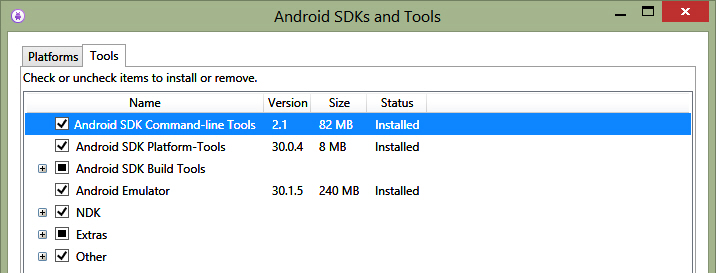
That doesn't help either.
I was wondering if there is some conflict going on with Android Studio and Visual Studio since I realized the adb was used from the path, which is Android Studio's sdk path.
I am wondering if I can follow the advice given in this post - Can Android Studio and Visual Studio safely share the same Android SDK? What would Microsoft or Android Studio developers say?
I think that would be a great advantage, if that could work.
The other thing is, I can't debug my Android project, because, 1) Visual Studio creates a default emulator that is not working, perhaps because of these other issues I have to get sorted out.
I'm getting a message telling me I don't have API 28 installed, which I do.
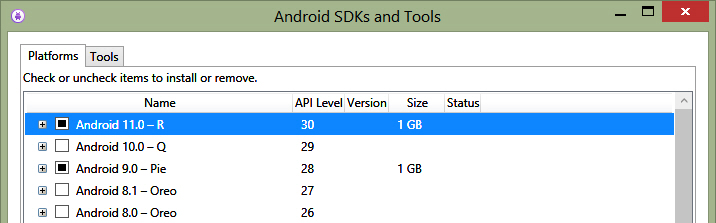
2) Visual Studio does not use any of the emulators I create. not even the latest one.

What's the best way to go about solving these issues, so that I can have a problem free Android working environment?
I decided to try something.
I copied the files from C:\ProgramData\Microsoft\AndroidSDK\25\tools into cmdline-tool directory, but that didn't help.
I tried the files from C:\Program Files (x86)\Android\android-sdk\tools, and copied those into the cmdline-tools directory, and the messages went away, and the emulator was recognized in the debugger.
C:\Program Files (x86)\Android\android-sdk\emulator\emulator.EXE -no-boot-anim -avd pixel_2_r_11_0_-api_30 -prop monodroid.avdname=pixel_2_r_11_0-api_30
Emulator pixel_2_r_11_0-_api_30 cannot be started.
That was quite a short moment of hope. :(
I decided to try something.
I copied the files from C:\ProgramData\Microsoft\AndroidSDK\25\tools into cmdline-tool directory, but that didn't help.
I tried the files from C:\Program Files (x86)\Android\android-sdk\tools, and copied those into the cmdline-tools directory, and the messages went away, and the emulator was recognized in the debugger.
C:\Program Files (x86)\Android\android-sdk\emulator\emulator.EXE -no-boot-anim -avd pixel_2_r_11_0_-_api_30 -prop monodroid.avdname=pixel_2_r_11_0_-_api_30
Emulator pixel_2_r_11_0_-_api_30 cannot be started.
That was quite a short moment of hope. :(
Edit
So I had to manually start the emulator. then keep choosing to wait rather than close. Then debug the project, and it works.

I guess then, the workaround is to copy the files from the tools directory into the cmdline-tools directory for now, until Microsoft Visual Studio SDK Manager can place them in that folder in the future.