
All these answers are assuming that all the computers on earth are laptops?
This browser is no longer supported.
Upgrade to Microsoft Edge to take advantage of the latest features, security updates, and technical support.
' cx='32' cy='32' r='32' /%3E%3Ctext x='50%25' y='55%25' dominant-baseline='middle' text-anchor='middle' fill='%23FFF' %3EJD%3C/text%3E%3C/svg%3E)
In my recently installed Windows 11 I have chosen the transparency settings like this:

However, none of the screen elements show any transparency whatsoever. Why is that? Have I missed something?
' cx='32' cy='32' r='32' /%3E%3Ctext x='50%25' y='55%25' dominant-baseline='middle' text-anchor='middle' fill='%23FFF' %3EJ%3C/text%3E%3C/svg%3E)
If your problems is still not solved, try updating your GPU driver, it may fix it.
If your problems is still not solved, try updating your GPU driver, it may fix it.
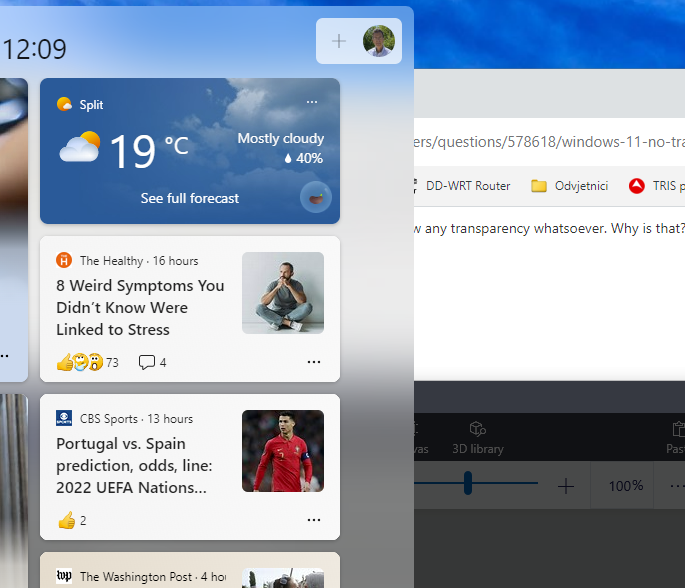
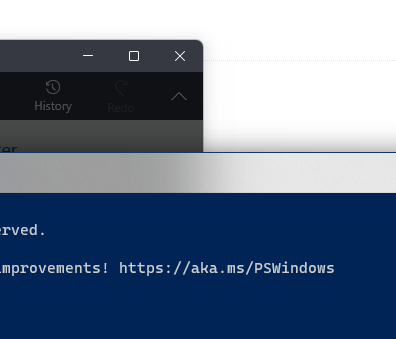
I have now installed 22H2. Transparency is still the same - barely noticeable. The only two exceptions seem to be the taskbar widget and the title bar of the Terminal window.

All these answers are assuming that all the computers on earth are laptops?

Hi there,
Windows disables almost all the graphical customizations if the battery saver mode is enabled.
If the reply is helpful, please Upvote and Accept it as an answer
' cx='32' cy='32' r='32' /%3E%3Ctext x='50%25' y='55%25' dominant-baseline='middle' text-anchor='middle' fill='%23FFF' %3ERV%3C/text%3E%3C/svg%3E)
This Windows 11 marketing is all cr@p. I upgraded for the transparency but it's got zero effect.
Many thanks for the good advice! However, something is still wrong.
The Personalization transparency effects setting is on. The battery saver is not enabled. The registry entries in HKEY_CURRENT_USER\Software\Microsoft\Windows\CurrentVersion\Themes\Personalize look like this:
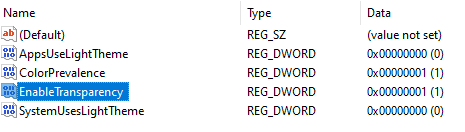
However, I see no transparency. Not on my Surface Pro screen when used as mobile, not on my two 27" 4K monitors when the PC is docked.
Go figure!
' cx='32' cy='32' r='32' /%3E%3Ctext x='50%25' y='55%25' dominant-baseline='middle' text-anchor='middle' fill='%23FFF' %3EGR%3C/text%3E%3C/svg%3E)
I've the same problem on my Surface Pro 8 and windows 11 23h2

Make sure you're not on battery saver mode. Try enabling transparency using registry:
https://www.kapilarya.com/enable-disable-transparency-effects-in-windows-11
Let me know if this helps!
Note: Included link in this reply refers to blog post by a trusted Microsoft MVP.