Dear Mike McKean,
Thank you for posting your question in the Microsoft Q&A forum.
Based on your description, you are unable to access Planner even though your subscription is up to date and you have also tried using a trial license. While your Microsoft account shows that a license is assigned to you, you will need to verify in the Microsoft 365 Admin Center that the correct license is assigned and fully enabled for your user account.
Please log in to the Microsoft 365 Admin Center Users page using a Global Admin account > select your user > on the right-side panel, select Licenses and apps > under Licenses, ensure that the Project Plan 3 license is assigned > expand the license details and confirm that all related service components are enabled > click Save changes.
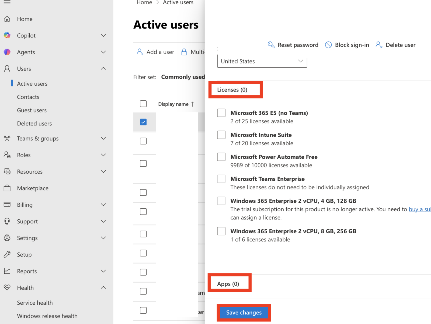
Please note that Planner (standard) is typically included automatically within most Microsoft 365 business licenses and may not appear as a separate toggle.
If everything is assigned correctly and the product still shows as unlicensed, this may indicate a backend provisioning issue.
In addition, if you are requesting direct support from an agent who can call or email you, you can raise a support ticket through the Microsoft 365 Admin Center as well. Microsoft moderators are not permitted to contact users directly or access personal account information.
To raise a support ticket, you can follow the below:
- Go to the admin center
- On the bottom right side of the page, select Help & support.
If you need clarifications, please let me know.
If you have extra questions about this answer, please click "Comment".
Note: Please follow the steps in our documentation to enable e-mail notifications if you want to receive the related email notification for this thread
' cx='32' cy='32' r='32' /%3E%3Ctext x='50%25' y='55%25' dominant-baseline='middle' text-anchor='middle' fill='%23FFF' %3EMM%3C/text%3E%3C/svg%3E)

' cx='32' cy='32' r='32' /%3E%3Ctext x='50%25' y='55%25' dominant-baseline='middle' text-anchor='middle' fill='%23FFF' %3EDV%3C/text%3E%3C/svg%3E)
' cx='32' cy='32' r='32' /%3E%3Ctext x='50%25' y='55%25' dominant-baseline='middle' text-anchor='middle' fill='%23FFF' %3EWW%3C/text%3E%3C/svg%3E)