SQL Server Migration Assistant
A Microsoft tool designed to automate database migration to SQL Server from Access, DB2, MySQL, Oracle, and SAP ASE.
This browser is no longer supported.
Upgrade to Microsoft Edge to take advantage of the latest features, security updates, and technical support.
' cx='32' cy='32' r='32' /%3E%3Ctext x='50%25' y='55%25' dominant-baseline='middle' text-anchor='middle' fill='%23FFF' %3EA%3C/text%3E%3C/svg%3E)
Hi There,
As titled, is there any way to assess multiple databases when migration from sql 2008 to sql 2019?
The purpose of assess is to evaluate the suitability of migrating multiple databases to 2019 at the same time, with objects such as stored procedures.
Is is possible way to do using DMA or any other tool available?
Thank you in advance
' cx='32' cy='32' r='32' /%3E%3Ctext x='50%25' y='55%25' dominant-baseline='middle' text-anchor='middle' fill='%23FFF' %3EYM%3C/text%3E%3C/svg%3E)
Please do not forget to mark as accepted answer wherever information provided to you were helpful.
Regards
' cx='32' cy='32' r='32' /%3E%3Ctext x='50%25' y='55%25' dominant-baseline='middle' text-anchor='middle' fill='%23FFF' %3ES%3C/text%3E%3C/svg%3E)
Hi,
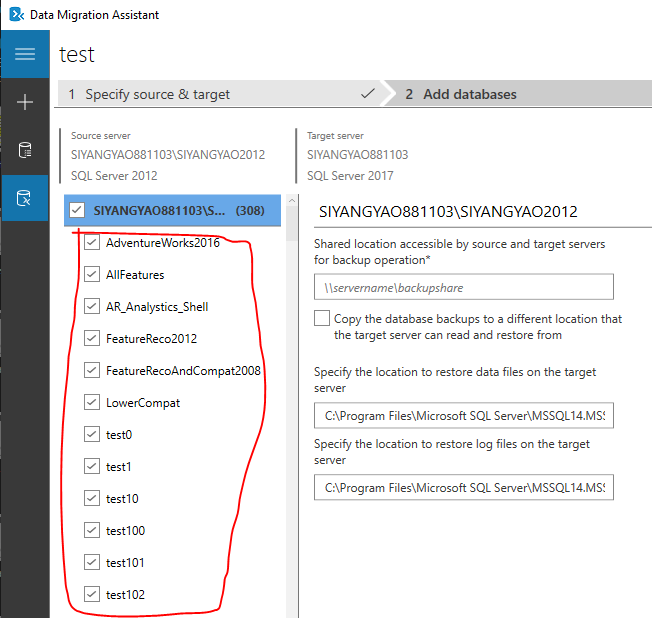
DMA supports to migrate multiple databases. Please check the screen shot below
Thanks,
Siyang
Hi Siyang,
Thank you for your reply, but it's not the answer I want.
What I want to ask is that when evaluating with DMA, I wonder if there is a result of whether it is possible to migrate the databases as they are, with multiple databases referencing each other.
Hi @중석 김 ,
the migration workflow of DMA can help you to migratie the following components:
Schema of database(such as tables,views,stored procedures etc.)
Data and users
Server roles
SQL Server and Windows logins
so, you can use DMA migration:https://learn.microsoft.com/en-us/sql/dma/dma-migrateonpremsql?view=sql-server-ver15
like Views and Stored Produres, you also can choose other ways to migrate (unfortunately, there is no built-in way to do this with the command line):
use SSMS and login in
right click on database and go to Tasks-> Generate Scripts
click Next, and you can change Script entire database and all database objects to Select specific database objects
click Next, notice the File option
when finishing, select file you choose and copy it to the destination server
go to the destination server, open SSMS and login in
Go to File > Open > File or use the keyboard shortcut CTRL+O to open the SQL script. Select the file you choose
You will see the script generated from the source server containing all views and stored procedures. Click Execute or use the keyboard shortcut F5 and run the script.