MDX Filter function using CurrentMember (multidimensional)

Matze 21 Reputation points
2021-10-07T15:25:03.26+00:00

Hello,

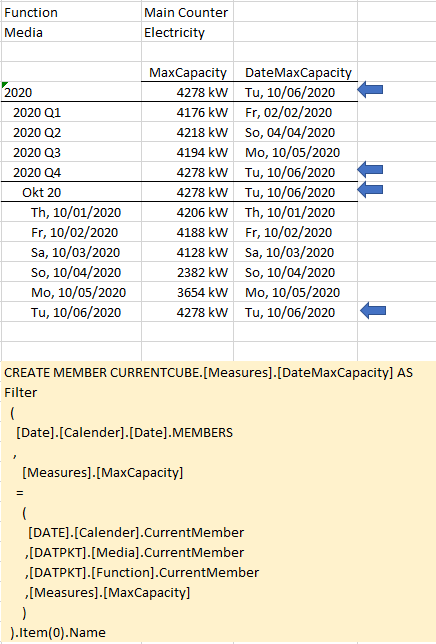
I am still quite new to MDX and need a measure, wich gives back a corresponding date.

The approach with filter() works properly as long as the tuple is defined by fixed elements.

But changing to CurrentMember leads to wrong results. Does this need just a simple modification or a total different approach?

Thanks in advance for any help.

Bests, Matze

138595-mdxsample5.png

SQL Server Analysis Services
A Microsoft online analytical data engine used in decision support and business analytics, providing the analytical data for business reports and client applications such as Power BI, Excel, Reporting Services reports, and other data visualization tools.
0 comments No comments
{count} votes

Answer accepted by question author
  1. Alexei Stoyanovsky 3,416 Reputation points
    2021-10-07T18:22:24.717+00:00

    Try Filter ( (existing [Date].[Calender].[Date]) as [DaysSet], [Measures].[MaxCapacity] = Max ( [DaysSet], [Measures].[MaxCapacity] ) ).Item(0).Name

    0 comments No comments

1 additional answer

Sort by: Most helpful
  1. Matze 21 Reputation points
    2021-10-08T06:46:57.397+00:00

    Thank you very much Alexei for your help, it works and gives back correct results.

    This is more than a "simple modification", interesting to see that there can be a reference to the set part inside the logical part of Filter function.
    Unfortunately the performance is a bit weak.


Your answer

Answers can be marked as 'Accepted' by the question author and 'Recommended' by moderators, which helps users know the answer solved the author's problem.