How to restart SQL listener after changing RegisterAllProvidersIP and HostTTL

Sai 126 Reputation points
2021-10-08T10:16:50.793+00:00

Hi Team,

I am going to implement the below changes using powershell commands in Sql server 2017.

  1. Change the RegisterAllProvidersIP parameter.
    RegisterAllProvidersIP parameter value is 0
  2. Reduce the HostRecordTTL.
    HostRecordTTL paramenter value is 300
  3. Take the listener offline.
  4. Bring the listener back online.
  5. Ensure the entire AG is online.
    But after changing parameters values how to bring Listener offline and online and AG offline and online
    Please guide me with the steps?

With AG offline and online, will it affect in secondary AG's. How Secondary servers will behave with this change.

SQL Server | Other
0 comments No comments
{count} votes

Answer accepted by question author
  1. CathyJi-MSFT 22,406 Reputation points Microsoft External Staff
    2021-10-11T07:53:13.09+00:00

    Hi @Sai ,

    >But after changing parameters values how to bring Listener offline and online and AG offline and online
    >Please guide me with the steps?

    You can using below PowerShell scripts;

    Stop-ClusterResource yourListenerName  
    Start-ClusterResource yourListenerName  
    Start-ClusterGroup yourListenerGroupName  
    

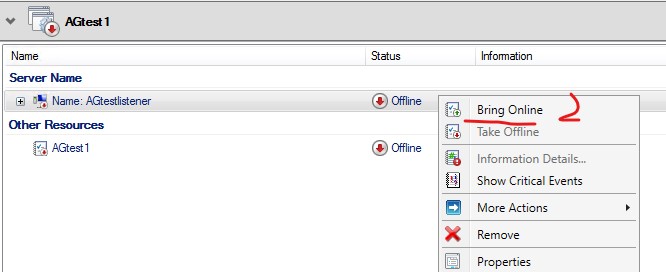
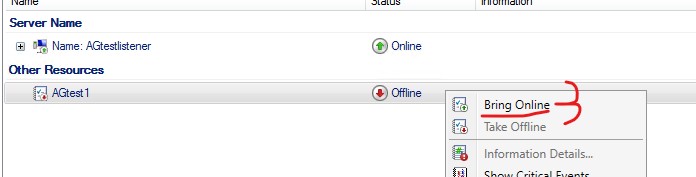
    Or you can do this from failover cluster manager as below screenshot.

    139374-screenshot-2021-10-11-154604.jpg

    139411-screenshot-2021-10-11-154633.jpg

    139412-screenshot-2021-10-11-154716.jpg

    >With AG offline and online, will it affect in secondary AG's. How Secondary servers will behave with this change.

    Yes. The AG will be in a resolving state as below screenshot until you bring SQL AG online.
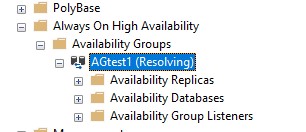
    139280-screenshot-2021-10-11-155039.jpg


    If the response is helpful, please click "Accept Answer" and upvote it, as this could help other community members looking for similar thread.


0 additional answers

Sort by: Most helpful

Your answer

Answers can be marked as 'Accepted' by the question author and 'Recommended' by moderators, which helps users know the answer solved the author's problem.