Azure Data Factory
An Azure service for ingesting, preparing, and transforming data at scale.
This browser is no longer supported.
Upgrade to Microsoft Edge to take advantage of the latest features, security updates, and technical support.
' cx='32' cy='32' r='32' /%3E%3Ctext x='50%25' y='55%25' dominant-baseline='middle' text-anchor='middle' fill='%23FFF' %3EB%3C/text%3E%3C/svg%3E)
Hi,
Cannot select datatypes anymore when creating additional columns or when adding stored procedure parameters in activities, something is wrong with the designer(?).
Also in pipelines with If condition activity, the stored procedure cannot read from a variable anymore, parameterizing it when Sinking in Copy Activity. This happens while debugging the pipeline not sure what will happen if published.
Could you please advise?
Cheers,
Kostas
' cx='32' cy='32' r='32' /%3E%3Ctext x='50%25' y='55%25' dominant-baseline='middle' text-anchor='middle' fill='%23FFF' %3EHM%3C/text%3E%3C/svg%3E)
Hi @BitAday ,
Welcome to Microsoft Q&A Platform.
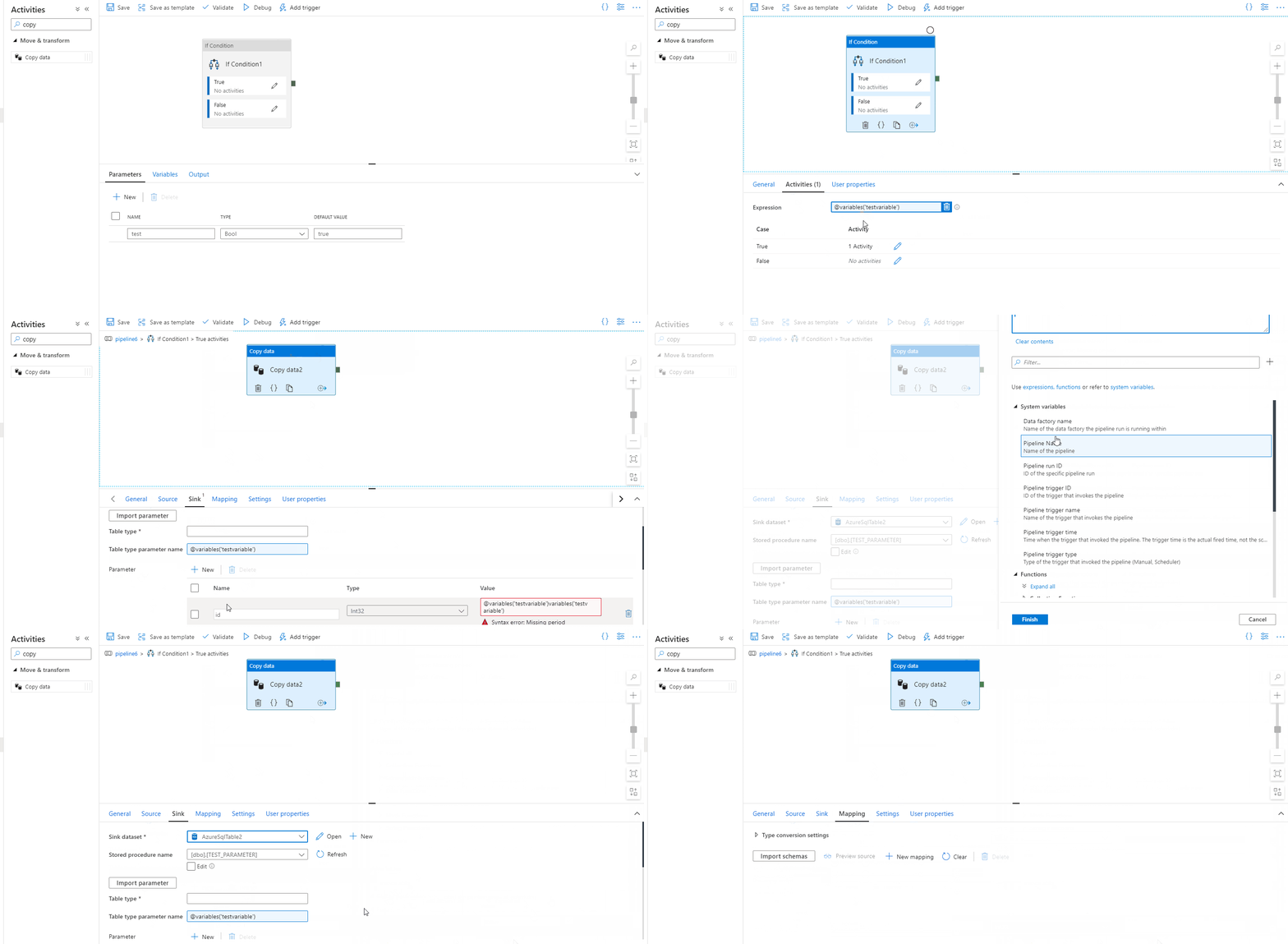
By default, Azure data factory considers string datatype when inserting additional columns and hence there is no provision to choose the datatype and this is as per current functionality. I was reproducing adding parameter for stored procedure in copy activity inside If condition activity and it can be read from a variable as below. And stored procedure parameter datatype is taken by Azure Data Factory based on the parameter type defined when creating stored procedure. Hope this helps! Please suggest if the scenario you are looking for is a different one.
Hi thank you for your prompt reply,
Please use a variable for your stored procedure and then try to execute your pipeline, does it work?
Also what if I want to change the "id" parameter on your GIF example from Int32 to Int64, would you be able to see the dropdown to change it?
Cheers,
Kostas
Hi @BitAday ,
Thanks for sharing the details. Please find below successful pipeline execution using above scenario. Also, as mentioned earlier, Int64 can be depicted as datatype for parameter only if we are using BIGINT (in case of SQL database) and it cannot be modified in Azure Data Factory which is also shown below. Hope this helps!

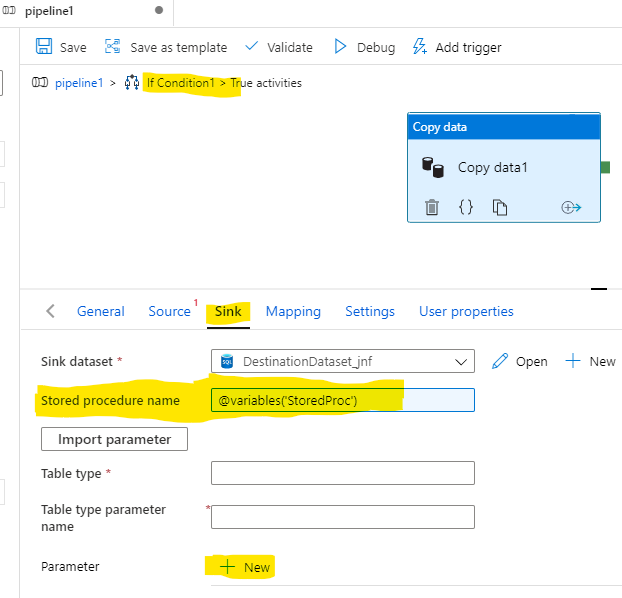
Like I said on my first post, I want to dynamically assign my stored procedure in the Sinking tab so I want to read it from a variable but that causes the aforementioned error.
Still in Sinking tab:
I know how to get the stored procedure parameter's datatype when clicking on the "Import parameter" button.
Not sure since when this is the only normal way to develop my parameterization?
Not sure why the "New" button adding stored procedure parameters is still there then. Does the Azure Data Factory team plans to remove it?
@MarkKromer-8019 can you please help?
' cx='32' cy='32' r='32' /%3E%3Ctext x='50%25' y='55%25' dominant-baseline='middle' text-anchor='middle' fill='%23FFF' %3EH%3C/text%3E%3C/svg%3E)
Hello @BitAday ,
Let me try to answer your question here and the end we will need some more info , request you to share the same
Ask #1 :Cannot select datatypes anymore when creating additional columns or when adding stored procedure parameters in activities, something is wrong with the designer(?).
[Himanshu] As Haritha mentioned before , additional columns which we add are created as data type string and so we do not have the option to change that in ADF .
When we use the store proc , we get the data types from the SQL objects and it shows the data types which is defined on the SP side . We cannot update on the ADF UI . As a test if you change the data type of the dummy proc ( on SQL side ) . on the ADF UI if you refresh and import paramters you will see the data type updates .
Ask #2 : Also in pipelines with If condition activity, the stored procedure cannot read from a variable anymore, parameterizing it when Sinking in Copy Activity. This happens while debugging the pipeline not sure what will happen if published.
Ask #3:Please use a variable for your stored procedure and then try to execute your pipeline, does it work?
[Himanshu] For both #2 & #3 ,I think Haritha was able to share the GIF with something which was working . Are you still facing the issue . Can you share the error please ?
Ask #4:Also what if I want to change the "id" parameter on your GIF example from Int32 to Int64, would you be able to see the dropdown to change it?
[Himanshu]:please check my answer to Ask#1 , second part.
Ask 5#
I know how to get the stored procedure parameter's datatype when clicking on the "Import parameter" button.
Not sure since when this is the only normal way to develop my parameterization?
[Himanshu] : You can read more here : https://learn.microsoft.com/en-us/azure/data-factory/connector-sql-server#sql-server-as-a-sink
Ask 6#Not sure why the "New" button adding stored procedure parameters is still there then. Does the Azure Data Factory team plans to remove it?
[Himanshu] : The feature has been included recently only and it does make sense for few users . eg . Lets say someone is trying to copy data from a blob to SQL .
They want to capture the time when the ingestion happened . We can use new option and create a new parameter and pass the value .
Need some more info :
Please send an email to AzCommunity@microsoft.com with the below details. We will try to get more info on the issue .
Subscription ID:
Subject : "Himanshu "
Please do let us know if you have any further queries .
Thanks
Himanshu
Please Ignore the additional columns.
I'm reporting the latest implementation for changing an sp parameter datatype via the ADF UI as a bug:

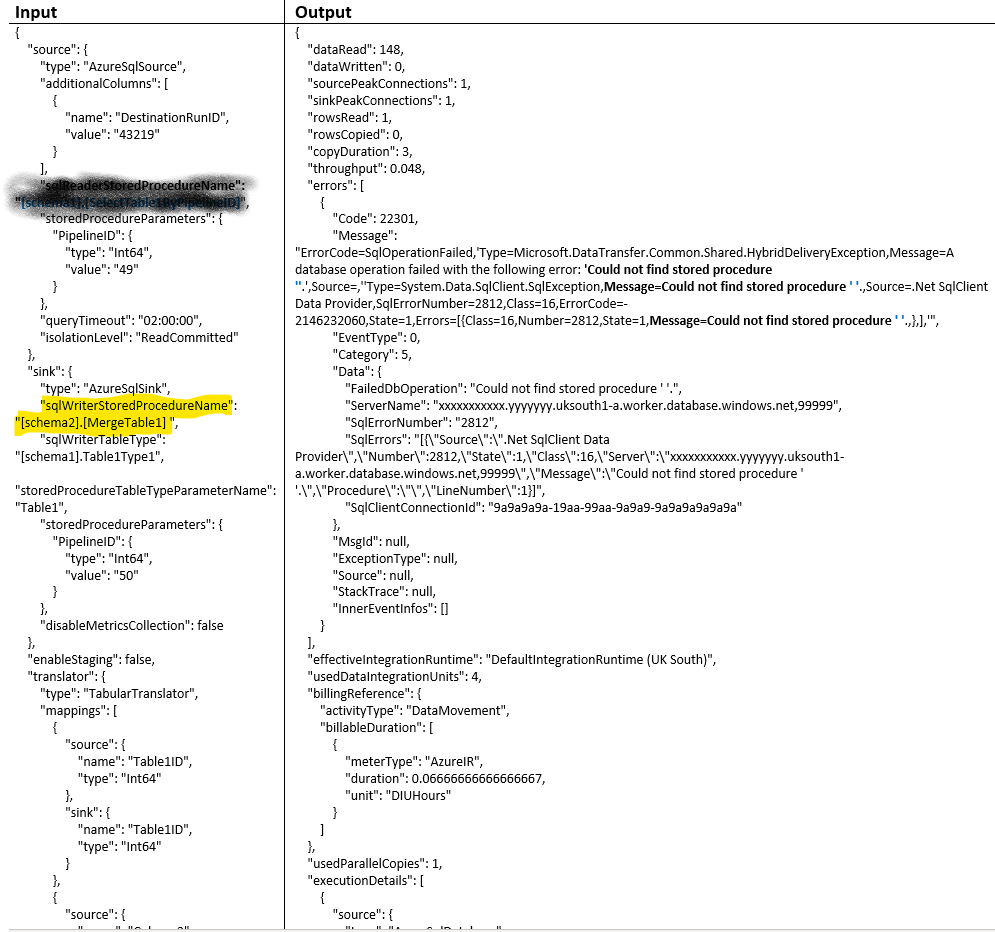
Pardon me I forgot to post the error here. I post it elsewhere first and I thought I did the same here. The error we get is:
Many thanks,
Kostas
I solved my issue with the variable containing my sp, the string had a non printable character (enter) at the end. Nothing to do with nested activities.
Hello @BitAday ,
Thanks for posting the error and also sharing the resolution of the issue .
Please do let us know if you have anything else where you need help with , we will try to pitch in and try to help .
Thanks
Himanshu
This has also been reinstated, the datatype listbox/ picker for parameters is now rendered properly in front of other objects/layers:
