Microsoft Security | Microsoft Graph
An API that connects multiple Microsoft services, enabling data access and automation across platforms

This browser is no longer supported.
Upgrade to Microsoft Edge to take advantage of the latest features, security updates, and technical support.

I am trying to add a new certificate to an App Registration via Graph API. The steps detailed in this article basically. I created a token along the lines of what is mentioned in this article . I wanted to use PowerShell Core so I did the following:
   $signingCert = New-Object System.Security.Cryptography.X509Certificates.X509Certificate2(${certPath}${certName}", "$certPassword")
   $signingCreds = New-Object Microsoft.IdentityModel.Tokens.X509SigningCredentials($signingCert)

   $claimsDict = New-Object System.Collections.Generic.Dictionary"[String,Object]"
   $claimsDict."aud" = "00000002-0000-0000-c000-000000000000"
   # This is the Id of the App Registration using which I am making the Graph API call. This is not the App Id (though I tried with that too) but the Graph Id (what I get from Get-MgApplication)
   $claimsDict."iss" = "9db7dfa6-4f4c-430b-a573-d64d5dc172fd"

   $securityToken = New-Object Microsoft.IdentityModel.Tokens.SecurityTokenDescriptor
   $securityToken.claims = $claimsDict
   $securityToken.NotBefore = [datetime]::now
   $securityToken.Expires = [datetime]::now.AddMinutes(10)
   $securityToken.SigningCredentials = $signingCreds

   $handler = New-Object Microsoft.IdentityModel.JsonWebTokens.JsonWebTokenHandler
   $token = $handler.CreateToken($securityToken)
Next I put this token as the proof in a POST request:
   $certData = New-Object System.Security.Cryptography.X509Certificates.X509Certificate2(${certPath}${newCertName}")
   $bodyParameter = @{
       "keyCredential" = @{
           "type" = "AsymmetricX509Cert";
           "usage" ="Verify";
           "key" = [System.Convert]::ToBase64String($certData.RawData)
       };
       "passwordCredential" = $null;
       "proof" = $token
   }
   (ConvertTo-Json $bodyParameter)
The result is some JSON along these lines:
   {
     "proof": "eyJhbGciOiJSUzI1NiIsImtpZCI6IjZFOEU3ODRGQ0ZGREQyQzY5RTI3RDQ2OEM4QjgxNEU3QzRFRDgwOEIiLCJ0eXAiOiJKV1QiLCJ4NXQiOiJibzU0VDhfOTBzYWVKOVJveUxnVTU4VHRnSXMifQ.eyJhdWQiOiIwMDAwMDAwMi0wMDAwLTAwMDAtYzAwMC0wMDAwMDAwMDAwMDAiLCJpc3MiOiI5ZGI3ZGZhNi00ZjRjLTQzMGItYTU3My1kNjRkNWRjMTcyZmQiLCJleHAiOjE2MzM5ODIwMjEsIm5iZiI6MTYzMzk4MTQyMSwiaWF0IjoxNjMzOTgxNDIyfQ.a__8to9Mav7r5to85O8PMHzUaz5el_VhsJQ6ahqHqdJRQ2TlcPDuNVEcUc1qHyq7pNaQid0LdnbR8s4Bt5ulZJBGRjXmf64cgPQFOGJFl2TQAneZlhoB_6zVQBwGPCnLL4EZHybT6GwTFhVYKvAiCK3HVdQUgTkVUEsGNKLjUtBzYNGgqxFWoOwKt-uZM7yCALYt2BHH2G8P0KroZEYmUZEU1KcSh1UqyEPg--Pr6qu4CwxFwurtNhmysiYMM3e7vdpIFPaJOT52hKeeppP-lAFsTkeoWQSD0G5Cvwl-HPU2A7uWHgQaZzer2htt5Xeys3woHhcNSHJgHRmceud7fSRMRbctexywlXzeclCOQjWOBYXAWAkIH3gzXbBZ6TomfgR6-EIenXwaxtADHnoflvQKsnclXQLF8BQ69Lw6UaxPBLG6EC1KMC4b_BLaR5E6P5FYf7E4WoljqwtiqD-3DwzQ_0PXBABFqHYV9JtW7cq1skA3pyc9XbUm1PHTh5Z0p7VC2lXRJ00MLuZiDAQxOPjV7RH-VucQZJcvZ06Wbz62hKDEbmKLWfq0BqCgjPPQQfQWsrEeN_eJ4INqrAWh_LWJ-utaiB9hNFq4qe-AvaPulKoIBYRkIb8j_dclR6DWRbvklNOgQ2rg6G56Mk96i_PJZq2afeJW-ocj67o72hk",
     "passwordCredential": null,
     "keyCredential": {
       "key": "MIIFXzCCA0egAwIBAgIJAI0jxh5R52r8MA0GCSqGSIb3DQEBCwUAMDAxLjAsBgNVBAMTJURlbnRvbnMgRGlnaXRhbCAtIFVzZXIgUmVhZCBXcml0ZSBBbGwwHhcNMjEwNzE5MTIyODA0WhcNMjMwNzE5MTIyODA0WjAwMS4wLAYDVQQDEyVEZW50b25zIERpZ2l0YWwgLSBVc2VyIFJlYWQgV3JpdGUgQWxsMIICIjANBgkqhkiG9w0BAQEFAAOCAg8AMIICCgKCAgEA4dz5yNsCsFGAI28NNwpSaI9rxazjHK3yy4OJdjO9vfgNc+mAq+Rc8R6fO0A6cw9NNxy9AEnbJhJiQxgW0Q+JPha2oWiordNNn9d/i9gY5nGDdc6G8xog8JmMiWC7pmW9Ylyweqncp8DL6C8imfv9tMoYCgD+TSbMVqIAYfSR2oCrF8Q5Lwilo+yptrCykaxqKQS8mURLH4JJMB79qzpDK1urkSU2sHP+lYdENlP80qQgo0HzLNuwHxqidw+bueRH/3CSmmgajmYX8V+8DmeJca+R2NHQthC/SR8kKp4A99eIvJ8Fr0AZTdpjqkNrqjXlNsJxp+LLEFIlpnIB/ekuCtBRY8w4vIdh1HWN9LX52Fc/YZLaHxc0crZZHCGOLAljIj2GFcoOAv3wOuD7W5fZguSjnsiLJQwAgbyjbAenMu3ev34Q9TCkqtbKdqqBqDTGceOc2ugkWOGLmAR07MGzSAL7BA2iJ4hEkp5i3f0FmWfs/yHTIL7CeRkbgmfw/vt2clJd+U+kXR2E0LVL4H+UmA0rXd81LgE9wb5QxQ49WlQuDSeK7TfD5dCgqnFyMObD33GOH23CpBkLzkP/ugTHafHNzR0w95KXbap/dlP/Rr7Wi8oHuNv77j/7y31Q+hHQvosU3RYbsYrytdFNMDOsD11hxIskUJ7w9ZdlSDP/O18CAwEAAaN8MHowCwYDVR0PBAQDAgWgMB0GA1UdJQQWMBQGCCsGAQUFBwMBBggrBgEFBQcDAjAMBgNVHRMEBTADAQH/MB0GA1UdDgQWBBQySMBv+J3sXXsYdlbNn3r8DWQW6DAfBgNVHSMEGDAWgBQySMBv+J3sXXsYdlbNn3r7DWQW6DANBgkqhkiG9w0BAQsFAAOCAgEAn7V6TKQeQsqb0elbOf29VC2fBmqHY+WJRxcaUS0fbMsCDLVK2LN+0vVbiT5CBEXq0hDQAoSoTT79ILWRPFQegEjQjFmLJCz2RK+yf6kSplNnOiIA8+nstaVQDWcTCarkIQ98xhoPUkMGhVCx2nbtsBsc+FOnx7+zO1SCSxFda/xIEeBV4n/40cEWcXRIZQQOjqdta5fTMstiKSqLJhu2ex/M8zg1jXvJooLs0Ya0GtyPzOLuIhSlW1290YekrZqIcuLe++hjhcjDerfr9sTJan7xlbBPx4O182uIX9WQRX454osXgf7yH0GoqhdOqU9ULi23m9YwxDZUMk2akg2IVbVjGN+/H9BcYfbK8nZGWwTChK+S4DFAWdg13RA6ukfK21HRrhXBQzkq1d1fVBFmCpK5ZG0msBKHovXyjgdTfF6RJS46796NZBiLOetf+pFtqusUI8jlXYbw/WUe/LlAka6oRLXy+K+HAtOwwbAVwoHrKmhc0d2R+m49l/mEKjL7DLhDmlAzQfgnofSaDCvFQXLaVr+0bM2WzLVju/hILN58u6JWjNTIe/+tXUiP8hpWwWC6Lrh7gWWHhCy3DPReRZkIr11Q3HEpFKnc6lHJEo3pOesc1KvWKptQQBflPNlRmSzcy1Ugi9CCXw4FYfhq1p667zm3JDJ7p2jlRb0wisQ=",
       "type": "AsymmetricX509Cert",
       "usage": "Verify"
     }
   }
As far as I can see this looks correct and similar to the example in the Microsoft doc. If I put the proof token in a JWT decoder like https://jwt.ms I see that it is correct:
   {
     "alg": "RS256",
     "kid": "6E8E784FCFFDD2C69E27D468C8B814E7C4ED808B",
     "typ": "JWT",
     "x5t": "bo54T8_90saeJ9RoyLgU58TtgIs"
   }.{
     "aud": "00000002-0000-0000-c000-000000000000",
     "iss": "9db7dfa6-4f4c-430b-a573-d64d5dc172fd",
     "exp": 1633982021,
     "nbf": 1633981421,
     "iat": 1633981422
   }.[Signature]
That certificate thumbprint matches the one that's already in the App Registration (which is the certificate I used to sign the token as per the docs).
However if I make a request with the above $bodyParamter JSON I get the following error:
   {
       "error": {
           "code": "Authentication_MissingOrMalformed",
           "message": "Access Token missing or malformed.",
           "innerError": {
               "date": "2021-10-11T19:44:46",
               "request-id": "1177fc83-1342-4a3d-82f8-172b452f8471",
               "client-request-id": "1177fc83-1342-4a3d-82f8-172b452f8471"
           }
       }
   }
This happens if I use a tool like Postman or Invoke-MgGraphRequest -Method POST -Uri "https://graph.microsoft.com/v1.0/applications/$appId/addKey" -Body (ConvertTo-Json $bodyParameter) or Add-MgApplicationKey -ApplicationId $appId -BodyParameter $bodyParameter... Any suggestions on what I could be doing wrong here?
Thanks.
An API that connects multiple Microsoft services, enabling data access and automation across platforms
' cx='32' cy='32' r='32' /%3E%3Ctext x='50%25' y='55%25' dominant-baseline='middle' text-anchor='middle' fill='%23FFF' %3EJS%3C/text%3E%3C/svg%3E)
Just another bump, that I am having the same issue...
Working solution using Microsoft.Graph.Authentication Module only.
Tested under powershell 7.4.1 and Windows PowerShell 5.1.22621.2506
For me the error was that I did not remove the padding in both jwt headers, I also don't see anything inherently wrong with your version, but it might be that your datetimes are not in UTC. not that you are likely to read this two and a half years later.
# Replace for your Environment
Connect-MgGraph -TenantId $graphConfig.tenantID -ClientId $graphConfig.unprivClientID -CertificateThumbprint $graphConfig.thumb

# Application / Client ID of the App you are rotating the Certificate on
$clientID = $graphConfig.unprivClientID

# Load Certificate from Windows Store
$cert = Get-Item "Cert:\CurrentUser\My\$($graphConfig.thumb)" -ErrorAction Stop
# Alternative from a Certificate file, drop in Replacement
# $cert = Get-PfxCertificate "[pathToCer]"

# Get base64 hash of certificate in Web Encoding
$CertificateBase64Hash = [System.Convert]::ToBase64String($cert.GetCertHash()) -replace '\+', '-' -replace '/', '_' -replace '='


# Very far removed, but still based on https://adamtheautomator.com/powershell-graph-api/

$StartDate = (Get-Date "1970-01-01T00:00:00Z").ToUniversalTime()
$now = (Get-Date).ToUniversalTime()
# Create JWT timestamp for expiration
$JWTExpirationTimeSpan = ( New-TimeSpan -Start $StartDate -End $now.AddMinutes(2) ).TotalSeconds
$JWTExpiration = [math]::Round($JWTExpirationTimeSpan, 0)

# Create JWT validity start timestamp
$NotBeforeExpirationTimeSpan = ( New-TimeSpan -Start $StartDate -End $now ).TotalSeconds
$NotBefore = [math]::Round($NotBeforeExpirationTimeSpan, 0)

# Create JWT header
$JWTHeader = @{
    alg = "RS256"
    typ = "JWT"
    x5t = $CertificateBase64Hash
}

# Create JWT payload
$JWTPayLoad = @{
    aud = "00000002-0000-0000-c000-000000000000"
    exp = $JWTExpiration
    iss = $clientID
    jti = [guid]::NewGuid()
    nbf = $NotBefore
    sub = $clientID
}


# Check if there are Equals in the JWT to replace, since that is referenced in one of the articles (add)
# Convert header and payload to base64
$JWTHeaderToByte = [System.Text.Encoding]::UTF8.GetBytes(($JWTHeader | ConvertTo-Json))
$EncodedHeader = [System.Convert]::ToBase64String($JWTHeaderToByte) -replace '='

$JWTPayLoadToByte = [System.Text.Encoding]::UTF8.GetBytes(($JWTPayload | ConvertTo-Json))
$EncodedPayload = [System.Convert]::ToBase64String($JWTPayLoadToByte) -replace '='

$JWT = $EncodedHeader + "." + $EncodedPayload

# Define RSA signature and hashing algorithm
$RSAPadding = [Security.Cryptography.RSASignaturePadding]::Pkcs1
$HashAlgorithm = [Security.Cryptography.HashAlgorithmName]::SHA256

# Sign the JWT
$rsaCert = [System.Security.Cryptography.X509Certificates.RSACertificateExtensions]::GetRSAPrivateKey($cert)
$Signature = [Convert]::ToBase64String(
    $rsaCert.SignData([System.Text.Encoding]::UTF8.GetBytes($JWT), $HashAlgorithm, $RSAPadding)
) -replace '\+', '-' -replace '/', '_' -replace '='

# Add Signature to JWT
$JWT = $JWT + "." + $Signature

# Load the new Certificate, again use Get-PfxCertificate as a drop in Replacement
$newCert = Get-Item "Cert:\CurrentUser\My\$($graphConfig.newThumb)" -ErrorAction Stop

$params = @{
	keyCredential = @{
		type = "AsymmetricX509Cert"
		usage = "Verify"
		key = [convert]::ToBase64String($newCert.GetRawCertData())
	}
	passwordCredential = $null
	proof = $JWT
}

Invoke-MgGraphRequest POST "/v1.0/applications(appId='$clientID')/addKey" -Body $params
' cx='32' cy='32' r='32' /%3E%3Ctext x='50%25' y='55%25' dominant-baseline='middle' text-anchor='middle' fill='%23FFF' %3ECI%3C/text%3E%3C/svg%3E)
Hey there. I am running into a similar issue but it is with the removeKey; specifically using Remove-MgApplicationKey. I keep getting back Authentication_MissingOrMalformedAuthentication_MissingOrMalformed. Any help would be awesome in figuring this out my post is over at https://stackoverflow.com/beta/discussions/78634459/remove-mgapplicationkey-proof
I did just redo my nbf and exp claims to use UTC and total seconds since 1970 but it didn't make any difference. I am also using PS 7.4.2 and Microsoft.IdentityModel.JsonWebTokens.JsonWebTokenHandler
' cx='32' cy='32' r='32' /%3E%3Ctext x='50%25' y='55%25' dominant-baseline='middle' text-anchor='middle' fill='%23FFF' %3EJG%3C/text%3E%3C/svg%3E)
Your keyCredential.key should be a Byte[] array, other than that it looks fine.
Just change:
key = [convert]::ToBase64String($newCert.GetRawCertData())
to:
key = $newcert.RawData
and you should be golden.
Your code helped me get started on my own rotation code, so trying to repay the favor :)
' cx='32' cy='32' r='32' /%3E%3Ctext x='50%25' y='55%25' dominant-baseline='middle' text-anchor='middle' fill='%23FFF' %3EQD%3C/text%3E%3C/svg%3E)
Did you find what was going wrong ?
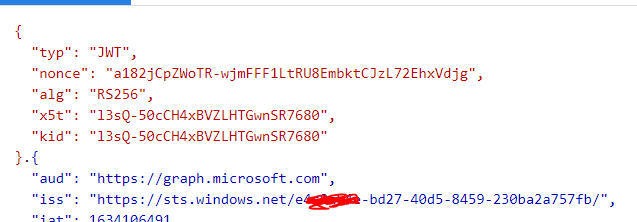
I noticed that you are using the old AAD graph, 00000002-0000-0000-c000-000000000000 is AAD Graph API, if you use it as an audience, then you will get AAD Graph token.
As far as I know, AAD graph tokens cannot call MS graph, so you need to change aud to: $claimsDict."aud" = "00000003-0000-0000-c000-000000000000" or $claimsDict."aud" = "https://graph.microsoft.com" to obtain the MS graph token.
In addition, according to my experience, iss should be your tenant id.
If an Answer is helpful, please click "Accept Answer" and upvote it.
Note: Please follow the steps in our documentation to enable e-mail notifications if you want to receive the related email notification for this thread.
Hi,
Thanks for replying. :) Unfortunately that didn't help. I tried with the "aud" set to "00000003-0000-0000-c000-000000000000" as well as "https://graph.microsoft.com", and also the "iss" set to what it was in my snippet as well as "https://sts.windows.net/<tenantId>" and none of that helped.
   {
     "alg": "RS256",
     "kid": "6E8E784FCFFDD2C69E27D468C8B814E7C4ED808B",
     "typ": "JWT",
     "x5t": "bo54T8_90saeJ9RoyLgU58TtgIs"
   }.{
     "aud": "00000003-0000-0000-c000-000000000000",
     "iss": "https://sts.windows.net/9a2b22ee-0fe6-4c87-aea7-34a8b67dfb4f",
     "exp": 1634108399,
     "nbf": 1634107798,
     "iat": 1634107799
   }.[Signature]
They all return the same Access Token missing or malformed. error.
One thing the document says is that the Authentication_MissingOrMalformed error could be if the JWT header or payload has a '=' character. But that's not the case either.
Regards,
Rakhesh
Ok, I am discussing this issue with my colleagues and will update you once we have any updates.
' cx='32' cy='32' r='32' /%3E%3Ctext x='50%25' y='55%25' dominant-baseline='middle' text-anchor='middle' fill='%23FFF' %3EA%3C/text%3E%3C/svg%3E)
I am also facing a similar issue when running Add-MgApplicationKey. What might be the issue?
Add-MgApplicationKey : Access Token missing or malformed.
At line:1 char:1
2) [Add-MgApplicationKey_Add1], RestException1