Azure SQL Database
An Azure relational database service.
This browser is no longer supported.
Upgrade to Microsoft Edge to take advantage of the latest features, security updates, and technical support.
' cx='32' cy='32' r='32' /%3E%3Ctext x='50%25' y='55%25' dominant-baseline='middle' text-anchor='middle' fill='%23FFF' %3EAT%3C/text%3E%3C/svg%3E)
Hello,
In Azure SQL - Master database I have created new SQL user that should be used to access all the database on the same server.
but while i am trying to access with that user it shows below error :
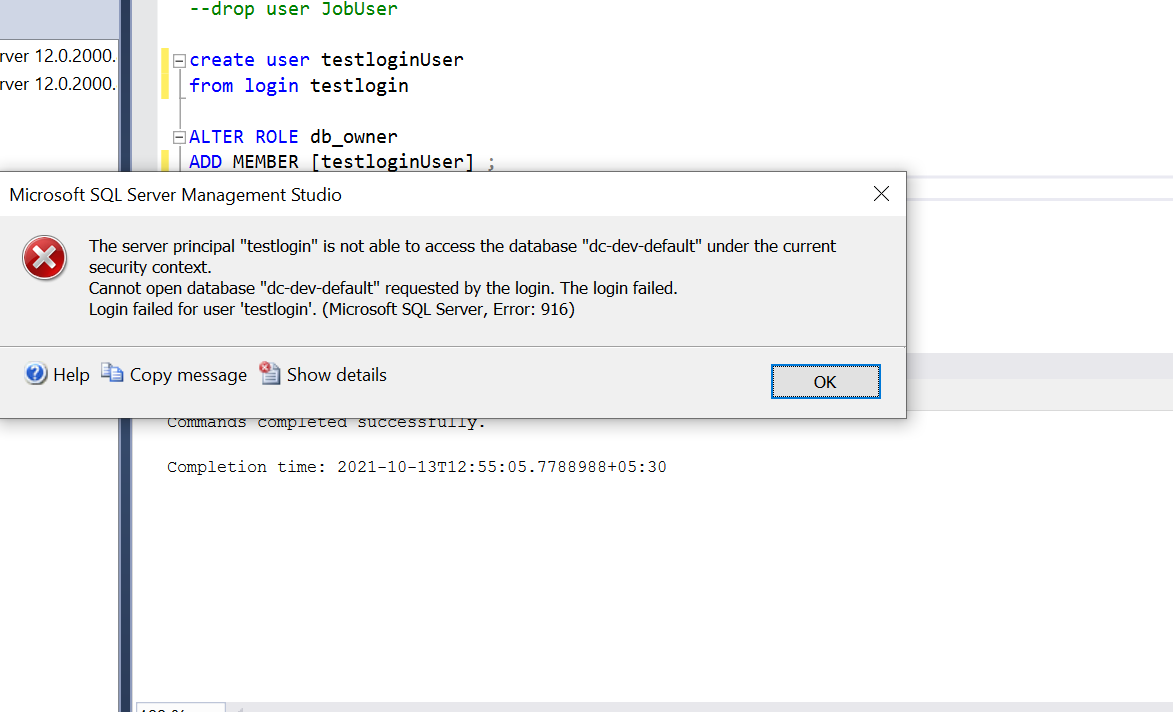
.
Have follow below sql queries
-CREATE LOGIN testlogin WITH password='...';
--CREATE USER testloginUser FOR LOGIN testlogin
--WITH DEFAULT_SCHEMA = master;
--alter role [dbmanager] add member testloginUser;
' cx='32' cy='32' r='32' /%3E%3Ctext x='50%25' y='55%25' dominant-baseline='middle' text-anchor='middle' fill='%23FFF' %3EAS%3C/text%3E%3C/svg%3E)
Hi @Atulkumar Thummar , just wanted to check if you any other details. If any answer helped you can mark it 'Accept Answer'

Good day Atulkumar,
You can try this
-- in the master database we need to create LOGIN
create login [MyLogin] with password = 'Not1My2Real3Password'

-- in teach database including the the master database, we need to create a USER, so we will be able to use the it by the LOGIN
-- This mean that in each database we add this the person will be able to connect, but still will have no permissions to do anything - keep reading
-- My guess is that you only created a USER in the master database but a USER is a databases level entity
create user [MyUser] from login [MyLogin];
Now we are moving to the permissions which you want to give your LOGIN/User. Here are some options for example
-- if you want the user to be able to create databases, then in the master database
exec sp_addRoleMember 'dbmanager', 'MyUser';

-- if you want the user to be able to create other LOGIN, then in the master database
exec sp_addRoleMember 'loginmanager', 'MyUser'

-- in each individual database, that you want to give the USER full control in the database level, grant him db_owner
exec sp_addRoleMember 'db_owner', 'MyUser';
Note! Give the USER only the permission that he need and nothing more! The above is only a sample of a few permissions. Use GRANT to give permissions on specific entities in the database and don't make each USER a database owner.
For more information you should check the following document:
https://learn.microsoft.com/en-us/azure/azure-sql/database/logins-create-manage
' cx='32' cy='32' r='32' /%3E%3Ctext x='50%25' y='55%25' dominant-baseline='middle' text-anchor='middle' fill='%23FFF' %3EYM%3C/text%3E%3C/svg%3E)
Hi @Atulkumar Thummar ,
Check to see if your user is mapped to the DB you are trying to log into.
in SSMS, expand Security->Logins, right-click the appropriate login and choose Login Properties
select User Mapping, from here you can select additional database you want to log into with this user
If the answer is the right solution, please click "Accept Answer" and kindly upvote it. If you have extra questions about this answer, please click "Comment".