Azure Logic Apps
An Azure service that automates the access and use of data across clouds without writing code.
This browser is no longer supported.
Upgrade to Microsoft Edge to take advantage of the latest features, security updates, and technical support.
' cx='32' cy='32' r='32' /%3E%3Ctext x='50%25' y='55%25' dominant-baseline='middle' text-anchor='middle' fill='%23FFF' %3EBM%3C/text%3E%3C/svg%3E)
We have logic apps that use a Salesforce API connector. The logic app runs good for a few times, but fails after a few runs with a 401 error. The logic app runs 2x per day. It seems to fail on the 3rd attempt.
This is the error:
{
"status": 401,
"message": "Salesforce failed to complete task: Message: This session is not valid for use with the REST API\r\nclientRequestId: d22d5dbe-ccfb-487b-8116-843f8e59db9e",
"error": null,
"source": "Salesforce.Common",
"errors": []
}
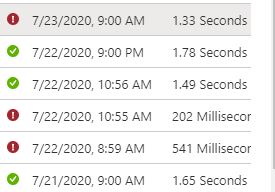
Run schedule:
' cx='32' cy='32' r='32' /%3E%3Ctext x='50%25' y='55%25' dominant-baseline='middle' text-anchor='middle' fill='%23FFF' %3ESV%3C/text%3E%3C/svg%3E)
@Bishop, Mike S - Just wanted to drop in and check with you whether the below answer helped in your case ?
' cx='32' cy='32' r='32' /%3E%3Ctext x='50%25' y='55%25' dominant-baseline='middle' text-anchor='middle' fill='%23FFF' %3ESM%3C/text%3E%3C/svg%3E)
Let us know if there is anything else related to this thread that we can assist you with, else please feel free to mark and close this out if the response below has been of help! Thanks again for reaching out.
Hello @Bishop, Mike S ,
One quick observation - The Logic App is failing after certain period of time for successive request - as per screen shot > 12 hours. I am assuming that you are signing in again in order to rectify the error.
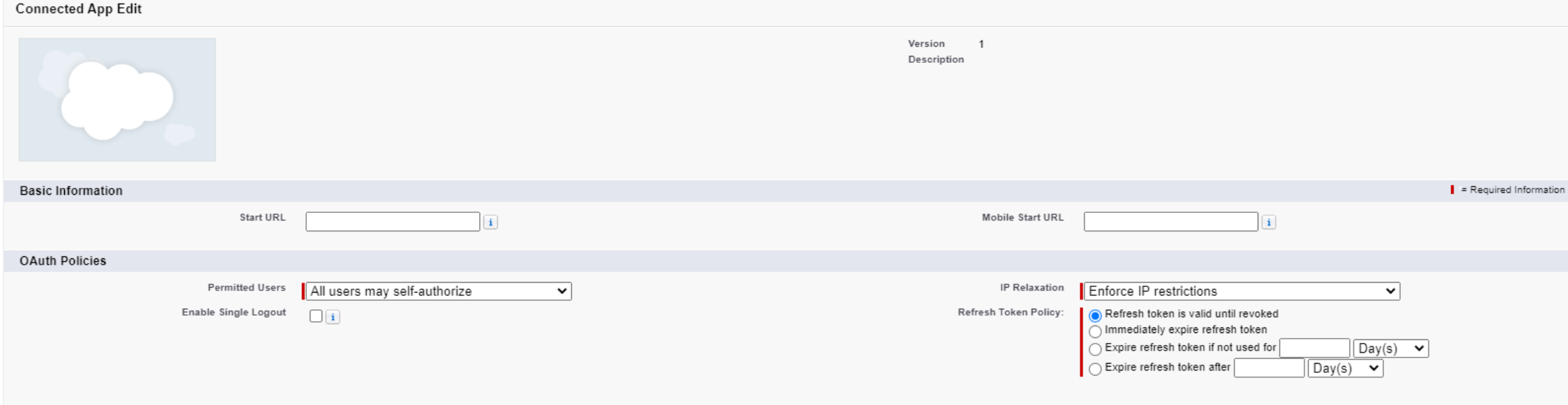
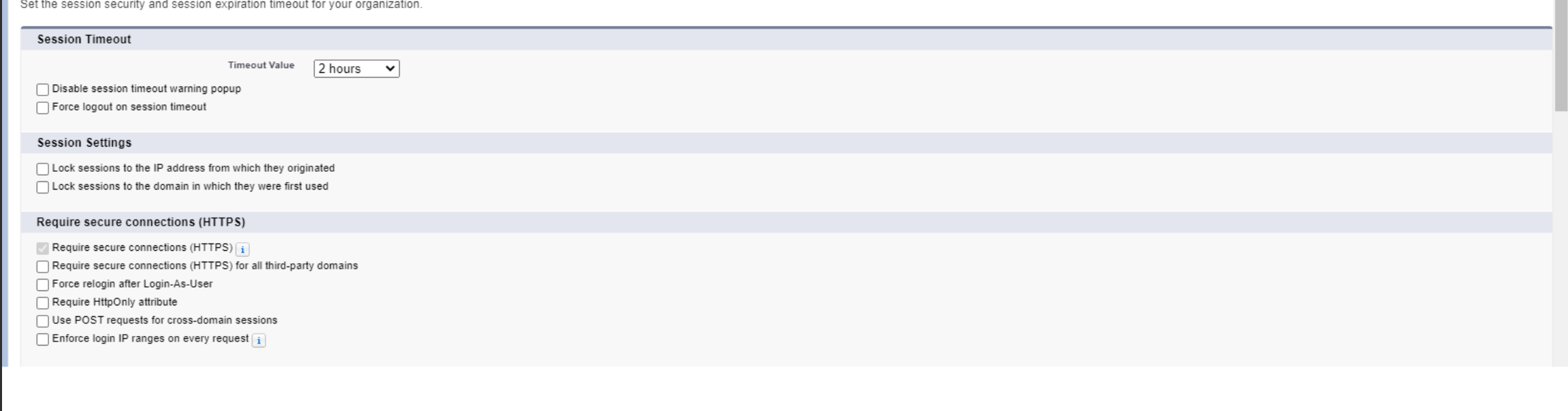
Logic App getting INVALID_SESSION_ID from Salesforce - usually indicates on a token / session expiration that is set in the Salesforce environment. (Or IP Restriction in some cases - but may not be your case as it works for certain amount of time) . There are few configuration that can be set up at the Salesforce end which can expire the access token (as well as the refresh token).
I would recommend you to check for the session restrictions. Attaching image for your reference. Managed to get some screenshots from internet but may actually vary at your environment.
' cx='32' cy='32' r='32' /%3E%3Ctext x='50%25' y='55%25' dominant-baseline='middle' text-anchor='middle' fill='%23FFF' %3EFB%3C/text%3E%3C/svg%3E)
Hi!
I'm facing the same issue after IT set the 2h timeout for the salesforce tool. The configuration is not at user level so it would be really difficult to disable it back only because of few using the PowerAutomate.
Any way to get a workaround to solve this?
Thanks!