SQL Server | Other
Additional SQL Server features and topics not covered by specific categories
This browser is no longer supported.
Upgrade to Microsoft Edge to take advantage of the latest features, security updates, and technical support.
' cx='32' cy='32' r='32' /%3E%3Ctext x='50%25' y='55%25' dominant-baseline='middle' text-anchor='middle' fill='%23FFF' %3EMM%3C/text%3E%3C/svg%3E)
Hi, I have a big problem in my SQL 2016 AlwaysOn instance.
I trying to add some cpu on Instance from SSMS in processor affinity tab and i got this error:
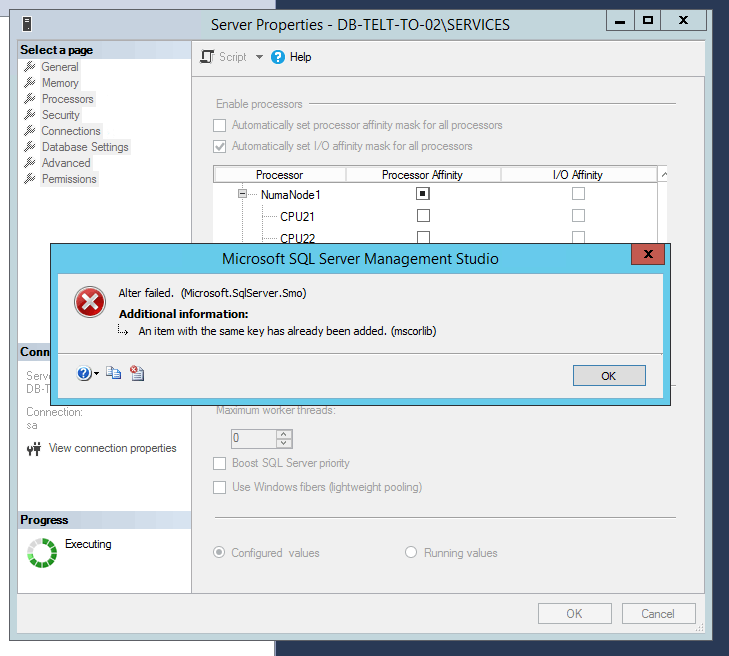
It's a bug or a configuration issue?
how can solve this?
Thanks all!
Additional SQL Server features and topics not covered by specific categories
' cx='32' cy='32' r='32' /%3E%3Ctext x='50%25' y='55%25' dominant-baseline='middle' text-anchor='middle' fill='%23FFF' %3EAM%3C/text%3E%3C/svg%3E)
Hi MarcoMilone-6587,
Please try to use the command to see if the issue occurs:
ALTER SERVER CONFIGURATION SET PROCESS AFFINITY NUMANODE = 0
GO
In addition, please try to install the latest SP3 for SQL Server 2016. Here is a doc about Rolling Upgrade for Always On which might be helpful.
Best Regards,
Amelia
If the answer is the right solution, please click "Accept Answer" and kindly upvote it. If you have extra questions about this answer, please click "Comment".
Note: Please follow the steps in our documentation to enable e-mail notifications if you want to receive the related email notification for this thread.

You can set the affinity mask directly from a query window. Read more here: https://learn.microsoft.com/en-us/sql/database-engine/configure-windows/affinity-mask-server-configuration-option?view=sql-server-ver15