Share via

Translate Presentation with Copilot

abdo elbarbary 60 Reputation points
2026-06-11T11:48:33.93+00:00

Issue Summary (English):

the "Translate Presentation with Copilot" feature in Microsoft PowerPoint is no longer available after the latest update, despite the functionality being described in the Microsoft documentation ("Translate your presentation with Copilot").

Description

The Translate Presentation feature is missing from PowerPoint Copilot after a recent update.

The customer expected the feature to remain available as documented by Microsoft.

As an alternative, the customer attempted to use Copilot Chat within the PowerPoint application to translate the presentation.

Impact

The workaround using Copilot Chat does not provide a satisfactory user experience:

Very long processing times.

Only parts of the presentation are translated.

Translation results are inconsistent and incomplete.

The workaround is not suitable for translating larger presentations efficiently.

Request

Clarification on why the Translate Presentation with Copilot feature is no longer available.

Confirmation whether the feature has been removed, disabled, or is affected by a recent update.

  • Guidance on how to restore the functionality or obtain an officially supported alternative solution
Microsoft 365 and Office | PowerPoint | For business | Windows
0 comments No comments

4 answers

Sort by: Most helpful
  1. Demi-N 18,240 Reputation points Microsoft External Staff Moderator
    2026-06-12T14:07:05.66+00:00

    Hello @abdo elbarbary, @Gustavo Vilela,

    Thank you everyone for sharing your input and observations, I truly appreciate it.

    Based on my own testing in my current environment, I can confirm that I am also not seeing that function anymore.

    Given this, I would recommend submitting feedback directly to Microsoft using the following link: PowerPoint · Community

    User's image

    The Product Team is responsible for the feedback portal and actively reviews customer suggestions. Many features have been introduced or improved based on user feedback.

    After submitting your request, you can return here and share the link in this thread. This will allow other users experiencing the same issue to access your post and upvote it, helping to increase visibility and bring more attention to the request.

    Thank you again for your contribution, and please feel free to reach out if you need any further assistance.

    Best regard,

    Was this answer helpful?

    0 comments No comments

  2. Gustavo Vilela 0 Reputation points
    2026-06-11T18:58:43.9533333+00:00

    I think what @abdo elbarbary is trying to say is the same problem I am having. This button disappeared and now just the Copilot Chat button is appearing. The result of translating from the Copilot Chat is very slow compared to the previous options that generate a new translated version instantly.

    This is the button:

    Was this answer helpful?


  3. Demi-N 18,240 Reputation points Microsoft External Staff Moderator
    2026-06-11T12:37:57.9333333+00:00

    Hello @abdo elbarbary,

    Thank you for your detailed explanation, it really helps clarify the situation.

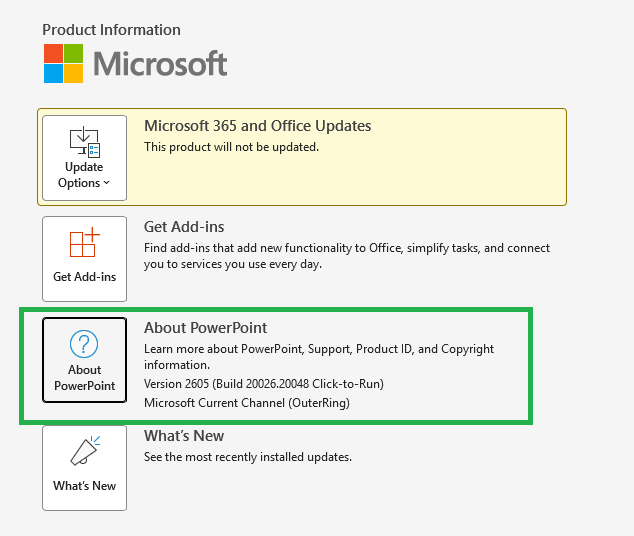
    To better understand your scenario, could you please help confirm which version of PowerPoint you are currently using? You can check this by going to: *File > Account > About PowerPoint. *This will show the version and build number.

    For reference, I am currently using the version shown in the screenshot (Version 2605, Build 20026.20048) under Current Channel), and I also do not see the “Translate Presentation with Copilot” option as described in the article.
    User's image

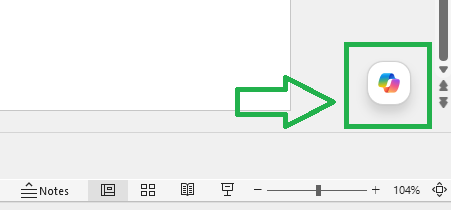
    Because of that, I would like to check how you are currently trying to use Copilot for translation. Are you using the Copilot panel on the right and asking it to translate the presentation content there?
    User's image

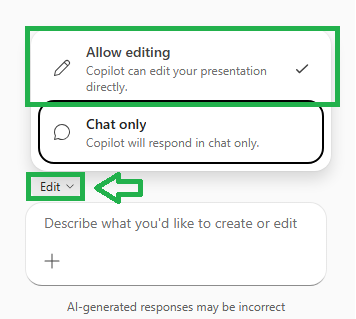
    From my testing, when using Copilot this way, it is still possible to translate content into another language. However, one important point is to make sure that Copilot is set to “Allow editing” rather than “Chat only”, as this allows Copilot to directly modify the presentation instead of just responding in text.
    User's image

    Could you please confirm if this is the same approach you are currently using?

    This will help me better understand your workflow and provide more accurate guidance.

    Thank you very much for your cooperation, and I look forward to your update.

    Best regards,


    Note: Please follow the steps in our documentation to enable e-mail notifications if you want to receive the related email notification for this thread.

    Was this answer helpful?

    0 comments No comments

  4. AI answer

    2026-06-11T11:48:57.8133333+00:00

    The Translate Presentation with Copilot feature is still an active, documented capability in PowerPoint for Microsoft 365 and is listed in the Microsoft 365 Copilot release notes as a current feature for Windows, Web, and Mac. The available documentation does not state that it has been removed or deprecated.

    From the documentation:

    • It applies to PowerPoint for Microsoft 365 with a work or school account, a qualifying Microsoft 365 subscription, and a Copilot add-on license.
    • It is accessed by selecting Copilot on the ribbon, then App skills, and then choosing Translate this Presentation.
    • Copilot then produces a new translated copy of the presentation while preserving slide design and structure.

    Given this, the most likely explanations for the feature no longer appearing in the UI are:

    • Changes in eligibility (for example, license, account type, or Copilot add-on no longer present or not recognized after the update).
    • A rollout or client-version issue where the feature is temporarily unavailable in a specific build or channel.

    The documentation also notes several limitations that could affect availability or behavior:

    • Only users with a qualifying Microsoft 365 subscription and Copilot add-on license can use it.
    • Very large presentations (more than about one million text characters, very large numbers of slides/masters, or file sizes larger than 500 MB) are not supported.
    • Translation is limited to Copilot’s supported languages, and only primary English/Spanish (no regional variants) when translating into English or Spanish.

    To restore or confirm the feature status and obtain an officially supported path:

    1. Verify prerequisites
      • Confirm that PowerPoint is part of Microsoft 365 for business and that the account is a work or school account.
      • Confirm that a Copilot add-on license is still assigned and active, as required by “Translate your presentation with Copilot”.
      • Ensure the PowerPoint client is updated to a build that includes the April 2, 2025 Copilot features listed in the release notes.
    2. Check the in-app entry point
      • In PowerPoint, open a presentation and select Copilot on the ribbon.
      • From the Copilot dropdown, select App skills and look for Translate this Presentation.
      • If the Copilot button or App skills menu is missing entirely, this further indicates a licensing, account, or rollout issue rather than a feature removal.
    3. Respect documented limits
      • If working with very large decks (size or slide count), test with a smaller presentation to see if the translation option appears and completes successfully.
    4. Use the supported translation alternatives when the Copilot feature is unavailable
      • Use the built-in Review > Translate feature in PowerPoint to translate selected text segments. This is a supported Office Translator feature for PowerPoint for Microsoft 365 and later versions. It translates highlighted text and inserts the translated text back into the slide.
      • Note that this is a manual, per-text-block workflow and does not replicate the full “Translate this Presentation” Copilot experience, but it is an officially supported alternative.

    Because the documentation and release notes still present Translate Presentation with Copilot as a current feature, there is no indication in the provided material that it has been permanently removed. If the feature remains missing after confirming licensing, account type, and client version, the next step is to treat this as a product issue (e.g., regression or rollout gap) and escalate through Microsoft 365 support channels, referencing the documented feature and the April 2, 2025 release notes.


    References:

    AI-generated content may be incorrect. Read our transparency notes for more information.

    Was this answer helpful?

Your answer

Answers can be marked as 'Accepted' by the question author and 'Recommended' by moderators, which helps users know the answer solved the author's problem.