Share via

Why is my start menu empty?

Thomas Mielke 41 Reputation points
2026-06-14T09:24:27.96+00:00

I often get this (experienced on different Windows 11 devices):

User's image

When this happens, I am only able to star an app, if I recall the exact name and type it in the search field. It feels like a time travel back to DOS times.

Edition Windows 11 Pro (Windows Feature Experience Pack 1000.26100.315.0)
Version 25H2
Installed ‎18.‎06.‎2025
build 26200.8655

Windows for home | Windows 11 | Desktop, Start, and personalization | Start Menu
0 comments No comments

3 answers

Sort by: Most helpful
  1. DaveM121 889.6K Reputation points Independent Advisor
    2026-06-14T09:58:53.4933333+00:00

    1

    That is a bug usually caused by a Windows update corrupting the Start menu process.

    Open the Settings App, go to Windows Update - Update History.

    What is the KB number of the latest Windows udpates installed.

    2

    Click your Start Button, type winver and hit Enter

    Please provide a screenshot of the resulting dialog.

    Was this answer helpful?

    0 comments No comments

  2. Thomas Mielke 41 Reputation points
    2026-06-14T09:43:17.6866667+00:00

    After typing "powershell" I get: User's image
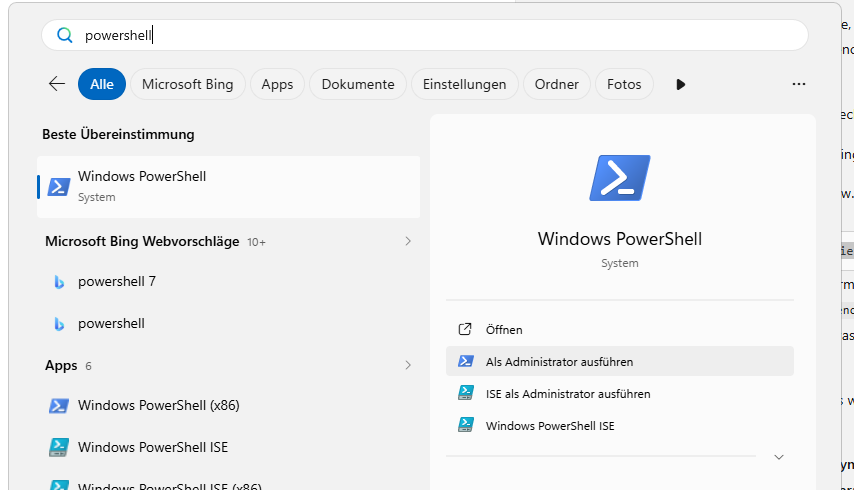
    so I think the process is not completely dead. Anyway:

    Handles WS(K) CPU(s) Id UserName ProcessName


    1417 184376 56,13 10056 BRIX\mielk StartMenuExperienceHost

    I currently can't start the event viewer, because of the start menu issue. I only get not so helpful bing results:
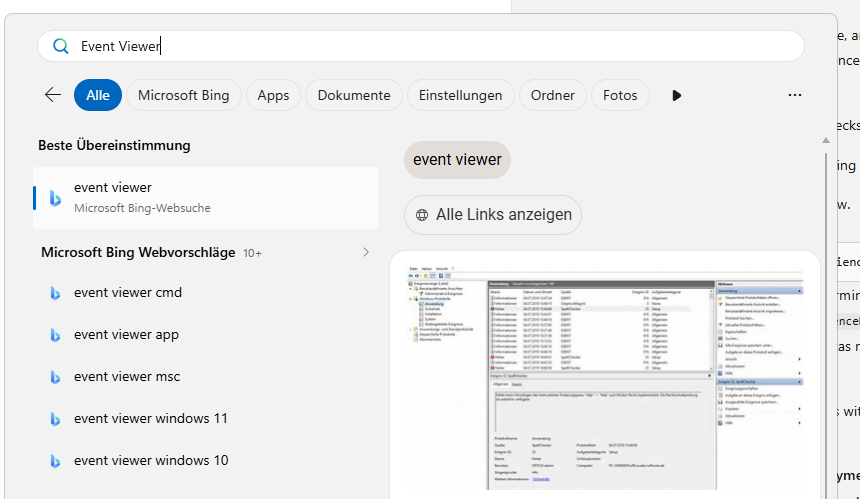
    User's image

    Under 3.: "The current documented mitigation is to move back to a known‑good state (for example, avoid provisioning paths where updates install before the first user logon, or roll back the affected update) while a permanent fix is in progress." This is haunting me for some time. The only thing that comes close to it, would be a downgrade to Windows 10, but since support of Windows 10 has ended, I don't think this is a viable option here...

    Was this answer helpful?

    0 comments No comments

  3. AI answer

    2026-06-14T09:24:43.65+00:00

    On Windows 11 25H2 builds in the 26200 range, an empty or non‑responsive Start menu can be caused by problems with the Start menu process (StartMenuExperienceHost) or with XAML‑based shell components that the Start menu depends on.

    For this type of symptom, use the following checks and mitigations:

    1. Verify that the Start menu process is running and not repeatedly crashing:
      • Open an elevated PowerShell window.
      • Run:
             get-Process StartMenuExperienceHost -IncludeUserName
        
      • If the process is missing or keeps terminating, check the Application event log for crash events (Event IDs 1000 and 1001 for StartMenuExperienceHost.exe) and the Microsoft-Windows-TWinUI/Operational log for activation errors such as "Package was not found" or "Package could not be registered". These indicate Start is installed but failing at runtime.
    2. Check for deployment or activation issues with the Start menu package:
      • In Event Viewer, review:
        • Microsoft-Windows-AppXDeployment* for deployment‑related errors.
        • Microsoft-Windows-TWinUI/Operational for activation errors mentioning Microsoft.Windows.StartMenuExperienceHost or Microsoft.Windows.ShellExperienceHost.
      • If events show that the package is missing or cannot be registered, the guidance is to revert the system to a known‑good configuration (for example, roll back the recent update, reset the PC to defaults, or restore from backup). Installing Start menu AppX files manually is not supported and often unreliable.
    3. Consider whether the device matches the known XAML‑dependency issue described for Windows 11 24H2/25H2 enterprise or managed environments:
      • After certain cumulative updates, XAML‑dependent shell components such as Explorer, StartMenuExperienceHost, and ShellExperienceHost might fail to start or close unexpectedly.
      • Typical symptoms include the Start menu failing to open or rendering incorrectly, taskbar issues, or XAML apps crashing.
      • The root cause is XAML dependency packages not registering in time after updates. The current documented mitigation is to move back to a known‑good state (for example, avoid provisioning paths where updates install before the first user logon, or roll back the affected update) while a permanent fix is in progress.

    If event logs confirm StartMenuExperienceHost is installed but crashing or failing to activate, and the device is on an affected 25H2 build, the supported path is to revert to a configuration from before the issue started (system restore, backup restore, or OS reset) rather than attempting to repair the Start menu package directly.


    References:

    AI-generated content may be incorrect. Read our transparency notes for more information.

    Was this answer helpful?

Your answer

Answers can be marked as 'Accepted' by the question author and 'Recommended' by moderators, which helps users know the answer solved the author's problem.
