Microsoft Security | Intune | Configuration Manager | Updates
Managing and deploying updates via Configuration Manager

This browser is no longer supported.
Upgrade to Microsoft Edge to take advantage of the latest features, security updates, and technical support.
' cx='32' cy='32' r='32' /%3E%3Ctext x='50%25' y='55%25' dominant-baseline='middle' text-anchor='middle' fill='%23FFF' %3EP%3C/text%3E%3C/svg%3E)
Hi All
I'm getting a strange error when trying to run Pre-requisite check on the 2107 update.
The logs seem to show it failing when trying to extract the update package to the folder in CMUStaging.
Delete folder \\?\C:\Program Files\Microsoft Configuration Manager\\CMUStaging\42E1CF6E-95A1-4A8D-96AD-311E6247B3FB\ returned 123. Extractring the content from content library...  CONFIGURATION_MANAGER_UPDATE    15/10/2021 13:34:02 3496 (0x0DA8)
CreateDirectoryW failed for \\?\C:\Program Files\Microsoft Configuration Manager\\CMUStaging\42E1CF6E-95A1-4A8D-96AD-311E6247B3FB\AUTORUN   CONFIGURATION_MANAGER_UPDATE    15/10/2021 13:34:02 3496 (0x0DA8)
CreateFolder failed; 0x8007007b CONFIGURATION_MANAGER_UPDATE    15/10/2021 13:34:02 3496 (0x0DA8)
CContentDefinition::ExpandContentDefinitionItems failed; 0x8007007b CONFIGURATION_MANAGER_UPDATE    15/10/2021 13:34:02 3496 (0x0DA8)
CContentDefinition::Expand failed; 0x8007007b   CONFIGURATION_MANAGER_UPDATE    15/10/2021 13:34:02 3496 (0x0DA8)
Failed to expand update package files from content library  CONFIGURATION_MANAGER_UPDATE    15/10/2021 13:34:02 3496 (0x0DA8)
I'm not sure what to do with this one, I've not seen it before and it's not listed in the known troubleshooting problems for ConfigMgr Updates. The parent directory "42E1CF6E-95A1-4A8D-96AD-311E6247B3FB" gets created but not the AUTORUN directory, I've tried making it manually but get the same error. The content seems to exist correctly in the corresponding EasySetupPayload folder.
Thanks in advance for any advice.
' cx='32' cy='32' r='32' /%3E%3Ctext x='50%25' y='55%25' dominant-baseline='middle' text-anchor='middle' fill='%23FFF' %3EPW%3C/text%3E%3C/svg%3E)
So after a lengthy amount of time spent troubleshooting with MS support. This issue turned out to be a result of the InstallDirectory value in the SC_SiteDefinition table having a \ at the end it should not have had. Removing the \ from the end of this value resolved the problem, after using the Update Reset tool to start the update process over.
I have absolutely no idea how it came to have this trailing \
' cx='32' cy='32' r='32' /%3E%3Ctext x='50%25' y='55%25' dominant-baseline='middle' text-anchor='middle' fill='%23FFF' %3EJA%3C/text%3E%3C/svg%3E)
I encountered this issue as well while preparing to upgrade from 2010 to 2111. I had recently migrated our Site Server to a new VM using a Site Server in Passive Mode to create the new Site Server, then fail over and uninstall the old Site Server. The Site Server install on the new system was performed by the EasySetup package that the site uses for installing site roles, and for some reason it added the "\" at the end of the site's Installation Directory. Modifying this value in the SC_SiteDefinition table did not resolve the issue for me, however I also found the path in the registry on the Site Server also included the additional "\".
I fixed the path values found here "HKEY_LOCAL_MACHINE\SOFTWARE\Microsoft\SMS\Setup", then restarted the CONFIGURATION_MANAGER_UPDATE component using the Configuration Manager Service Manager and this resolved the issue for me.

Hi @Philip_W ,
CreateDirectoryW failed for \?\C:\Program Files\Microsoft Configuration Manager\CMUStaging\42E1CF6E-95A1-4A8D-96AD-311E6247B3FB\AUTORUN
Please check if there is files in the directory, if not, the issue may miss System and Administrators, we could add those in and gave them Full Control then the installation progressed as expected.
Here is the similar post, please refer to this:
https://social.technet.microsoft.com/Forums/en-US/f8aba9b6-2b18-4d84-8622-129d379d9032/upgrading-the-sccm-1802-to-1806-and-getting-failed?forum=ConfigMgrMigration
If the response is helpful, please click "Accept Answer" and upvote it.
Note: Please follow the steps in our documentation to enable e-mail notifications if you want to receive the related email notification for this thread.
Unfortunately nothing that simple, the folder has lots of other subfolders with content, it's just the AUTORUN folder it seems to be erroring on.
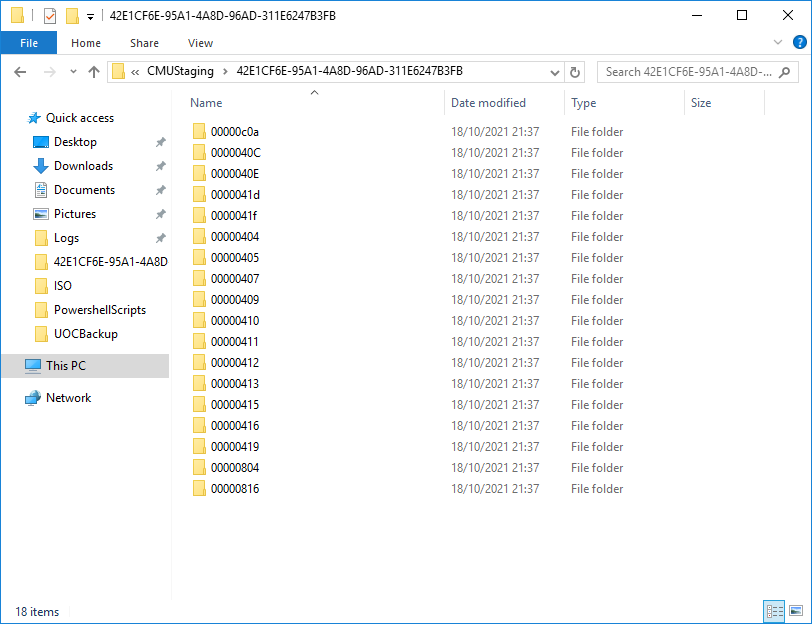
SYSTEM and local Administrators group both have full control of the entire structure, inherited from the parent level.
I've also just tried manually copying the content from EasySetupPayload\42E1CF6E-95A1-4A8D-96AD-311E6247B3FB to CMUStaging\42E1CF6E-95A1-4A8D-96AD-311E6247B3FB but the same error for failing to create the AUTORUN directory persists (even though it, and all its content already exists).
In case it's relevant, I'm currently running 2010, 2103 was download and pre-requisite check only was run some time ago but never installed.
I'm wondering whether installing 2103 then trying 2107 might resolve the issue. I'm scheduled to do the 2107 install on the 25th October, so if I can't resolve the 2107 issue I may just proceed with 2103 and see if 2107 will work afterwards.
Hi,
Thanks for your update. We could upgrade to 2103 firstly to check if there is any issue, and then upgrade to 2107. During this period, If you have any other issues, please don't hesitate to let us know.
Thanks and have a nice day.
Best regards,
Amanda

Check your A/V on the server, they like to block anything Autorun.
Nope not that either, it's only Windows Defender anyway and I've added the appropriate exclusions and also tried disabling realtime protection.
Shot in the dark, but are you running any other Defender products that may not disabled - like Attack Surface Reduction? Anything showing in Event logs when the error occurs?